🔬Technical Deep Dive
Full Specifications [+]
Quick Commands
git clone https://github.com/instill-ai/instill-core ⚖️ Nexus Index V2.0
💬 Index Insight
FNI V2.0 for Instill Core: Semantic (S:50), Authority (A:0), Popularity (P:59), Recency (R:100), Quality (Q:70).
Verification Authority
🚀 What's Next?
Technical Deep Dive
🔮 **Instill Core**




A complete unstructured data solution: ETL processing, AI-readiness, open-source LLM hosting, and RAG capabilities in one powerful platform.
Quick start
Follow the installation steps below or documentation for more details to build versatile AI applications locally.
What is Instill Core?
Instill Core is an end-to-end AI platform for data, pipeline and model orchestration.
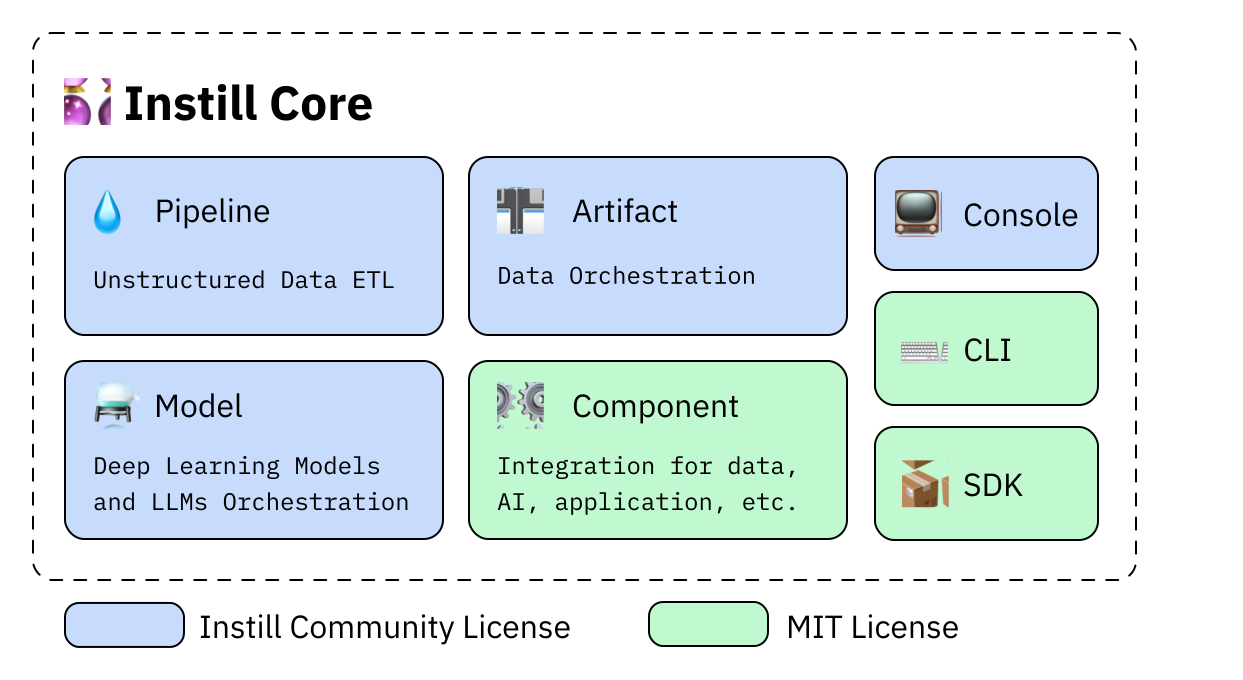
🔮 Instill Core simplifies infrastructure hassle and encompasses these core features:
- 💧 Pipeline: Quickly build versatile AI-first APIs or automated workflows.
- ⚙️ Component: Connect essential building blocks to construct powerful pipelines.
- 💾 Artifact: Transform unstructured data (e.g., documents, images, audio, video) into AI-ready formats.
- ⚗️ Model: Deploy and monitor AI models without GPU infrastructure hassles.
What can you build?
- 📖 Parsing PDF Files to Markdown: Cookbook
- 🧱 Generating Structured Outputs from LLMs: Cookbook & Tutorial
- 🕸️ Web scraping & Google Search with Structured Insights
- 🌱 Instance segmentation on microscopic plant stomata images: Cookbook
See Examples for more!
Installation
Prerequisites
| Operating System | Requirements and Instructions |
|---|---|
| macOS or Linux | Instill Core works natively |
| Windows | • Use Windows Subsystem for Linux (WSL2) • Install latest yq from GitHub Repository• Install latest Docker Desktop and enable WSL2 integration (tutorial) • (Optional) Install cuda-toolkit on WSL2 (NVIDIA tutorial) |
| All Systems | • Docker Engine v25 or later • Docker Compose v2 or later • Install latest stable Docker and Docker Compose |
Spin up Instill Core
Execute the following commands to pull pre-built images with all the dependencies to launch:
git clone -b v0.58.1 https://github.com/instill-ai/instill-core.git && cd instill-core

# Launch all services
make run
That's it! Once all the services are up with health status, the UI is ready to go at http://localhost:3000. Please find the default login credentials in the documentation.
To shut down all running services:
make downDeployment
Visit the Deployment Overview for more details.
Client Access
- 📺 Console
- ⌨️ CLI
- 📦 SDK:
- Python SDK
- TypeScript SDK
- Stay tuned, as more SDKs are on the way!
Documentation
Please visit our official documentation for more.
Additional resources:
Contributing
We welcome contributions from our community! Checkout the methods below:
Cookbooks: Help us create helpful pipelines and guides for the community. Visit our Cookbook repository to get started.
Issues: Contribute to improvements by raising tickets using templates here or discuss in existing ones you think you can help with.
Community Standards
We are committed to maintaining a respectful and welcoming atmosphere for all contributors. Before contributing, please read:
Support
Get help by joining our Discord community where you can post any questions on our #ask-for-help channel.
License
See the LICENSE file for licensing information.
🚀 Quick Start
git clone -b v0.58.1 https://github.com/instill-ai/instill-core.git && cd instill-core

# Launch all services
make run⚠️ Incomplete Data
Some information about this model is not available. Use with Caution - Verify details from the original source before relying on this data.
View Original Source →📝 Limitations & Considerations
- • Benchmark scores may vary based on evaluation methodology and hardware configuration.
- • VRAM requirements are estimates; actual usage depends on quantization and batch size.
- • FNI scores are relative rankings and may change as new models are added.
- ⚠ License Unknown: Verify licensing terms before commercial use.
AI Summary: Based on GitHub metadata. Not a recommendation.
🛡️ Model Transparency Report
Technical metadata sourced from upstream repositories.
🆔 Identity & Source
- id
- gh-tool--instill-ai--instill-core
- slug
- instill-ai--instill-core
- source
- github
- author
- Instill Ai
- license
- NOASSERTION
- tags
- unstructured-data, low-code, developer-tools, etl, no-code, open-source, hacktoberfest, ai, api, cli, generative-ai, golang, gpt, llm, pipeline, python, stable-diffusion, typescript
⚙️ Technical Specs
- architecture
- null
- params billions
- null
- context length
- null
- pipeline tag
- other
📊 Engagement & Metrics
- downloads
- 0
- stars
- 0
- forks
- 0
Data indexed from public sources. Updated daily.