Optimize Ai Agent Memory
| Entity Passport | |
| Registry ID | gh-tool--fareedkhan-dev--optimize-ai-agent-memory |
| License | MIT |
| Provider | github |
Cite this model
Academic & Research Attribution
@misc{gh_tool__fareedkhan_dev__optimize_ai_agent_memory,
author = {Fareedkhan Dev},
title = {Optimize Ai Agent Memory Model},
year = {2026},
howpublished = {\url{https://github.com/fareedkhan-dev/optimize-ai-agent-memory}},
note = {Accessed via Free2AITools Knowledge Fortress}
} 🔬Technical Deep Dive
Full Specifications [+]▾
Quick Commands
git clone https://github.com/fareedkhan-dev/optimize-ai-agent-memory ⚖️ Nexus Index V2.0
💬 Index Insight
FNI V2.0 for Optimize Ai Agent Memory: Semantic (S:50), Authority (A:0), Popularity (P:51), Recency (R:56), Quality (Q:70).
Verification Authority
🚀 What's Next?
Technical Deep Dive
Optimizing Memory of AI Agents
One way to optimize an AI agent is to design its architecture with multiple sub-agents to improve accuracy. However, in conversational AI, optimization doesn’t stop there—memory becomes even more crucial.
This is due to components like previous context storage, tool calling, database searches, and other dependencies your AI agent relies on.
In this blog, we will code and evaluate 9 beginner-to-advanced memory optimization techniques for AI agents.
You will learn how to apply each technique, along with their advantages and drawbacks—from simple sequential approaches to advanced, OS-like memory management implementations.
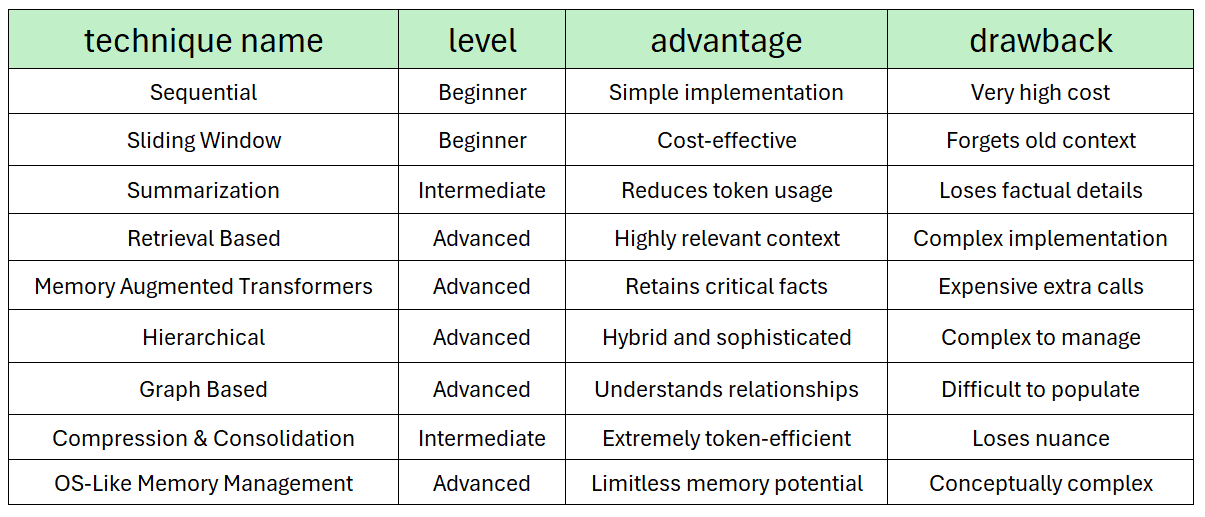
To keep things clear and practical, we will use a simple AI agent throughout the blog. This will help us observe the internal mechanics of each technique and make it easier to scale and implement these strategies in more complex systems.
Table of Contents
- Setting up the Environment
- Creating Helper Functions
- Creating Foundational Agent and Memory Class
- Problem with Sequential Optimization Approach
- Sliding Window Approach
- Summarization Based Optimization
- Retrieval Based Memory
- Memory Augmented Transformers
- Hierarchical Optimization for Multi-tasks
- Graph Based Optimization
- Compression & Consolidation Memory
- OS-Like Memory Management
- Choosing the Right Strategy
Setting up the Environment
To optimize and test different memory techniques for AI agents, we need to initialize several components before starting the evaluation. But before initializing, we first need to install the necessary Python libraries.
We will need:
openai: The client library for interacting with the LLM API.numpy: For numerical operations, especially with embeddings.faiss-cpu: A library from Facebook AI for efficient similarity search, which will power our retrieval memory. It's a perfect in-memory vector database.networkx: For creating and managing the knowledge graph in our Graph-Based Memory strategy.tiktoken: To accurately count tokens and manage context window limits.
Let’s install these modules.
# Installing Required Dependencies
pip install openai numpy faiss-cpu networkx tiktoken
Now we need to initialize the client module, which will be used to make LLM calls. Let’s do that.
# Import necessary libraries
import os
from openai import OpenAI
# Define the API key for authentication.
API_KEY = "YOUR_LLM_API_KEY"
# Define the base URL for the API endpoint.
BASE_URL = "https://api.studio.nebius.com/v1/"
# Initialize the OpenAI client with the specified base URL and API key.
client = OpenAI(
base_url=BASE_URL,
api_key=API_KEY
)
# Print a confirmation message to indicate successful client setup.
print("OpenAI client configured successfully.")
We will be using open-source models through an API provider such as Bnebius or Together AI. Next, we need to import and decide which open-source LLM will be used to create our AI agent.
# Import additional libraries for functionality.
import tiktoken
import time
# --- Model Configuration ---
# Define the specific models to be used for generation and embedding tasks.
# These are hardcoded for this lab but could be loaded from a config file.
GENERATION_MODEL = "meta-llama/Meta-Llama-3.1-8B-Instruct"
EMBEDDING_MODEL = "BAAI/bge-multilingual-gemma2"
For the main tasks, we are using the LLaMA 3.1 8B Instruct model. Some of the optimizations depend on an embedding model, for which we will be using the Gemma-2-BGE multimodal embedding model.
Next, we need to define multiple helpers that will be used throughout this blog.
Creating Helper Functions
To avoid repetitive code and follow good coding practices, we will define three helper functions that will be used throughout this guide:
generate_text: Generates content based on the system and user prompts passed to the LLM.generate_embeddings: Generates embeddings for retrieval-based approaches.count_tokens: Counts the total number of tokens for each retrieval-based approach.
Let’s start by coding the first function, generate_text, which will generate text based on the given input prompt.
def generate_text(system_prompt: str, user_prompt: str) -> str:
"""
Calls the LLM API to generate a text response.
Args:
system_prompt: The instruction that defines the AI's role and behavior.
user_prompt: The user's input to which the AI should respond.
Returns:
The generated text content from the AI, or an error message.
"""
# Create a chat completion request to the configured client.
response = client.chat.completions.create(
model=GENERATION_MODEL,
messages=[
{"role": "system", "content": system_prompt},
{"role": "user", "content": user_prompt}
]
)
# Extract and return the content of the AI's message.
return response.choices[0].message.content
Our generate_text function takes two inputs: a system prompt and a user prompt. Based on our text generation model, LLaMA 3.1 8B, it generates a response using the client module.
Next, let’s code the generate_embeddings function. We have chosen the Gemma-2 model for this purpose, and we will use the same client module to generate embeddings.
def generate_embedding(text: str) -> list[float]:
"""
Generates a numerical embedding for a given text string using the embedding model.
Args:
text: The input string to be converted into an embedding.
Returns:
A list of floats representing the embedding vector, or an empty list on error.
"""
# Create an embedding request to the configured client.
response = client.embeddings.create(
model=EMBEDDING_MODEL,
input=text
)
# Extract and return the embedding vector from the response data.
return response.data[0].embedding
Our embedding function returns the embedding of the given input text using the selected Gemma-2 model.
Now, we need one more function that will count tokens based on the entire AI and user chat history. This helps us understand the overall flow and how it has been optimized.
We will use the most common and modern tokenizer used in many LLM architectures, OpenAI cl100k_base, which is a Byte Pair Encoding (BPE) tokenizer.
BPE, in simpler terms, is a tokenization algorithm that efficiently splits text into sub-word units.
# BPE Example
"lower", "lowest" → ["low", "er"], ["low", "est"]
So let’s initialize the tokenizer using the tiktoken module:
# --- Token Counting Setup ---
# Initialize the tokenizer using tiktoken. 'cl100k_base' is a common encoding
# used by many modern models, including those from OpenAI and Llama.
# This allows us to accurately estimate the size of our prompts before sending them.
tokenizer = tiktoken.get_encoding("cl100k_base")
We can now create a function to tokenize the text and count the total number of tokens.
def count_tokens(text: str) -> int:
"""
Counts the number of tokens in a given string using the pre-loaded tokenizer.
Args:
text: The string to be tokenized.
Returns:
The integer count of tokens.
"""
# The `encode` method converts the string into a list of token IDs.
# The length of this list is the token count.
return len(tokenizer.encode(text))
Great! Now that we have created all the helper functions, we can start exploring different techniques to learn and evaluate them.
Creating Foundational Agent and Memory Class
Now we need to create the core design structure of our agent so that it can be used throughout the guide. Regarding memory, there are three important components that play a key role in any AI agent:
- Adding past messages to the AI agent’s memory to make the agent aware of the context.
- Retrieving relevant content that helps the AI agent generate responses.
- Clearing the AI agent’s memory after each strategy has been implemented.
Object-Oriented Programming (OOP) is the best way to build this memory-based feature, so let’s create that.
import abc
# --- Abstract Base Class for Memory Strategies ---
# This class defines the 'contract' that all memory strategies must follow.
# By using an Abstract Base Class (ABC), we ensure that any memory implementation
# we create will have the same core methods (add_message, get_context, clear),
# allowing them to be interchangeably plugged into the AIAgent.
class BaseMemoryStrategy(abc.ABC):
"""Abstract Base Class for all memory strategies."""
@abc.abstractmethod
def add_message(self, user_input: str, ai_response: str):
"""
An abstract method that must be implemented by subclasses.
It's responsible for adding a new user-AI interaction to the memory store.
"""
pass
@abc.abstractmethod
def get_context(self, query: str) -> str:
"""
An abstract method that must be implemented by subclasses.
It retrieves and formats the relevant context from memory to be sent to the LLM.
The 'query' parameter allows some strategies (like retrieval) to fetch context
that is specifically relevant to the user's latest input.
"""
pass
@abc.abstractmethod
def clear(self):
"""
An abstract method that must be implemented by subclasses.
It provides a way to reset the memory, which is useful for starting new conversations.
"""
pass
We are using @abstractmethod, which is a common coding style when subclasses are reused with different implementations. In our case, each strategy (which is a subclass) includes a different kind of implementation, so it is necessary to use abstract methods in the design.
Now, based on the memory state we recently defined and the helper functions we’ve created, we can build our AI agent structure using OOP principles. Let’s code that and then understand the process.
# --- The Core AI Agent ---
# This class orchestrates the entire conversation flow. It is initialized with a
# specific memory strategy and uses it to manage the conversation's context.
class AIAgent:
"""The main AI Agent class, designed to work with any memory strategy."""
def __init__(self, memory_strategy: BaseMemoryStrategy, system_prompt: str = "You are a helpful AI assistant."):
"""
Initializes the agent.
Args:
memory_strategy: An instance of a class that inherits from BaseMemoryStrategy.
This determines how the agent will remember the conversation.
system_prompt: The initial instruction given to the LLM to define its persona and task.
"""
self.memory = memory_strategy
self.system_prompt = system_prompt
print(f"Agent initialized with {type(memory_strategy).__name__}.")
def chat(self, user_input: str):
"""
Handles a single turn of the conversation.
Args:
user_input: The latest message from the user.
"""
print(f"\n{'='*25} NEW INTERACTION {'='*25}")
print(f"User > {user_input}")
# Step 1: Retrieve context from the agent's memory strategy.
# This is where the specific memory logic (e.g., sequential, retrieval) is executed.
start_time = time.time()
context = self.memory.get_context(query=user_input)
retrieval_time = time.time() - start_time
# Step 2: Construct the full prompt for the LLM.
# This combines the retrieved historical context with the user's current request.
full_user_prompt = f"### MEMORY CONTEXT\n{context}\n\n### CURRENT REQUEST\n{user_input}"
# Step 3: Provide detailed debug information.
# This is crucial for understanding how the memory strategy affects the prompt size and cost.
prompt_tokens = count_tokens(self.system_prompt + full_user_prompt)
print("\n--- Agent Debug Info ---")
print(f"Memory Retrieval Time: {retrieval_time:.4f} seconds")
print(f"Estimated Prompt Tokens: {prompt_tokens}")
print(f"\n[Full Prompt Sent to LLM]:\n---\nSYSTEM: {self.system_prompt}\nUSER: {full_user_prompt}\n---")
# Step 4: Call the LLM to get a response.
# The LLM uses the system prompt and the combined user prompt (context + new query) to generate a reply.
start_time = time.time()
ai_response = generate_text(self.system_prompt, full_user_prompt)
generation_time = time.time() - start_time
# Step 5: Update the memory with the latest interaction.
# This ensures the current turn is available for future context retrieval.
self.memory.add_message(user_input, ai_response)
# Step 6: Display the AI's response and performance metrics.
print(f"\nAgent > {ai_response}")
print(f"(LLM Generation Time: {generation_time:.4f} seconds)")
print(f"{'='*70}")
So, our agent is based on 6 simple steps.
- First it retrieves the context from memory based on the strategy we will be using, during the process how much time it takes and so.
- Then it merges the retrieved memory context with the current user input, preparing it as a complete prompt for the LLM.
- Then it prints some debug info, things like how many tokens the prompt might use and how long context retrieval took.
- Then it sends the full prompt (system + user + context) to the LLM and waits for a response.
- Then it updates the memory with this new interaction, so it’s available for future context.
- And finally, it shows the AI’s response along with how long it took to generate, wrapping up this turn of the conversation.
Great! Now that we have coded every component, we can start understanding and implementing each of the memory optimization techniques.
Problem with Sequential Optimization Approach
The very first optimization approach is the most basic and simplest, commonly used by many developers. It was one of the earliest methods to manage conversation history, often used by early chatbots.
This method involves adding each new message to a running log and feeding the entire conversation back to the model every time. It creates a linear chain of memory, preserving everything that has been said so far. Let’s visualize it.
Sequential Approach (Created by Fareed Khan)
Sequential approach works like this…
- User starts a conversation with the AI agent.
- The agent responds.
- This user-AI interaction (a “turn”) is saved as a single block of text.
- For the next turn, the agent takes the entire history (Turn 1 + Turn 2 + Turn 3…) and combines it with the new user query.
- This massive block of text is sent to the LLM to generate the next response.
Using our Memory class, we can now implement the sequential optimization approach. Let's code that.
# --- Strategy 1: Sequential (Keep-It-All) Memory ---
# This is the most basic memory strategy. It stores the entire conversation
# history in a simple list. While it provides perfect recall, it is not scalable
# as the context sent to the LLM grows with every turn, quickly becoming expensive
# and hitting token limits.
class SequentialMemory(BaseMemoryStrategy):
def __init__(self):
"""Initializes the memory with an empty list to store conversation history."""
self.history = []
def add_message(self, user_input: str, ai_response: str):
"""
Adds a new user-AI interaction to the history.
Each interaction is stored as two dictionary entries in the list.
"""
self.history.append({"role": "user", "content": user_input})
self.history.append({"role": "assistant", "content": ai_response})
def get_context(self, query: str) -> str:
"""
Retrieves the entire conversation history and formats it into a single
string to be used as context for the LLM. The 'query' parameter is ignored
as this strategy always returns the full history.
"""
# Join all messages into a single newline-separated string.
return "\n".join([f"{turn['role'].capitalize()}: {turn['content']}" for turn in self.history])
def clear(self):
"""Resets the conversation history by clearing the list."""
self.history = []
print("Sequential memory cleared.")
Now you might understand what our base Memory class is doing here. Our subclasses (each approach) will implement the same abstract methods that we define throughout the guide.
Let’s quickly go over the code to understand how it works.
__init__(self): Initializes an emptyself.historylist to store the conversation.add_message(...): Adds the user's input and AI's response to the history.get_context(...): Formats and joins the history into a single "Role: Content" string as context.clear(): Resets the history for a new conversation.
We can initialize the memory class and build the AI agent on top of it.
# Initialize and run the agent
# Create an instance of our SequentialMemory strategy.
sequential_memory = SequentialMemory()
# Create an AIAgent and inject the sequential memory strategy into it.
agent = AIAgent(memory_strategy=sequential_memory)
To test our sequential approach, we need to create a multi-turn chat conversation. Let’s do that.
# --- Start the conversation ---
# First turn: The user introduces themselves.
agent.chat("Hi there! My name is Sam.")
# Second turn: The user states their interest.
agent.chat("I'm interested in learning about space exploration.")
# Third turn: The user tests the agent's memory.
agent.chat("What was the first thing I told you?")
Output:
text========================= NEW INTERACTION ========================= User > Hi there! My name is Sam. Agent > Hello Sam! Nice to meet you. What brings you here today? (LLM Generation Time: 2.2500 seconds) Estimated Prompt Tokens: 23 ====================================================================== ========================= NEW INTERACTION ========================= User > I'm interested in learning about space exploration. Agent > Awesome! Are you curious about: - Mars missions - Space agencies - Private companies (e.g., SpaceX) - Space tourism - Search for alien life? ... (LLM Generation Time: 4.4600 seconds) Estimated Prompt Tokens: 92 ====================================================================== ========================= NEW INTERACTION ========================= User > What was the first thing I told you? Agent > You said, "Hi there! My name is Sam." (LLM Generation Time: 0.5200 seconds) Estimated Prompt Tokens: 378 ======================================================================
The conversation is pretty smooth, but if you pay attention to the token calculation, you’ll notice that it gets bigger and bigger after each turn. Our agent isn’t dependent on any external tool that would significantly increase the token size, so this growth is purely due to the sequential accumulation of messages.
While the sequential approach is easy to implement, it has a major drawback:
The bigger your agent conversation gets, the more expensive the token cost becomes, so a sequential approach is quite costly.
Sliding Window Approach
To avoid the issue of a large context, the next approach we will focus on is the sliding window approach, where our agent doesn’t need to remember all previous messages, but only the context from a certain number of recent messages.
Instead of retaining the entire conversation history, the agent keeps only the most recent N messages as context. As new messages arrive, the oldest ones are dropped, and the window slides forward.
Sliding Window Approach (Created by Fareed Khan)
The process is simple:
- Define a fixed window size, say
N = 2turns. - The first two turns fill up the window.
- When the third turn happens, the very first turn is pushed out of the window to make space.
- The context sent to the LLM is only what’s currently inside the window.
Now, we can implement the Sliding Window Memory class.
from collections import deque
# --- Strategy 2: Sliding Window Memory ---
# This strategy keeps only the 'N' most recent turns of the conversation.
# It prevents the context from growing indefinitely, making it scalable and
# cost-effective, but at the cost of forgetting older information.
class SlidingWindowMemory(BaseMemoryStrategy):
def __init__(self, window_size: int = 4): # window_size is number of turns (user + AI = 1 turn)
"""
Initializes the memory with a deque of a fixed size.
Args:
window_size: The number of conversational turns to keep in memory.
A single turn consists of one user message and one AI response.
"""
# A deque with 'maxlen' will automatically discard the oldest item
# when a new item is added and the deque is full. This is the core
# mechanism of the sliding window. We store turns, so maxlen is window_size.
self.history = deque(maxlen=window_size)
def add_message(self, user_input: str, ai_response: str):
"""
Adds a new conversational turn to the history. If the deque is full,
the oldest turn is automatically removed.
"""
# Each turn (user input + AI response) is stored as a single element
# in the deque. This makes it easy to manage the window size by turns.
self.history.append([
{"role": "user", "content": user_input},
{"role": "assistant", "content": ai_response}
])
def get_context(self, query: str) -> str:
"""
Retrieves the conversation history currently within the window and
formats it into a single string. The 'query' parameter is ignored.
"""
# Create a temporary list to hold the formatted messages.
context_list = []
# Iterate through each turn stored in the deque.
for turn in self.history:
# Iterate through the user and assistant messages within that turn.
for message in turn:
# Format the message and add it to our list.
context_list.append(f"{message['role'].capitalize()}: {message['content']}")
# Join all the formatted messages into a single string, separated by newlines.
return "\n".join(context_list)
def clear(self):
self.history.clear()
print("Sliding window memory cleared.")
Our sequential and sliding memory classes are quite similar. The key difference is that we’re adding a window to our context. Let’s quickly go through the code.
__init__(self, window_size=2): Sets up a deque with a fixed size, enabling automatic sliding of the context window.add_message(...): Adds a new turn, old entries are dropped when the deque is full.get_context(...): Builds the context from only the messages within the current sliding window.
Let’s initialize the sliding window state memory and build the AI agent on top of it.
# Initialize with a small window size of 2 turns.
# This means the agent will only remember the last two user-AI interactions.
sliding_memory = SlidingWindowMemory(window_size=2)
# Create an AIAgent and inject the sliding window memory strategy.
agent = AIAgent(memory_strategy=sliding_memory)
We are using a small window size of 2, which means the agent will remember only the last two messages. To test this optimization approach, we need a multi-turn conversation. So, let’s first try a straightforward conversation.
# --- Start the conversation ---
# First turn: The user introduces themselves. This is Turn 1.
agent.chat("My name is Priya and I'm a software developer.")
# Second turn: The user provides more details. The memory now holds Turn 1 and Turn 2.
agent.chat("I work primarily with Python and cloud technologies.")
# Third turn: The user mentions a hobby. Adding this turn pushes Turn 1 out of the
# fixed-size deque. The memory now only holds Turn 2 and Turn 3.
agent.chat("My favorite hobby is hiking.")
Partial Output:
text========================= NEW INTERACTION ========================= User > My favorite hobby is hiking. Agent > It seems we had a nice conversation about your background... (LLM Generation Time: 1.5900 seconds) Estimated Prompt Tokens: 167 ======================================================================
The conversation is quite similar and simple, just like we saw earlier in the sequential approach. However, now if the user asks the agent something that doesn’t exist within the sliding window, let’s observe the expected output.
# Now, ask about the first thing mentioned.
# The context sent to the LLM will only contain the information about Python/cloud and hiking.
# The information about the user's name has been forgotten.
agent.chat("What is my name?")
# The agent will likely fail, as the first turn has been pushed out of the window.
Output:
text========================= NEW INTERACTION ========================= User > What is my name? Agent > I apologize, but I dont have access to your name from our recent conversation. Could you please remind me? (LLM Generation Time: 0.6000 seconds) Estimated Prompt Tokens: 197 ======================================================================
The AI agent couldn’t answer the question because the relevant context was outside the sliding window. However, we did see a reduction in token count due to this optimization.
The downside is clear, important context may be lost if the user refers back to earlier information. The sliding window is a crucial factor to consider and should be tailored based on the specific type of AI agent we are building.
Summarization Based Optimization
As we’ve seen earlier, the sequential approach suffers from a gigantic context issue, while the sliding window approach risks losing important context.
Therefore, there’s a need for an approach that can address both problems, by compacting the context without losing essential information. This can be achieved through summarization.
Summarization Approach (Created by Fareed Khan)
Instead of simply dropping old messages, this strategy periodically uses the LLM itself to create a running summary of the conversation. It works like this:
- Recent messages are stored in a temporary holding area, called a “buffer”.
- Once this buffer reaches a certain size (a “threshold”), the agent pauses and triggers a special action.
- It sends the contents of the buffer, along with the previous summary, to the LLM with a specific instruction: “Create a new, updated summary that incorporates these recent messages”.
- The LLM generates a new, consolidated summary. This new summary replaces the old one, and the buffer is cleared.
Let’s implement the summarization optimization approach and observe how it affects the agent’s performance.
# --- Strategy 3: Summarization Memory ---
# This strategy aims to manage long conversations by periodically summarizing them.
# It keeps a buffer of recent messages. When the buffer reaches a certain size,
# it uses an LLM call to consolidate the buffer's content with a running summary.
# This keeps the context size manageable while retaining the gist of the conversation.
# The main risk is information loss if the summary is not perfect.
class SummarizationMemory(BaseMemoryStrategy):
def __init__(self, summary_threshold: int = 4): # Default: Summarize after 4 messages (2 turns)
"""
Initializes the summarization memory.
Args:
summary_threshold: The number of messages (user + AI) to accumulate in the
buffer before triggering a summarization.
"""
# Stores the continuously updated summary of the conversation so far.
self.running_summary = ""
# A temporary list to hold recent messages before they are summarized.
self.buffer = []
# The threshold that triggers the summarization process.
self.summary_threshold = summary_threshold
def add_message(self, user_input: str, ai_response: str):
"""
Adds a new user-AI interaction to the buffer. If the buffer size
reaches the threshold, it triggers the memory consolidation process.
"""
# Append the latest user and AI messages to the temporary buffer.
self.buffer.append({"role": "user", "content": user_input})
self.buffer.append({"role": "assistant", "content": ai_response})
# Check if the buffer has reached its capacity.
if len(self.buffer) >= self.summary_threshold:
# If so, call the method to summarize the buffer's contents.
self._consolidate_memory()
def _consolidate_memory(self):
"""
Uses the LLM to summarize the contents of the buffer and merge it
with the existing running summary.
"""
print("\n--- [Memory Consolidation Triggered] ---")
# Convert the list of buffered messages into a single formatted string.
buffer_text = "\n".join([f"{msg['role'].capitalize()}: {msg['content']}" for msg in self.buffer])
# Construct a specific prompt for the LLM to perform the summarization task.
summarization_prompt = (
f"You are a summarization expert. Your task is to create a concise summary of a conversation. "
f"Combine the 'Previous Summary' with the 'New Conversation' into a single, updated summary. "
f"Capture all key facts, names, and decisions.\n\n"
f"### Previous Summary:\n{self.running_summary}\n\n"
f"### New Conversation:\n{buffer_text}\n\n"
f"### Updated Summary:"
)
# Call the LLM with a specific system prompt to get the new summary.
new_summary = generate_text("You are an expert summarization engine.", summarization_prompt)
# Replace the old summary with the newly generated, consolidated one.
self.running_summary = new_summary
# Clear the buffer, as its contents have now been incorporated into the summary.
self.buffer = []
print(f"--- [New Summary: '{self.running_summary}'] ---")
def get_context(self, query: str) -> str:
"""
Constructs the context to be sent to the LLM. It combines the long-term
running summary with the short-term buffer of recent messages.
The 'query' parameter is ignored as this strategy provides a general context.
"""
buffer_text = "\n".join([f"{msg['role'].capitalize()}: {msg['content']}" for msg in self.buffer])
return f"### Summary of Past Conversation:\n{self.running_summary}\n\n### Recent Messages:\n{buffer_text}"
def clear(self):
self.running_summary = ""
self.buffer = []
print("Summarization memory cleared.")
Our summarization memory component is a bit different compared to the previous approaches. Let’s break down and understand the component we’ve just coded.
__init__(...): Sets up an emptyrunning_summarystring and an emptybufferlist.add_message(...): Adds messages to the buffer. If the buffer size meets oursummary_threshold, it calls the private_consolidate_memorymethod._consolidate_memory(): This is the new, important part. It formats the buffer content and the existing summary into a special prompt, asks the LLM to create a new summary, updatesself.running_summary, and clears the buffer.get_context(...): Provides the LLM with both the long-term summary and the short-term buffer, giving it a complete picture of the conversation.
Let’s initialize the summary memory component and build the AI agent on top of it.
# Initialize the SummarizationMemory with a threshold of 4 messages (2 turns).
# This means a summary will be generated after the second full interaction.
summarization_memory = SummarizationMemory(summary_threshold=4)
# Create an AIAgent and inject the summarization memory strategy.
agent = AIAgent(memory_strategy=summarization_memory)
The initialization is done in the same way as we saw earlier. We’ve set the summary threshold to 4, which means after every 2 turns, a summary will be generated and passed as context to the AI agent, instead of the entire or sliding window conversation history.
This aligns with the core goal of the summarization approach, saving tokens while retaining important information.
Let’s test this approach and evaluate how efficient it is in terms of token usage and preserving relevant context.
# --- Start the conversation ---
# First turn: The user provides initial details.
agent.chat("I'm starting a new company called 'Innovatech'. Our focus is on sustainable energy.")
# Second turn: The user gives more specific information. After the AI responds to this,
# the buffer will contain 4 messages, triggering the memory consolidation process.
agent.chat("Our first product will be a smart solar panel, codenamed 'Project Helios'.")
Partial Output:
text========================= NEW INTERACTION ========================= User > Our first product will be a smart solar panel, codenamed 'Project Helios'. --- [Memory Consolidation Triggered] --- --- [New Summary: The user started a company...'] --- Agent > That is exciting news about... (LLM Generation Time: 3.5800 seconds) Estimated Prompt Tokens: 204 ======================================================================
So far, we’ve had two basic conversation turns. Since we’ve set the summary generator parameter to 2, a summary will now be generated for those previous turns.
Let’s proceed with the next turn and observe the impact on token usage.
# Third turn: The user adds another detail.
agent.chat("The marketing budget is set at $50,000.")
# Fourth turn: The user tests the agent's memory.
agent.chat("What is the name of my company and its first product?")
Output:
text========================= NEW INTERACTION ========================= User > What is the name of my company and its first product? Agent > Your company is called 'Innovatech' and its first product is codenamed 'Project Helios'. (LLM Generation Time: 1.0500 seconds) Estimated Prompt Tokens: 147 ======================================================================
Did you notice that in our fourth conversation, the token count dropped to nearly half of what we saw in the sequential and sliding window approaches? That’s the biggest advantage of the summarization approach, it greatly reduces token usage.
However, for it to be truly effective, your summarization prompts need to be carefully crafted to ensure they capture the most important details.
The main downside is that critical information can still be lost in the summarization process. For example, if you continue a conversation for up to 40 turns and include numeric or factual details, there’s a risk that earlier key info may not appear in the summary anymore.
Let’s take a look at this example, where you had a 40-turn conversation with the AI agent and included several numeric details.
# 42th turn: The user tests the agent's memory.
agent.chat("what was the gross sales of our company in the fiscal year?")
Output:
text========================= NEW INTERACTION ========================= User > what was the gross sales of our company in the fiscal year? Agent > I am sorry but I do not have that information. Could you please provide the gross sales figure for the fiscal year? (LLM Generation Time: 2.8310 seconds) Estimated Prompt Tokens: 1532 ======================================================================
You can see that although the summarized information uses fewer tokens, the answer quality and accuracy can decrease significantly because of problematic context being passed to the AI agent.
Retrieval Based Memory
This is the most powerful strategy used in many AI agent use cases: RAG-based AI agents. As we saw earlier, previous approaches reduce token usage but risk losing relevant context. RAG, however, is different—it retrieves relevant context based on the current user query.
The context is stored in a database, where embedding models play a crucial role by transforming text into vector representations that make retrieval efficient.
Let’s visualize how this process works.
RAG Based Memory (Created by Fareed Khan)
Let’s understand the workflow of RAG-based memory:
- Every time a new interaction happens, it’s saved as a “document” in a specialized database. We also generate a numerical representation of this document’s meaning, called an embedding, and store it.
- When the user sends a new message, the agent first converts this new message into an embedding as well.
- It then uses this query embedding to perform a similarity search against all the document embeddings stored in its memory database.
- The system retrieves the top k most semantically relevant documents.
- Finally, only these highly relevant, retrieved documents are injected into the LLM’s context window.
We will be using FAISS for vector storage in this approach. Let’s code this memory component.
import numpy as np
import faiss
# --- Strategy 4: Retrieval-Based Memory ---
# This strategy treats each piece of conversation as a document in a searchable
# database. It uses vector embeddings to find and retrieve the most semantically
# relevant pieces of information from the past to answer a new query.
class RetrievalMemory(BaseMemoryStrategy):
def __init__(self, k: int = 2, embedding_dim: int = 3584):
self.k = k
self.embedding_dim = embedding_dim
self.documents = []
self.index = faiss.IndexFlatL2(self.embedding_dim)
def add_message(self, user_input: str, ai_response: str):
docs_to_add = [
f"User said: {user_input}",
f"AI responded: {ai_response}"
]
for doc in docs_to_add:
embedding = generate_embedding(doc)
if embedding:
self.documents.append(doc)
vector = np.array([embedding], dtype='float32')
self.index.add(vector)
def get_context(self, query: str) -> str:
if self.index.ntotal == 0:
return "No information in memory yet."
query_embedding = generate_embedding(query)
if not query_embedding:
return "Could not process query for retrieval."
query_vector = np.array([query_embedding], dtype='float32')
distances, indices = self.index.search(query_vector, self.k)
retrieved_docs = [self.documents[i] for i in indices[0] if i != -1]
if not retrieved_docs:
return "Could not find any relevant information in memory."
return "### Relevant Information Retrieved from Memory:\n" + "\n---\n".join(retrieved_docs)
def clear(self):
self.documents = []
self.index = faiss.IndexFlatL2(self.embedding_dim)
print("Retrieval memory cleared.")
Let’s go through what’s happening in the code.
__init__(...): We initialize a list for our text documents and afaiss.IndexFlatL2to store and search our vectors.add_message(...): For each turn, we generate an embedding for both the user and AI messages and add them to our FAISS index.get_context(...): This is important. It embeds the user's query, usesself.index.searchto find thekmost similar vectors, and then uses their indices to pull the original text from our documents list. This retrieved text becomes the context.
As before, we initialize our memory state and build the AI agent using it.
# Initialize the RetrievalMemory with k=2.
retrieval_memory = RetrievalMemory(k=2)
# Create an AIAgent and inject the retrieval memory strategy.
agent = AIAgent(memory_strategy=retrieval_memory)
We are setting k = 2, which means we fetch only two relevant chunks related to the user's query. When dealing with larger datasets, we typically set k to a higher value.
Let's test our AI agent with this setup.
# --- Start the conversation with mixed topics ---
agent.chat("I am planning a vacation to Japan for next spring.")
agent.chat("For my software project, I'm using the React framework for the frontend.")
agent.chat("I want to visit Tokyo and Kyoto while I'm on my trip.")
agent.chat("The backend of my project will be built with Django.")
Now, let’s try a newer conversation based on past information and see how well the relevant context is retrieved.
# --- Test the retrieval mechanism ---
# Ask a question specifically about the vacation.
agent.chat("What cities am I planning to visit on my vacation?")
Output:
text========================= NEW INTERACTION ========================= User > What cities am I planning to visit on my vacation? --- Agent Debug Info --- [Full Prompt Sent to LLM]: --- SYSTEM: You are a helpful AI assistant. USER: ### MEMORY CONTEXT Relevant Information Retrieved from Memory: User said: I want to visit Tokyo and Kyoto while I am on my trip. --- User said: I am planning a vacation to Japan for next spring. ... --- Agent > You are planning to visit Tokyo and Kyoto while on your vacation to Japan next spring. (LLM Generation Time: 0.5300 seconds) Estimated Prompt Tokens: 65 ======================================================================
You can see that the relevant context has been successfully fetched, and the token count is extremely low because we’re retrieving only the pertinent information.
The choice of embedding model and the vector storage database plays a crucial role here. However, the downside is that this approach is more complex to implement than it seems.
Memory Augmented Transformers
Beyond these core strategies, AI systems are implementing even more sophisticated approaches. We can understand this technique through an analogy: imagine a regular AI is like a student with a small notepad. They have to erase old notes to make room for new ones.
Now, memory-augmented transformers are like giving that student a bunch of sticky notes. The notepad still handles the current work, but the sticky notes help them save key info from earlier.
- You're designing a video game with an AI. Early on, you say you want it to be set in space with no violence. Normally, that would get forgotten after a long talk. But with memory, the AI writes “space setting, no violence” on a sticky note.
- Later, when you ask, “What characters would fit our game?”, it checks the note and gives ideas that match your original vision, even hours later.
- It’s like having a smart helper who remembers the important stuff without needing you to repeat it.
Let’s visualize this:
Memory Augmented Transformers (Created by Fareed Khan)
We will create a memory class that:
- Uses a
SlidingWindowMemoryfor recent chat. - After each turn, uses the LLM to act as a “fact extractor.” It will analyze the conversation and decide if it contains a core fact, preference, or decision.
- If an important fact is found, it’s stored as a
memory token(a concise string) in a separate list. - The final context provided to the agent is a combination of the recent chat window and all the persistent
memory tokens.
# --- Strategy 5: Memory-Augmented Memory (Simulation) ---
class MemoryAugmentedMemory(BaseMemoryStrategy):
def __init__(self, window_size: int = 2):
self.recent_memory = SlidingWindowMemory(window_size=window_size)
self.memory_tokens = []
def add_message(self, user_input: str, ai_response: str):
self.recent_memory.add_message(user_input, ai_response)
fact_extraction_prompt = (
f"Analyze the following conversation turn. Does it contain a core fact, preference, or decision that should be remembered long-term? "
f"Examples include user preferences ('I hate flying'), key decisions ('The budget is $1000'), or important facts ('My user ID is 12345').\n\n"
f"Conversation Turn:\nUser: {user_input}\nAI: {ai_response}\n\n"
f"If it contains such a fact, state the fact concisely in one sentence. Otherwise, respond with 'No important fact.'"
)
extracted_fact = generate_text("You are a fact-extraction expert.", fact_extraction_prompt)
if "no important fact" not in extracted_fact.lower():
print(f"--- [Memory Augmentation: New memory token created: '{extracted_fact}'] ---")
self.memory_tokens.append(extracted_fact)
def get_context(self, query: str) -> str:
recent_context = self.recent_memory.get_context(query)
memory_token_context = "\n".join([f"- {token}" for token in self.memory_tokens])
return f"### Key Memory Tokens (Long-Term Facts):\n{memory_token_context}\n\n### Recent Conversation:\n{recent_context}"
def clear(self):
self.recent_memory.clear()
self.memory_tokens = []
print("Memory-augmented memory cleared.")
Let’s initialize this memory-augmented state and AI agent.
# Initialize the MemoryAugmentedMemory with a window size of 2.
mem_aug_memory = MemoryAugmentedMemory(window_size=2)
# Create an AIAgent and inject the memory-augmented strategy.
agent = AIAgent(memory_strategy=mem_aug_memory)
We are using a window size of 2, just as we set previously. Now, we can simply test this approach using a multi-turn chat conversation.
# --- Start the conversation ---
# The agent's fact-extraction mechanism should identify this as important.
agent.chat("Please remember this for all future interactions: I am severely allergic to peanuts.")
# Standard conversational turns.
agent.chat("Okay, let's talk about recipes. What's a good idea for dinner tonight?")
agent.chat("That sounds good. What about a dessert option?")
Now, let’s test the memory-augmented technique.
# --- Test the memory augmentation ---
# The agent's only way to know about the allergy is by accessing its long-term "memory tokens".
agent.chat("Could you suggest a Thai green curry recipe? Please ensure it's safe for me.")
Output:
text========================= NEW INTERACTION ========================= User > Could you suggest a Thai green curry recipe? Please ensure it is safe for me. --- Agent Debug Info --- [Full Prompt Sent to LLM]: --- SYSTEM: You are a helpful AI assistant. USER: ### MEMORY CONTEXT ### Key Memory Tokens (Long-Term Facts): - The user has a severe allergy to peanuts. ### Recent Conversation: User: Okay, lets talk about recipes... ... --- Agent > Of course. Given your peanut allergy, it is very important to be careful with Thai cuisine as many recipes use peanuts or peanut oil. Here is a peanut-free Thai green curry recipe... (LLM Generation Time: 6.4500 seconds) Estimated Prompt Tokens: 712 ======================================================================
It is a more complex and expensive strategy due to the extra LLM calls for fact extraction, but its ability to retain critical information over long, evolving conversations makes it incredibly powerful.
Hierarchical Optimization for Multi-tasks
So far, we have treated memory as a single system. But what if we could build an agent that thinks more like a human, with different types of memory for different purposes?
This is the idea behind Hierarchical Memory. It combines multiple, simpler memory types into a layered system. Think about how you remember things:
- Working Memory: The last few sentences someone said. It’s fast, but fleeting.
- Short-Term Memory: The main points from a meeting. You can recall them for a few hours.
- Long-Term Memory: Your home address. It’s durable and deeply ingrained.
Hierarchical Optimization (Created by Fareed Khan)
Hierarchical approach works like this:
- It starts by capturing the user message into working memory.
- Then it checks if the information is important enough to promote to long-term memory.
- After that, promoted content is stored in a retrieval memory for future use.
- On new queries, it searches long-term memory for relevant context.
- Finally, it injects relevant memories into context to generate better responses.
Let’s build this component.
# --- Strategy 6: Hierarchical Memory ---
class HierarchicalMemory(BaseMemoryStrategy):
def __init__(self, window_size: int = 2, k: int = 2, embedding_dim: int = 3584):
print("Initializing Hierarchical Memory...")
# Level 1: Fast, short-term working memory
self.working_memory = SlidingWindowMemory(window_size=window_size)
# Level 2: Slower, durable long-term memory
self.long_term_memory = RetrievalMemory(k=k, embedding_dim=embedding_dim)
# Heuristic keywords that trigger promotion to long-term memory.
self.promotion_keywords = ["remember", "rule", "preference", "always", "never", "allergic"]
def add_message(self, user_input: str, ai_response: str):
self.working_memory.add_message(user_input, ai_response)
if any(keyword in user_input.lower() for keyword in self.promotion_keywords):
print(f"--- [Hierarchical Memory: Promoting message to long-term storage.] ---")
self.long_term_memory.add_message(user_input, ai_response)
def get_context(self, query: str) -> str:
working_context = self.working_memory.get_context(query)
long_term_context = self.long_term_memory.get_context(query)
return f"### Retrieved Long-Term Memories:\n{long_term_context}\n\n### Recent Conversation (Working Memory):\n{working_context}"
def clear(self):
self.working_memory.clear()
self.long_term_memory.clear()
print("Hierarchical memory cleared.")
Let’s now initialize the memory component and AI agent.
# Initialize the HierarchicalMemory.
hierarchical_memory = HierarchicalMemory()
# Create an AIAgent and inject the hierarchical memory strategy.
agent = AIAgent(memory_strategy=hierarchical_memory)
We can now create a multi-turn chat conversation for this technique.
# --- Start the conversation ---
# Provide important information with a keyword ("remember").
agent.chat("Please remember my User ID is AX-7890.")
# Add casual conversation to push the first message out of short-term memory.
agent.chat("Let's chat about the weather. It's very sunny today.")
agent.chat("I'm planning to go for a walk later.")
# --- Test the hierarchical retrieval ---
# The User ID is now out of the working memory's window.
agent.chat("I need to log into my account, can you remind me of my ID?")
Let’s look at the output of the AI agent.
Output:
text========================= NEW INTERACTION ========================= User > I need to log into my account, can you remind me of my ID? --- Agent Debug Info --- [Full Prompt Sent to LLM]: --- SYSTEM: You are a helpful AI assistant. USER: ### MEMORY CONTEXT ### Retrieved Long-Term Memories: Relevant Information Retrieved from Memory: User said: Please remember my User ID is AX-7890. ... ### Recent Conversation (Working Memory): User: Let's chat about the weather... User: I'm planning to go for a walk later... --- Agent > Your User ID is AX-7890. You can use this to log into your account. (LLM Generation Time: 2.0600 seconds) Estimated Prompt Tokens: 452 ======================================================================
As you can see, the agent successfully combines different memory types. It uses the fast working memory for the flow of conversation but correctly queries its deep, long-term memory to retrieve the critical User ID when asked.
Graph Based Optimization
So far, our memory has stored information as chunks of text. But what if we could teach our agent to understand the relationships between different pieces of information? This is the leap we take with Graph-Based Memory.
This strategy represents information as a knowledge graph with:
Nodes(orEntities): The "things" in our conversation, like people (Clara), companies (FutureScape), or concepts (Project Odyssey).Edges(orRelations): The connections that describe how nodes relate, likeworks_forormanages.
Graph Based Approach (Created by Fareed Khan)
This is powerful for answering complex queries that require reasoning. For this, we can use the LLM itself as a tool to extract structured (Subject, Relation, Object) triples from the text. We’ll use the networkx library to build our graph.
import networkx as nx
import re
# --- Strategy 7: Graph-Based Memory ---
class GraphMemory(BaseMemoryStrategy):
def __init__(self):
self.graph = nx.DiGraph()
def _extract_triples(self, text: str) -> list[tuple[str, str, str]]:
print("--- [Graph Memory: Attempting to extract triples from text.] ---")
extraction_prompt = (
f"You are a knowledge extraction engine. Extract Subject-Relation-Object triples from the text. "
f"Format your output strictly as a list of Python tuples. Example: [('Sam', 'works_for', 'Innovatech')]. "
f"If no triples are found, return an empty list [].\n\n"
f"Text to analyze:\n\"{text}\""
)
response_text = generate_text("You are an expert knowledge graph extractor.", extraction_prompt)
try:
# Use regex for safe parsing
found_triples = re.findall(r"\(['\"](.*?)['\"],\s*['\"](.*?)['\"],\s*['\"](.*?)['\"]\)", response_text)
print(f"--- [Graph Memory: Extracted triples: {found_triples}] ---")
return found_triples
except Exception as e:
print(f"Could not parse triples from LLM response: {e}")
return []
def add_message(self, user_input: str, ai_response: str):
full_text = f"User: {user_input}\nAI: {ai_response}"
triples = self._extract_triples(full_text)
for subject, relation, obj in triples:
self.graph.add_edge(subject.strip(), obj.strip(), relation=relation.strip())
def get_context(self, query: str) -> str:
if not self.graph.nodes:
return "The knowledge graph is empty."
# Simple entity linking
query_entities = [word.capitalize() for word in query.replace('?','').split() if word.capitalize() in self.graph.nodes]
if not query_entities:
return "No relevant entities from your query were found in the knowledge graph."
context_parts = []
for entity in set(query_entities):
for u, v, data in self.graph.out_edges(entity, data=True):
context_parts.append(f"{u} --[{data['relation']}]--> {v}")
for u, v, data in self.graph.in_edges(entity, data=True):
context_parts.append(f"{u} --[{data['relation']}]--> {v}")
return "### Facts Retrieved from Knowledge Graph:\n" + "\n".join(sorted(list(set(context_parts))))
def clear(self):
self.graph.clear()
print("Graph memory cleared.")
Let’s see if our agent can build a mental map of a scenario.
# Initialize the GraphMemory strategy and the agent.
graph_memory = GraphMemory()
agent = AIAgent(memory_strategy=graph_memory)
# Start the conversation, feeding the agent facts one by one.
agent.chat("A person named Clara works for a company called 'FutureScape'.")
agent.chat("FutureScape is based in Berlin.")
agent.chat("Clara's main project is named 'Odyssey'.")
# Now, ask a question that requires connecting multiple facts.
agent.chat("Tell me about Clara's project.")
Output:
text========================= NEW INTERACTION ========================= User > Tell me about Clara's project. --- Agent Debug Info --- [Full Prompt Sent to LLM]: --- SYSTEM: You are a helpful AI assistant. USER: ### MEMORY CONTEXT ### Facts Retrieved from Knowledge Graph: Clara --[manages_project]--> Odyssey Clara --[works_for]--> FutureScape ... --- Agent > Based on my knowledge graph, Clara's main project is named 'Odyssey', and Clara works for the company FutureScape. (LLM Generation Time: 1.5000 seconds) Estimated Prompt Tokens: 78 ======================================================================
The agent didn’t just find a sentence containing “Clara” and “project”, it navigated its internal graph to present all known facts related to the entities in the query.
This opens the door to building highly knowledgeable expert agents.
Compression & Consolidation Memory
We have seen that summarization is a good way to manage long conversations, but what if we could be even more aggressive in cutting down token usage? This is where Compression & Consolidation Memory comes into play.
Instead of creating a narrative summary, the goal here is to distill each piece of information into its most dense, factual representation.
Compression Approach (Created by Fareed Khan)
The process is straightforward:
- After each turn, the agent sends the text to the LLM.
- It uses a specific prompt that asks the LLM to act like a “data compression engine”.
- The LLM’s task is to re-write the turn as a single, essential statement, stripping out all conversational fluff.
- This highly compressed fact is then stored in a simple list.
# --- Strategy 8: Compression & Consolidation Memory ---
class CompressionMemory(BaseMemoryStrategy):
def __init__(self):
self.compressed_facts = []
def add_message(self, user_input: str, ai_response: str):
text_to_compress = f"User: {user_input}\nAI: {ai_response}"
compression_prompt = (
f"You are a data compression engine. Your task is to distill the following text into its most essential, factual statement. "
f"Be as concise as possible, removing all conversational fluff. Example: 'User asked for AI's name.'\n\n"
f"Text to compress:\n\"{text_to_compress}\""
)
compressed_fact = generate_text("You are an expert data compressor.", compression_prompt)
print(f"--- [Compression Memory: New fact stored: '{compressed_fact}'] ---")
self.compressed_facts.append(compressed_fact)
def get_context(self, query: str) -> str:
if not self.compressed_facts:
return "No compressed facts in memory."
return "### Compressed Factual Memory:\n- " + "\n- ".join(self.compressed_facts)
def clear(self):
self.compressed_facts = []
print("Compression memory cleared.")
Let’s test this strategy with a simple planning conversation.
# Initialize the CompressionMemory strategy and the agent.
compression_memory = CompressionMemory()
agent = AIAgent(memory_strategy=compression_memory)
# Start the conversation, providing key details one by one.
agent.chat("Okay, I've decided on the venue for the conference. It's going to be the 'Metropolitan Convention Center'.")
agent.chat("The date is confirmed for October 26th, 2025.")
agent.chat("Could you please summarize the key details for the conference plan?")
Output:
text========================= NEW INTERACTION ========================= User > Could you please summarize the key details for the conference plan? --- Agent Debug Info --- [Full Prompt Sent to LLM]: --- SYSTEM: You are a helpful AI assistant. USER: ### MEMORY CONTEXT ### Compressed Factual Memory: - The conference venue has been decided as the 'Metropolitan Convention Center'. - The conference date is confirmed for October 26th, 2025. --- Agent > Of course. Based on my notes, here are the key details for the conference plan: - **Venue:** Metropolitan Convention Center - **Date:** October 26th, 2025 (LLM Generation Time: 1.2000 seconds) Estimated Prompt Tokens: 48 ======================================================================
As you can see, this strategy is extremely effective at reducing token count while preserving core facts.
OS-Like Memory Management
What if we could build a memory system for our agent that works just like the memory in your computer? This concept borrows from how an OS manages RAM and a hard disk.
- RAM: This is the super-fast memory for active programs. For our agent, the LLM’s context window is its RAM—fast but limited.
- Hard Disk: This is long-term storage. It’s larger and cheaper, but slower. For our agent, this can be an external database or file.
OS Like Memory Management (Created by Fareed Khan)
This strategy works by moving information between two tiers:
- Active Memory (RAM): The most recent turns are kept here.
- Passive Memory (Disk): When active memory is full, the oldest information is moved to passive storage. This is “paging out.”
- Page Fault: When the user asks about information not in active memory, a “page fault” occurs.
- The system finds the info in passive storage and loads it back. This is “paging in.”
# --- Strategy 9: OS-Like Memory Management (Simulation) ---
class OSMemory(BaseMemoryStrategy):
def __init__(self, ram_size: int = 2):
self.ram_size = ram_size
self.active_memory = deque()
self.passive_memory = {}
self.turn_count = 0
def add_message(self, user_input: str, ai_response: str):
turn_id = self.turn_count
turn_data = f"User: {user_input}\nAI: {ai_response}"
if len(self.active_memory) >= self.ram_size:
lru_turn_id, lru_turn_data = self.active_memory.popleft()
self.passive_memory[lru_turn_id] = lru_turn_data
print(f"--- [OS Memory: Paging out Turn {lru_turn_id} to passive storage.] ---")
self.active_memory.append((turn_id, turn_data))
self.turn_count += 1
def get_context(self, query: str) -> str:
active_context = "\n".join([data for _, data in self.active_memory])
# Simulate a page fault
paged_in_context = ""
for turn_id, data in self.passive_memory.items():
if any(word in data.lower() for word in query.lower().split() if len(word) > 3):
paged_in_context += f"\n(Paged in from Turn {turn_id}): {data}"
print(f"--- [OS Memory: Page fault! Paging in Turn {turn_id} from passive storage.] ---")
return f"### Active Memory (RAM):\n{active_context}\n\n### Paged-In from Passive Memory (Disk):\n{paged_in_context}"
def clear(self):
self.active_memory.clear()
self.passive_memory = {}
self.turn_count = 0
print("OS-like memory cleared.")
Let’s run a scenario where the agent is told a secret code, which is then “paged out” to passive memory.
# Initialize the OS-like memory strategy with a RAM size of 2 turns.
os_memory = OSMemory(ram_size=2)
agent = AIAgent(memory_strategy=os_memory)
# Start the conversation
agent.chat("The secret launch code is 'Orion-Delta-7'.") # Turn 0
agent.chat("The weather for the launch looks clear.") # Turn 1
agent.chat("The launch window opens at 0400 Zulu.") # Turn 2, pages out Turn 0.
# Now, ask about the paged-out information.
agent.chat("I need to confirm the launch code.")
Output:
text========================= NEW INTERACTION ========================= User > I need to confirm the launch code. --- [OS Memory: Page fault! Paging in Turn 0 from passive storage.] --- --- Agent Debug Info --- [Full Prompt Sent to LLM]: --- SYSTEM: You are a helpful AI assistant. USER: ### MEMORY CONTEXT ### Active Memory (RAM): User: The weather for the launch looks clear. ... ### Paged-In from Passive Memory (Disk): (Paged in from Turn 0): User: The secret launch code is 'Orion-Delta-7'. ... --- Agent > CONFIRMING LAUNCH CODE: The stored secret launch code is 'Orion-Delta-7'. (LLM Generation Time: 2.5600 seconds) Estimated Prompt Tokens: 539 ======================================================================
It works perfectly! This is a conceptually powerful model for building large-scale systems with virtually limitless memory while keeping the active context small and fast.
Choosing the Right Strategy
We have gone through nine distinct memory optimization strategies. There is no single “best” strategy; the right choice is a balance of your agent’s needs, your budget, and your engineering resources.
Let’s understand when to choose what?
- For simple, short-lived bots: Sequential or Sliding Window are perfect. They are easy to implement and get the job done.
- For long, creative conversations: Summarization is a great choice to maintain the general flow without a massive token overhead.
- For agents needing precise, long-term recall: Retrieval-Based memory is the industry standard. It’s powerful, scalable, and the foundation of most RAG applications.
- For highly reliable personal assistants: Memory-Augmented or Hierarchical approaches provide a robust way to separate critical facts from conversational chatter.
- For expert systems and knowledge bases: Graph-Based memory is unparalleled in its ability to reason about relationships between data points.
The most powerful agents in production often use hybrid approaches, combining these techniques. You might use a hierarchical system where the long-term memory is a combination of both a vector database and a knowledge graph.
The key is to start with a clear understanding of what you need your agent to remember, for how long, and with what level of precision. By mastering these memory strategies, you can move beyond building simple chatbots and start creating truly intelligent agents that learn, remember, and perform better over time.
Happy reading
🚀 Quick Start
# Installing Required Dependencies
pip install openai numpy faiss-cpu networkx tiktoken
⚠️ Incomplete Data
Some information about this model is not available. Use with Caution - Verify details from the original source before relying on this data.
View Original Source →📝 Limitations & Considerations
- • Benchmark scores may vary based on evaluation methodology and hardware configuration.
- • VRAM requirements are estimates; actual usage depends on quantization and batch size.
- • FNI scores are relative rankings and may change as new models are added.
- ⚠ License Unknown: Verify licensing terms before commercial use.
AI Summary: Based on GitHub metadata. Not a recommendation.
🛡️ Model Transparency Report
Technical metadata sourced from upstream repositories.
🆔 Identity & Source
- id
- gh-tool--fareedkhan-dev--optimize-ai-agent-memory
- slug
- fareedkhan-dev--optimize-ai-agent-memory
- source
- github
- author
- Fareedkhan Dev
- license
- MIT
- tags
- ai-agents, llm, memory, openai, optimization, python, rag, jupyter notebook
⚙️ Technical Specs
- architecture
- null
- params billions
- null
- context length
- null
- pipeline tag
- other
📊 Engagement & Metrics
- downloads
- 0
- stars
- 0
- forks
- 0
Data indexed from public sources. Updated daily.