🔬Technical Deep Dive
Full Specifications [+]
🚀 What's Next?
🖼️ Visual Gallery
1 Images Detected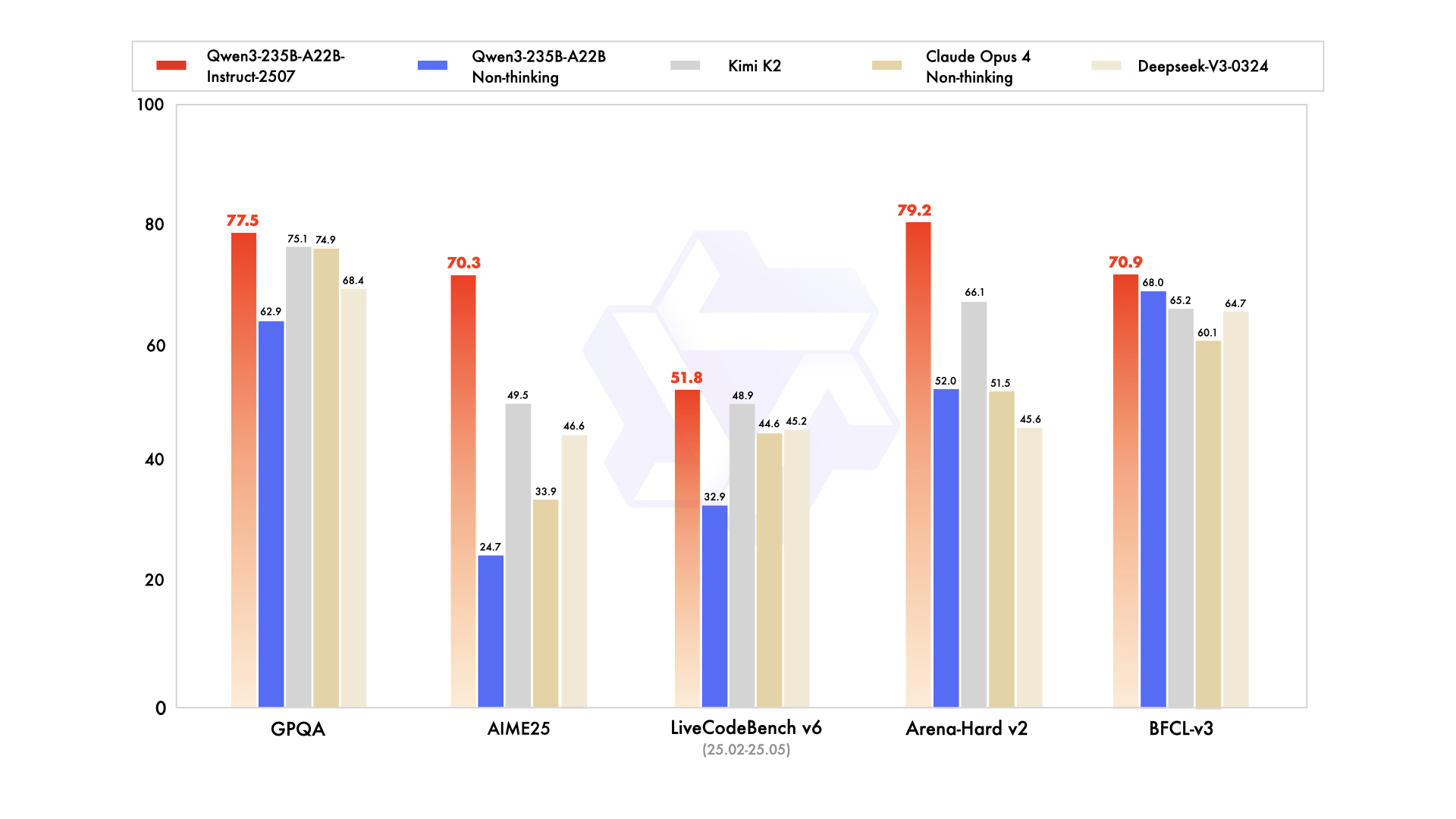
⚡ Quick Commands
huggingface-cli download qwen/qwen3-235b-a22b-instruct-2507 pip install -U transformers Hardware Compatibility
Multi-Tier Validation Matrix
RTX 3060 / 4060 Ti
RTX 4070 Super
RTX 4080 / Mac M3
RTX 3090 / 4090
RTX 6000 Ada
A100 / H100
Pro Tip: Compatibility is estimated for 4-bit quantization (Q4). High-precision (FP16) or ultra-long context windows will significantly increase VRAM requirements.
README
Qwen3-235B-A22B-Instruct-2507

Highlights
We introduce the updated version of the Qwen3-235B-A22B non-thinking mode, named Qwen3-235B-A22B-Instruct-2507, featuring the following key enhancements:
- Significant improvements in general capabilities, including instruction following, logical reasoning, text comprehension, mathematics, science, coding and tool usage.
- Substantial gains in long-tail knowledge coverage across multiple languages.
- Markedly better alignment with user preferences in subjective and open-ended tasks, enabling more helpful responses and higher-quality text generation.
- Enhanced capabilities in 256K long-context understanding.
Model Overview
Qwen3-235B-A22B-Instruct-2507 has the following features:
- Type: Causal Language Models
- Training Stage: Pretraining & Post-training
- Number of Parameters: 235B in total and 22B activated
- Number of Paramaters (Non-Embedding): 234B
- Number of Layers: 94
- Number of Attention Heads (GQA): 64 for Q and 4 for KV
- Number of Experts: 128
- Number of Activated Experts: 8
- Context Length: 262,144 natively and extendable up to 1,010,000 tokens
NOTE: This model supports only non-thinking mode and does not generate <think></think> blocks in its output. Meanwhile, specifying enable_thinking=False is no longer required.
For more details, including benchmark evaluation, hardware requirements, and inference performance, please refer to our blog, GitHub, and Documentation.
Performance
| Deepseek-V3-0324 | GPT-4o-0327 | Claude Opus 4 Non-thinking | Kimi K2 | Qwen3-235B-A22B Non-thinking | Qwen3-235B-A22B-Instruct-2507 | |
|---|---|---|---|---|---|---|
| Knowledge | ||||||
| MMLU-Pro | 81.2 | 79.8 | 86.6 | 81.1 | 75.2 | 83.0 |
| MMLU-Redux | 90.4 | 91.3 | 94.2 | 92.7 | 89.2 | 93.1 |
| GPQA | 68.4 | 66.9 | 74.9 | 75.1 | 62.9 | 77.5 |
| SuperGPQA | 57.3 | 51.0 | 56.5 | 57.2 | 48.2 | 62.6 |
| SimpleQA | 27.2 | 40.3 | 22.8 | 31.0 | 12.2 | 54.3 |
| CSimpleQA | 71.1 | 60.2 | 68.0 | 74.5 | 60.8 | 84.3 |
| Reasoning | ||||||
| AIME25 | 46.6 | 26.7 | 33.9 | 49.5 | 24.7 | 70.3 |
| HMMT25 | 27.5 | 7.9 | 15.9 | 38.8 | 10.0 | 55.4 |
| ARC-AGI | 9.0 | 8.8 | 30.3 | 13.3 | 4.3 | 41.8 |
| ZebraLogic | 83.4 | 52.6 | - | 89.0 | 37.7 | 95.0 |
| LiveBench 20241125 | 66.9 | 63.7 | 74.6 | 76.4 | 62.5 | 75.4 |
| Coding | ||||||
| LiveCodeBench v6 (25.02-25.05) | 45.2 | 35.8 | 44.6 | 48.9 | 32.9 | 51.8 |
| MultiPL-E | 82.2 | 82.7 | 88.5 | 85.7 | 79.3 | 87.9 |
| Aider-Polyglot | 55.1 | 45.3 | 70.7 | 59.0 | 59.6 | 57.3 |
| Alignment | ||||||
| IFEval | 82.3 | 83.9 | 87.4 | 89.8 | 83.2 | 88.7 |
| Arena-Hard v2* | 45.6 | 61.9 | 51.5 | 66.1 | 52.0 | 79.2 |
| Creative Writing v3 | 81.6 | 84.9 | 83.8 | 88.1 | 80.4 | 87.5 |
| WritingBench | 74.5 | 75.5 | 79.2 | 86.2 | 77.0 | 85.2 |
| Agent | ||||||
| BFCL-v3 | 64.7 | 66.5 | 60.1 | 65.2 | 68.0 | 70.9 |
| TAU1-Retail | 49.6 | 60.3# | 81.4 | 70.7 | 65.2 | 71.3 |
| TAU1-Airline | 32.0 | 42.8# | 59.6 | 53.5 | 32.0 | 44.0 |
| TAU2-Retail | 71.1 | 66.7# | 75.5 | 70.6 | 64.9 | 74.6 |
| TAU2-Airline | 36.0 | 42.0# | 55.5 | 56.5 | 36.0 | 50.0 |
| TAU2-Telecom | 34.0 | 29.8# | 45.2 | 65.8 | 24.6 | 32.5 |
| Multilingualism | ||||||
| MultiIF | 66.5 | 70.4 | - | 76.2 | 70.2 | 77.5 |
| MMLU-ProX | 75.8 | 76.2 | - | 74.5 | 73.2 | 79.4 |
| INCLUDE | 80.1 | 82.1 | - | 76.9 | 75.6 | 79.5 |
| PolyMATH | 32.2 | 25.5 | 30.0 | 44.8 | 27.0 | 50.2 |
*: For reproducibility, we report the win rates evaluated by GPT-4.1.
#: Results were generated using GPT-4o-20241120, as access to the native function calling API of GPT-4o-0327 was unavailable.
Quickstart
The code of Qwen3-MoE has been in the latest Hugging Face transformers and we advise you to use the latest version of transformers.
With transformers<4.51.0, you will encounter the following error:
KeyError: 'qwen3_moe'The following contains a code snippet illustrating how to use the model generate content based on given inputs.
from transformers import AutoModelForCausalLM, AutoTokenizer

model_name = "Qwen/Qwen3-235B-A22B-Instruct-2507"

# load the tokenizer and the model
tokenizer = AutoTokenizer.from_pretrained(model_name)
model = AutoModelForCausalLM.from_pretrained(
    model_name,
    torch_dtype="auto",
    device_map="auto"
)

# prepare the model input
prompt = "Give me a short introduction to large language model."
messages = [
    {"role": "user", "content": prompt}
]
text = tokenizer.apply_chat_template(
    messages,
    tokenize=False,
    add_generation_prompt=True,
)
model_inputs = tokenizer([text], return_tensors="pt").to(model.device)

# conduct text completion
generated_ids = model.generate(
    **model_inputs,
    max_new_tokens=16384
)
output_ids = generated_ids[0][len(model_inputs.input_ids[0]):].tolist()

content = tokenizer.decode(output_ids, skip_special_tokens=True)

print("content:", content)
For deployment, you can use sglang>=0.4.6.post1 or vllm>=0.8.5 or to create an OpenAI-compatible API endpoint:
- SGLang:
python -m sglang.launch_server --model-path Qwen/Qwen3-235B-A22B-Instruct-2507 --tp 8 --context-length 262144 - vLLM:
vllm serve Qwen/Qwen3-235B-A22B-Instruct-2507 --tensor-parallel-size 8 --max-model-len 262144
Note: If you encounter out-of-memory (OOM) issues, consider reducing the context length to a shorter value, such as 32,768.
For local use, applications such as Ollama, LMStudio, MLX-LM, llama.cpp, and KTransformers have also supported Qwen3.
Agentic Use
Qwen3 excels in tool calling capabilities. We recommend using Qwen-Agent to make the best use of agentic ability of Qwen3. Qwen-Agent encapsulates tool-calling templates and tool-calling parsers internally, greatly reducing coding complexity.
To define the available tools, you can use the MCP configuration file, use the integrated tool of Qwen-Agent, or integrate other tools by yourself.
from qwen_agent.agents import Assistant

# Define LLM
llm_cfg = {
    'model': 'Qwen3-235B-A22B-Instruct-2507',

    # Use a custom endpoint compatible with OpenAI API:
    'model_server': 'http://localhost:8000/v1',  # api_base
    'api_key': 'EMPTY',
}

# Define Tools
tools = [
    {'mcpServers': {  # You can specify the MCP configuration file
            'time': {
                'command': 'uvx',
                'args': ['mcp-server-time', '--local-timezone=Asia/Shanghai']
            },
            "fetch": {
                "command": "uvx",
                "args": ["mcp-server-fetch"]
            }
        }
    },
  'code_interpreter',  # Built-in tools
]

# Define Agent
bot = Assistant(llm=llm_cfg, function_list=tools)

# Streaming generation
messages = [{'role': 'user', 'content': 'https://qwenlm.github.io/blog/ Introduce the latest developments of Qwen'}]
for responses in bot.run(messages=messages):
    pass
print(responses)
Processing Ultra-Long Texts
To support ultra-long context processing (up to 1 million tokens), we integrate two key techniques:
- Dual Chunk Attention (DCA): A length extrapolation method that splits long sequences into manageable chunks while preserving global coherence.
- MInference: A sparse attention mechanism that reduces computational overhead by focusing on critical token interactions.
Together, these innovations significantly improve both generation quality and inference efficiency for sequences beyond 256K tokens. On sequences approaching 1M tokens, the system achieves up to a 3× speedup compared to standard attention implementations.
For full technical details, see the Qwen2.5-1M Technical Report.
How to Enable 1M Token Context
[!NOTE] To effectively process a 1 million token context, users will require approximately 1000 GB of total GPU memory. This accounts for model weights, KV-cache storage, and peak activation memory demands.
Step 1: Update Configuration File
Download the model and replace the content of your config.json with config_1m.json, which includes the config for length extrapolation and sparse attention.
export MODELNAME=Qwen3-235B-A22B-Instruct-2507
huggingface-cli download Qwen/${MODELNAME} --local-dir ${MODELNAME}
mv ${MODELNAME}/config.json ${MODELNAME}/config.json.bak
mv ${MODELNAME}/config_1m.json ${MODELNAME}/config.json
Step 2: Launch Model Server
After updating the config, proceed with either vLLM or SGLang for serving the model.
Option 1: Using vLLM
To run Qwen with 1M context support:
pip install -U vllm \
    --torch-backend=auto \
    --extra-index-url https://wheels.vllm.ai/nightly
Then launch the server with Dual Chunk Flash Attention enabled:
VLLM_ATTENTION_BACKEND=DUAL_CHUNK_FLASH_ATTN VLLM_USE_V1=0 \
vllm serve ./Qwen3-235B-A22B-Instruct-2507 \
  --tensor-parallel-size 8 \
  --max-model-len 1010000 \
  --enable-chunked-prefill \
  --max-num-batched-tokens 131072 \
  --enforce-eager \
  --max-num-seqs 1 \
  --gpu-memory-utilization 0.85
Key Parameters
| Parameter | Purpose |
|---|---|
VLLM_ATTENTION_BACKEND=DUAL_CHUNK_FLASH_ATTN |
Enables the custom attention kernel for long-context efficiency |
--max-model-len 1010000 |
Sets maximum context length to ~1M tokens |
--enable-chunked-prefill |
Allows chunked prefill for very long inputs (avoids OOM) |
--max-num-batched-tokens 131072 |
Controls batch size during prefill; balances throughput and memory |
--enforce-eager |
Disables CUDA graph capture (required for dual chunk attention) |
--max-num-seqs 1 |
Limits concurrent sequences due to extreme memory usage |
--gpu-memory-utilization 0.85 |
Set the fraction of GPU memory to be used for the model executor |
Option 2: Using SGLang
First, clone and install the specialized branch:
git clone https://github.com/sgl-project/sglang.git
cd sglang
pip install -e "python[all]"
Launch the server with DCA support:
python3 -m sglang.launch_server \
    --model-path ./Qwen3-235B-A22B-Instruct-2507 \
    --context-length 1010000 \
    --mem-frac 0.75 \
    --attention-backend dual_chunk_flash_attn \
    --tp 8 \
    --chunked-prefill-size 131072
Key Parameters
| Parameter | Purpose |
|---|---|
--attention-backend dual_chunk_flash_attn |
Activates Dual Chunk Flash Attention |
--context-length 1010000 |
Defines max input length |
--mem-frac 0.75 |
The fraction of the memory used for static allocation (model weights and KV cache memory pool). Use a smaller value if you see out-of-memory errors. |
--tp 8 |
Tensor parallelism size (matches model sharding) |
--chunked-prefill-size 131072 |
Prefill chunk size for handling long inputs without OOM |
Troubleshooting:
Encountering the error: "The model's max sequence length (xxxxx) is larger than the maximum number of tokens that can be stored in the KV cache." or "RuntimeError: Not enough memory. Please try to increase --mem-fraction-static."
The VRAM reserved for the KV cache is insufficient.
- vLLM: Consider reducing the
max_model_lenor increasing thetensor_parallel_sizeandgpu_memory_utilization. Alternatively, you can reducemax_num_batched_tokens, although this may significantly slow down inference. - SGLang: Consider reducing the
context-lengthor increasing thetpandmem-frac. Alternatively, you can reducechunked-prefill-size, although this may significantly slow down inference.
- vLLM: Consider reducing the
Encountering the error: "torch.OutOfMemoryError: CUDA out of memory."
The VRAM reserved for activation weights is insufficient. You can try lowering
gpu_memory_utilizationormem-frac, but be aware that this might reduce the VRAM available for the KV cache.Encountering the error: "Input prompt (xxxxx tokens) + lookahead slots (0) is too long and exceeds the capacity of the block manager." or "The input (xxx xtokens) is longer than the model's context length (xxx tokens)."
The input is too lengthy. Consider using a shorter sequence or increasing the
max_model_lenorcontext-length.
Long-Context Performance
We test the model on an 1M version of the RULER benchmark.
| Model Name | Acc avg | 4k | 8k | 16k | 32k | 64k | 96k | 128k | 192k | 256k | 384k | 512k | 640k | 768k | 896k | 1000k |
|---|---|---|---|---|---|---|---|---|---|---|---|---|---|---|---|---|
| Qwen3-235B-A22B (Non-Thinking) | 83.9 | 97.7 | 96.1 | 97.5 | 96.1 | 94.2 | 90.3 | 88.5 | 85.0 | 82.1 | 79.2 | 74.4 | 70.0 | 71.0 | 68.5 | 68.0 |
| Qwen3-235B-A22B-Instruct-2507 (Full Attention) | 92.5 | 98.5 | 97.6 | 96.9 | 97.3 | 95.8 | 94.9 | 93.9 | 94.5 | 91.0 | 92.2 | 90.9 | 87.8 | 84.8 | 86.5 | 84.5 |
| Qwen3-235B-A22B-Instruct-2507 (Sparse Attention) | 91.7 | 98.5 | 97.2 | 97.3 | 97.7 | 96.6 | 94.6 | 92.8 | 94.3 | 90.5 | 89.7 | 89.5 | 86.4 | 83.6 | 84.2 | 82.5 |
- All models are evaluated with Dual Chunk Attention enabled.
- Since the evaluation is time-consuming, we use 260 samples for each length (13 sub-tasks, 20 samples for each).
Best Practices
To achieve optimal performance, we recommend the following settings:
Sampling Parameters:
- We suggest using
Temperature=0.7,TopP=0.8,TopK=20, andMinP=0. - For supported frameworks, you can adjust the
presence_penaltyparameter between 0 and 2 to reduce endless repetitions. However, using a higher value may occasionally result in language mixing and a slight decrease in model performance.
- We suggest using
Adequate Output Length: We recommend using an output length of 16,384 tokens for most queries, which is adequate for instruct models.
Standardize Output Format: We recommend using prompts to standardize model outputs when benchmarking.
- Math Problems: Include "Please reason step by step, and put your final answer within \boxed{}." in the prompt.
- Multiple-Choice Questions: Add the following JSON structure to the prompt to standardize responses: "Please show your choice in the
answerfield with only the choice letter, e.g.,"answer": "C"."
Citation
If you find our work helpful, feel free to give us a cite.
@misc{qwen3technicalreport,
      title={Qwen3 Technical Report},
      author={Qwen Team},
      year={2025},
      eprint={2505.09388},
      archivePrefix={arXiv},
      primaryClass={cs.CL},
      url={https://arxiv.org/abs/2505.09388},
}

@article{qwen2.5-1m,
      title={Qwen2.5-1M Technical Report},
      author={An Yang and Bowen Yu and Chengyuan Li and Dayiheng Liu and Fei Huang and Haoyan Huang and Jiandong Jiang and Jianhong Tu and Jianwei Zhang and Jingren Zhou and Junyang Lin and Kai Dang and Kexin Yang and Le Yu and Mei Li and Minmin Sun and Qin Zhu and Rui Men and Tao He and Weijia Xu and Wenbiao Yin and Wenyuan Yu and Xiafei Qiu and Xingzhang Ren and Xinlong Yang and Yong Li and Zhiying Xu and Zipeng Zhang},
      journal={arXiv preprint arXiv:2501.15383},
      year={2025}
}16,035 chars • Full Disclosure Protocol Active
Qwen3-235B-A22B-Instruct-2507
Highlights
We introduce the updated version of the Qwen3-235B-A22B non-thinking mode, named Qwen3-235B-A22B-Instruct-2507, featuring the following key enhancements:
- Significant improvements in general capabilities, including instruction following, logical reasoning, text comprehension, mathematics, science, coding and tool usage.
- Substantial gains in long-tail knowledge coverage across multiple languages.
- Markedly better alignment with user preferences in subjective and open-ended tasks, enabling more helpful responses and higher-quality text generation.
- Enhanced capabilities in 256K long-context understanding.
Model Overview
Qwen3-235B-A22B-Instruct-2507 has the following features:
- Type: Causal Language Models
- Training Stage: Pretraining & Post-training
- Number of Parameters: 235B in total and 22B activated
- Number of Paramaters (Non-Embedding): 234B
- Number of Layers: 94
- Number of Attention Heads (GQA): 64 for Q and 4 for KV
- Number of Experts: 128
- Number of Activated Experts: 8
- Context Length: 262,144 natively and extendable up to 1,010,000 tokens
NOTE: This model supports only non-thinking mode and does not generate <think></think> blocks in its output. Meanwhile, specifying enable_thinking=False is no longer required.
For more details, including benchmark evaluation, hardware requirements, and inference performance, please refer to our blog, GitHub, and Documentation.
Performance
| Deepseek-V3-0324 | GPT-4o-0327 | Claude Opus 4 Non-thinking | Kimi K2 | Qwen3-235B-A22B Non-thinking | Qwen3-235B-A22B-Instruct-2507 | |
|---|---|---|---|---|---|---|
| Knowledge | ||||||
| MMLU-Pro | 81.2 | 79.8 | 86.6 | 81.1 | 75.2 | 83.0 |
| MMLU-Redux | 90.4 | 91.3 | 94.2 | 92.7 | 89.2 | 93.1 |
| GPQA | 68.4 | 66.9 | 74.9 | 75.1 | 62.9 | 77.5 |
| SuperGPQA | 57.3 | 51.0 | 56.5 | 57.2 | 48.2 | 62.6 |
| SimpleQA | 27.2 | 40.3 | 22.8 | 31.0 | 12.2 | 54.3 |
| CSimpleQA | 71.1 | 60.2 | 68.0 | 74.5 | 60.8 | 84.3 |
| Reasoning | ||||||
| AIME25 | 46.6 | 26.7 | 33.9 | 49.5 | 24.7 | 70.3 |
| HMMT25 | 27.5 | 7.9 | 15.9 | 38.8 | 10.0 | 55.4 |
| ARC-AGI | 9.0 | 8.8 | 30.3 | 13.3 | 4.3 | 41.8 |
| ZebraLogic | 83.4 | 52.6 | - | 89.0 | 37.7 | 95.0 |
| LiveBench 20241125 | 66.9 | 63.7 | 74.6 | 76.4 | 62.5 | 75.4 |
| Coding | ||||||
| LiveCodeBench v6 (25.02-25.05) | 45.2 | 35.8 | 44.6 | 48.9 | 32.9 | 51.8 |
| MultiPL-E | 82.2 | 82.7 | 88.5 | 85.7 | 79.3 | 87.9 |
| Aider-Polyglot | 55.1 | 45.3 | 70.7 | 59.0 | 59.6 | 57.3 |
| Alignment | ||||||
| IFEval | 82.3 | 83.9 | 87.4 | 89.8 | 83.2 | 88.7 |
| Arena-Hard v2* | 45.6 | 61.9 | 51.5 | 66.1 | 52.0 | 79.2 |
| Creative Writing v3 | 81.6 | 84.9 | 83.8 | 88.1 | 80.4 | 87.5 |
| WritingBench | 74.5 | 75.5 | 79.2 | 86.2 | 77.0 | 85.2 |
| Agent | ||||||
| BFCL-v3 | 64.7 | 66.5 | 60.1 | 65.2 | 68.0 | 70.9 |
| TAU1-Retail | 49.6 | 60.3# | 81.4 | 70.7 | 65.2 | 71.3 |
| TAU1-Airline | 32.0 | 42.8# | 59.6 | 53.5 | 32.0 | 44.0 |
| TAU2-Retail | 71.1 | 66.7# | 75.5 | 70.6 | 64.9 | 74.6 |
| TAU2-Airline | 36.0 | 42.0# | 55.5 | 56.5 | 36.0 | 50.0 |
| TAU2-Telecom | 34.0 | 29.8# | 45.2 | 65.8 | 24.6 | 32.5 |
| Multilingualism | ||||||
| MultiIF | 66.5 | 70.4 | - | 76.2 | 70.2 | 77.5 |
| MMLU-ProX | 75.8 | 76.2 | - | 74.5 | 73.2 | 79.4 |
| INCLUDE | 80.1 | 82.1 | - | 76.9 | 75.6 | 79.5 |
| PolyMATH | 32.2 | 25.5 | 30.0 | 44.8 | 27.0 | 50.2 |
*: For reproducibility, we report the win rates evaluated by GPT-4.1.
#: Results were generated using GPT-4o-20241120, as access to the native function calling API of GPT-4o-0327 was unavailable.
Quickstart
The code of Qwen3-MoE has been in the latest Hugging Face transformers and we advise you to use the latest version of transformers.
With transformers<4.51.0, you will encounter the following error:
KeyError: 'qwen3_moe'The following contains a code snippet illustrating how to use the model generate content based on given inputs.
from transformers import AutoModelForCausalLM, AutoTokenizer

model_name = "Qwen/Qwen3-235B-A22B-Instruct-2507"

# load the tokenizer and the model
tokenizer = AutoTokenizer.from_pretrained(model_name)
model = AutoModelForCausalLM.from_pretrained(
    model_name,
    torch_dtype="auto",
    device_map="auto"
)

# prepare the model input
prompt = "Give me a short introduction to large language model."
messages = [
    {"role": "user", "content": prompt}
]
text = tokenizer.apply_chat_template(
    messages,
    tokenize=False,
    add_generation_prompt=True,
)
model_inputs = tokenizer([text], return_tensors="pt").to(model.device)

# conduct text completion
generated_ids = model.generate(
    **model_inputs,
    max_new_tokens=16384
)
output_ids = generated_ids[0][len(model_inputs.input_ids[0]):].tolist()

content = tokenizer.decode(output_ids, skip_special_tokens=True)

print("content:", content)
For deployment, you can use sglang>=0.4.6.post1 or vllm>=0.8.5 or to create an OpenAI-compatible API endpoint:
- SGLang:
python -m sglang.launch_server --model-path Qwen/Qwen3-235B-A22B-Instruct-2507 --tp 8 --context-length 262144 - vLLM:
vllm serve Qwen/Qwen3-235B-A22B-Instruct-2507 --tensor-parallel-size 8 --max-model-len 262144
Note: If you encounter out-of-memory (OOM) issues, consider reducing the context length to a shorter value, such as 32,768.
For local use, applications such as Ollama, LMStudio, MLX-LM, llama.cpp, and KTransformers have also supported Qwen3.
Agentic Use
Qwen3 excels in tool calling capabilities. We recommend using Qwen-Agent to make the best use of agentic ability of Qwen3. Qwen-Agent encapsulates tool-calling templates and tool-calling parsers internally, greatly reducing coding complexity.
To define the available tools, you can use the MCP configuration file, use the integrated tool of Qwen-Agent, or integrate other tools by yourself.
from qwen_agent.agents import Assistant

# Define LLM
llm_cfg = {
    'model': 'Qwen3-235B-A22B-Instruct-2507',

    # Use a custom endpoint compatible with OpenAI API:
    'model_server': 'http://localhost:8000/v1',  # api_base
    'api_key': 'EMPTY',
}

# Define Tools
tools = [
    {'mcpServers': {  # You can specify the MCP configuration file
            'time': {
                'command': 'uvx',
                'args': ['mcp-server-time', '--local-timezone=Asia/Shanghai']
            },
            "fetch": {
                "command": "uvx",
                "args": ["mcp-server-fetch"]
            }
        }
    },
  'code_interpreter',  # Built-in tools
]

# Define Agent
bot = Assistant(llm=llm_cfg, function_list=tools)

# Streaming generation
messages = [{'role': 'user', 'content': 'https://qwenlm.github.io/blog/ Introduce the latest developments of Qwen'}]
for responses in bot.run(messages=messages):
    pass
print(responses)
Processing Ultra-Long Texts
To support ultra-long context processing (up to 1 million tokens), we integrate two key techniques:
- Dual Chunk Attention (DCA): A length extrapolation method that splits long sequences into manageable chunks while preserving global coherence.
- MInference: A sparse attention mechanism that reduces computational overhead by focusing on critical token interactions.
Together, these innovations significantly improve both generation quality and inference efficiency for sequences beyond 256K tokens. On sequences approaching 1M tokens, the system achieves up to a 3× speedup compared to standard attention implementations.
For full technical details, see the Qwen2.5-1M Technical Report.
How to Enable 1M Token Context
[!NOTE] To effectively process a 1 million token context, users will require approximately 1000 GB of total GPU memory. This accounts for model weights, KV-cache storage, and peak activation memory demands.
Step 1: Update Configuration File
Download the model and replace the content of your config.json with config_1m.json, which includes the config for length extrapolation and sparse attention.
export MODELNAME=Qwen3-235B-A22B-Instruct-2507
huggingface-cli download Qwen/${MODELNAME} --local-dir ${MODELNAME}
mv ${MODELNAME}/config.json ${MODELNAME}/config.json.bak
mv ${MODELNAME}/config_1m.json ${MODELNAME}/config.json
Step 2: Launch Model Server
After updating the config, proceed with either vLLM or SGLang for serving the model.
Option 1: Using vLLM
To run Qwen with 1M context support:
pip install -U vllm \
    --torch-backend=auto \
    --extra-index-url https://wheels.vllm.ai/nightly
Then launch the server with Dual Chunk Flash Attention enabled:
VLLM_ATTENTION_BACKEND=DUAL_CHUNK_FLASH_ATTN VLLM_USE_V1=0 \
vllm serve ./Qwen3-235B-A22B-Instruct-2507 \
  --tensor-parallel-size 8 \
  --max-model-len 1010000 \
  --enable-chunked-prefill \
  --max-num-batched-tokens 131072 \
  --enforce-eager \
  --max-num-seqs 1 \
  --gpu-memory-utilization 0.85
Key Parameters
| Parameter | Purpose |
|---|---|
VLLM_ATTENTION_BACKEND=DUAL_CHUNK_FLASH_ATTN |
Enables the custom attention kernel for long-context efficiency |
--max-model-len 1010000 |
Sets maximum context length to ~1M tokens |
--enable-chunked-prefill |
Allows chunked prefill for very long inputs (avoids OOM) |
--max-num-batched-tokens 131072 |
Controls batch size during prefill; balances throughput and memory |
--enforce-eager |
Disables CUDA graph capture (required for dual chunk attention) |
--max-num-seqs 1 |
Limits concurrent sequences due to extreme memory usage |
--gpu-memory-utilization 0.85 |
Set the fraction of GPU memory to be used for the model executor |
Option 2: Using SGLang
First, clone and install the specialized branch:
git clone https://github.com/sgl-project/sglang.git
cd sglang
pip install -e "python[all]"
Launch the server with DCA support:
python3 -m sglang.launch_server \
    --model-path ./Qwen3-235B-A22B-Instruct-2507 \
    --context-length 1010000 \
    --mem-frac 0.75 \
    --attention-backend dual_chunk_flash_attn \
    --tp 8 \
    --chunked-prefill-size 131072
Key Parameters
| Parameter | Purpose |
|---|---|
--attention-backend dual_chunk_flash_attn |
Activates Dual Chunk Flash Attention |
--context-length 1010000 |
Defines max input length |
--mem-frac 0.75 |
The fraction of the memory used for static allocation (model weights and KV cache memory pool). Use a smaller value if you see out-of-memory errors. |
--tp 8 |
Tensor parallelism size (matches model sharding) |
--chunked-prefill-size 131072 |
Prefill chunk size for handling long inputs without OOM |
Troubleshooting:
Encountering the error: "The model's max sequence length (xxxxx) is larger than the maximum number of tokens that can be stored in the KV cache." or "RuntimeError: Not enough memory. Please try to increase --mem-fraction-static."
The VRAM reserved for the KV cache is insufficient.
- vLLM: Consider reducing the
max_model_lenor increasing thetensor_parallel_sizeandgpu_memory_utilization. Alternatively, you can reducemax_num_batched_tokens, although this may significantly slow down inference. - SGLang: Consider reducing the
context-lengthor increasing thetpandmem-frac. Alternatively, you can reducechunked-prefill-size, although this may significantly slow down inference.
- vLLM: Consider reducing the
Encountering the error: "torch.OutOfMemoryError: CUDA out of memory."
The VRAM reserved for activation weights is insufficient. You can try lowering
gpu_memory_utilizationormem-frac, but be aware that this might reduce the VRAM available for the KV cache.Encountering the error: "Input prompt (xxxxx tokens) + lookahead slots (0) is too long and exceeds the capacity of the block manager." or "The input (xxx xtokens) is longer than the model's context length (xxx tokens)."
The input is too lengthy. Consider using a shorter sequence or increasing the
max_model_lenorcontext-length.
Long-Context Performance
We test the model on an 1M version of the RULER benchmark.
| Model Name | Acc avg | 4k | 8k | 16k | 32k | 64k | 96k | 128k | 192k | 256k | 384k | 512k | 640k | 768k | 896k | 1000k |
|---|---|---|---|---|---|---|---|---|---|---|---|---|---|---|---|---|
| Qwen3-235B-A22B (Non-Thinking) | 83.9 | 97.7 | 96.1 | 97.5 | 96.1 | 94.2 | 90.3 | 88.5 | 85.0 | 82.1 | 79.2 | 74.4 | 70.0 | 71.0 | 68.5 | 68.0 |
| Qwen3-235B-A22B-Instruct-2507 (Full Attention) | 92.5 | 98.5 | 97.6 | 96.9 | 97.3 | 95.8 | 94.9 | 93.9 | 94.5 | 91.0 | 92.2 | 90.9 | 87.8 | 84.8 | 86.5 | 84.5 |
| Qwen3-235B-A22B-Instruct-2507 (Sparse Attention) | 91.7 | 98.5 | 97.2 | 97.3 | 97.7 | 96.6 | 94.6 | 92.8 | 94.3 | 90.5 | 89.7 | 89.5 | 86.4 | 83.6 | 84.2 | 82.5 |
- All models are evaluated with Dual Chunk Attention enabled.
- Since the evaluation is time-consuming, we use 260 samples for each length (13 sub-tasks, 20 samples for each).
Best Practices
To achieve optimal performance, we recommend the following settings:
Sampling Parameters:
- We suggest using
Temperature=0.7,TopP=0.8,TopK=20, andMinP=0. - For supported frameworks, you can adjust the
presence_penaltyparameter between 0 and 2 to reduce endless repetitions. However, using a higher value may occasionally result in language mixing and a slight decrease in model performance.
- We suggest using
Adequate Output Length: We recommend using an output length of 16,384 tokens for most queries, which is adequate for instruct models.
Standardize Output Format: We recommend using prompts to standardize model outputs when benchmarking.
- Math Problems: Include "Please reason step by step, and put your final answer within \boxed{}." in the prompt.
- Multiple-Choice Questions: Add the following JSON structure to the prompt to standardize responses: "Please show your choice in the
answerfield with only the choice letter, e.g.,"answer": "C"."
Citation
If you find our work helpful, feel free to give us a cite.
@misc{qwen3technicalreport,
      title={Qwen3 Technical Report},
      author={Qwen Team},
      year={2025},
      eprint={2505.09388},
      archivePrefix={arXiv},
      primaryClass={cs.CL},
      url={https://arxiv.org/abs/2505.09388},
}

@article{qwen2.5-1m,
      title={Qwen2.5-1M Technical Report},
      author={An Yang and Bowen Yu and Chengyuan Li and Dayiheng Liu and Fei Huang and Haoyan Huang and Jiandong Jiang and Jianhong Tu and Jianwei Zhang and Jingren Zhou and Junyang Lin and Kai Dang and Kexin Yang and Le Yu and Mei Li and Minmin Sun and Qin Zhu and Rui Men and Tao He and Weijia Xu and Wenbiao Yin and Wenyuan Yu and Xiafei Qiu and Xingzhang Ren and Xinlong Yang and Yong Li and Zhiying Xu and Zipeng Zhang},
      journal={arXiv preprint arXiv:2501.15383},
      year={2025}
}
📝 Limitations & Considerations
- • Benchmark scores may vary based on evaluation methodology and hardware configuration.
- • VRAM requirements are estimates; actual usage depends on quantization and batch size.
- • FNI scores are relative rankings and may change as new models are added.
- ⚠ License Unknown: Verify licensing terms before commercial use.
- • Source: Unknown
Cite this model
Academic & Research Attribution
@misc{hf_model__qwen__qwen3_235b_a22b_instruct_2507,
  author = {qwen},
  title = {undefined Model},
  year = {2026},
  howpublished = {\url{https://huggingface.co/qwen/qwen3-235b-a22b-instruct-2507}},
  note = {Accessed via Free2AITools Knowledge Fortress}
}AI Summary: Based on Hugging Face metadata. Not a recommendation.
🛡️ Model Transparency Report
Verified data manifest for traceability and transparency.
🆔 Identity & Source
- id
- hf-model--qwen--qwen3-235b-a22b-instruct-2507
- author
- qwen
- tags
- transformerssafetensorsqwen3_moetext-generationconversationalarxiv:2402.17463arxiv:2407.02490arxiv:2501.15383arxiv:2404.06654arxiv:2505.09388license:apache-2.0endpoints_compatibledeploy:azureregion:us
⚙️ Technical Specs
- architecture
- Qwen3MoeForCausalLM
- params billions
- 235.09
- context length
- 4,096
- vram gb
- 178.8
- vram is estimated
- true
- vram formula
- VRAM ≈ (params * 0.75) + 2GB (KV) + 0.5GB (OS)
📊 Engagement & Metrics
- likes
- 730
- downloads
- 121,152
Free2AITools Constitutional Data Pipeline: Curated disclosure mode active. (V15.x Standard)