🔬Technical Deep Dive
Full Specifications [+]
🚀 What's Next?
🖼️ Visual Gallery
2 Images Detected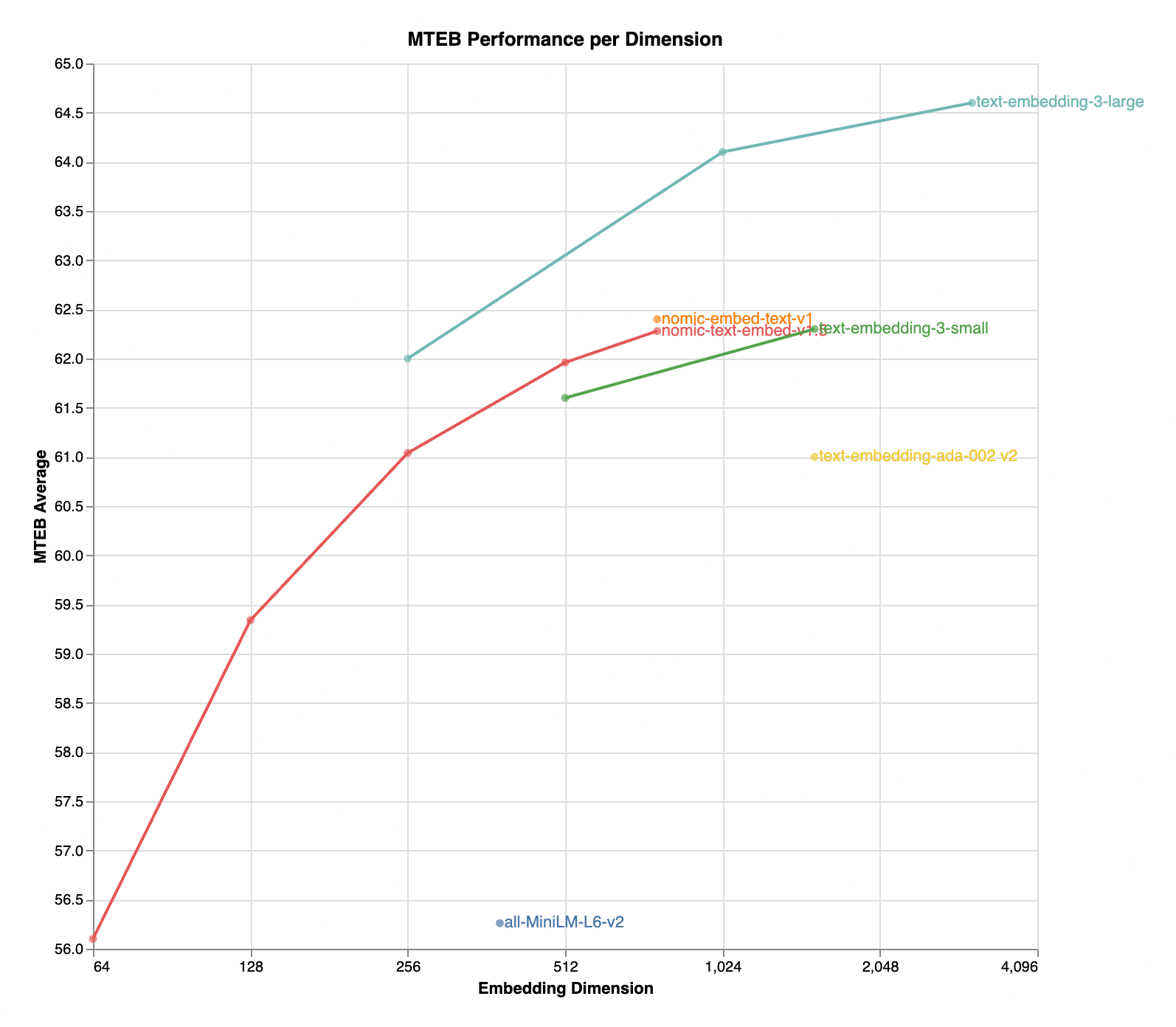

⚡ Quick Commands
ollama run nomic-embed-text-v1.5 huggingface-cli download nomic-ai/nomic-embed-text-v1.5 pip install -U transformers Hardware Compatibility
Multi-Tier Validation Matrix
RTX 3060 / 4060 Ti
RTX 4070 Super
RTX 4080 / Mac M3
RTX 3090 / 4090
RTX 6000 Ada
A100 / H100
Pro Tip: Compatibility is estimated for 4-bit quantization (Q4). High-precision (FP16) or ultra-long context windows will significantly increase VRAM requirements.
README
nomic-embed-text-v1.5: Resizable Production Embeddings with Matryoshka Representation Learning
Blog | Technical Report | AWS SageMaker | Nomic Platform
Exciting Update!: nomic-embed-text-v1.5 is now multimodal! nomic-embed-vision-v1.5 is aligned to the embedding space of nomic-embed-text-v1.5, meaning any text embedding is multimodal!
Usage
Important: the text prompt must include a task instruction prefix, instructing the model which task is being performed.
For example, if you are implementing a RAG application, you embed your documents as search_document: <text here> and embed your user queries as search_query: <text here>.
Task instruction prefixes
`search_document`
Purpose: embed texts as documents from a dataset
This prefix is used for embedding texts as documents, for example as documents for a RAG index.
from sentence_transformers import SentenceTransformer

model = SentenceTransformer("nomic-ai/nomic-embed-text-v1.5", trust_remote_code=True)
sentences = ['search_document: TSNE is a dimensionality reduction algorithm created by Laurens van Der Maaten']
embeddings = model.encode(sentences)
print(embeddings)
`search_query`
Purpose: embed texts as questions to answer
This prefix is used for embedding texts as questions that documents from a dataset could resolve, for example as queries to be answered by a RAG application.
from sentence_transformers import SentenceTransformer

model = SentenceTransformer("nomic-ai/nomic-embed-text-v1.5", trust_remote_code=True)
sentences = ['search_query: Who is Laurens van Der Maaten?']
embeddings = model.encode(sentences)
print(embeddings)
`clustering`
Purpose: embed texts to group them into clusters
This prefix is used for embedding texts in order to group them into clusters, discover common topics, or remove semantic duplicates.
from sentence_transformers import SentenceTransformer

model = SentenceTransformer("nomic-ai/nomic-embed-text-v1.5", trust_remote_code=True)
sentences = ['clustering: the quick brown fox']
embeddings = model.encode(sentences)
print(embeddings)
`classification`
Purpose: embed texts to classify them
This prefix is used for embedding texts into vectors that will be used as features for a classification model
from sentence_transformers import SentenceTransformer

model = SentenceTransformer("nomic-ai/nomic-embed-text-v1.5", trust_remote_code=True)
sentences = ['classification: the quick brown fox']
embeddings = model.encode(sentences)
print(embeddings)
Sentence Transformers
import torch.nn.functional as F
from sentence_transformers import SentenceTransformer

matryoshka_dim = 512

model = SentenceTransformer("nomic-ai/nomic-embed-text-v1.5", trust_remote_code=True)
sentences = ['search_query: What is TSNE?', 'search_query: Who is Laurens van der Maaten?']
embeddings = model.encode(sentences, convert_to_tensor=True)
embeddings = F.layer_norm(embeddings, normalized_shape=(embeddings.shape[1],))
embeddings = embeddings[:, :matryoshka_dim]
embeddings = F.normalize(embeddings, p=2, dim=1)
print(embeddings)
Transformers
import torch
import torch.nn.functional as F
from transformers import AutoTokenizer, AutoModel

def mean_pooling(model_output, attention_mask):
    token_embeddings = model_output[0]
    input_mask_expanded = attention_mask.unsqueeze(-1).expand(token_embeddings.size()).float()
    return torch.sum(token_embeddings * input_mask_expanded, 1) / torch.clamp(input_mask_expanded.sum(1), min=1e-9)

sentences = ['search_query: What is TSNE?', 'search_query: Who is Laurens van der Maaten?']

tokenizer = AutoTokenizer.from_pretrained('bert-base-uncased')
model = AutoModel.from_pretrained('nomic-ai/nomic-embed-text-v1.5', trust_remote_code=True, safe_serialization=True)
model.eval()

encoded_input = tokenizer(sentences, padding=True, truncation=True, return_tensors='pt')

+ matryoshka_dim = 512

with torch.no_grad():
    model_output = model(**encoded_input)

embeddings = mean_pooling(model_output, encoded_input['attention_mask'])
+ embeddings = F.layer_norm(embeddings, normalized_shape=(embeddings.shape[1],))
+ embeddings = embeddings[:, :matryoshka_dim]
embeddings = F.normalize(embeddings, p=2, dim=1)
print(embeddings)
The model natively supports scaling of the sequence length past 2048 tokens. To do so,
- tokenizer = AutoTokenizer.from_pretrained('bert-base-uncased')
+ tokenizer = AutoTokenizer.from_pretrained('bert-base-uncased', model_max_length=8192)


- model = AutoModel.from_pretrained('nomic-ai/nomic-embed-text-v1.5', trust_remote_code=True)
+ model = AutoModel.from_pretrained('nomic-ai/nomic-embed-text-v1.5', trust_remote_code=True, rotary_scaling_factor=2)
Transformers.js
import { pipeline, layer_norm } from '@huggingface/transformers';

// Create a feature extraction pipeline
const extractor = await pipeline('feature-extraction', 'nomic-ai/nomic-embed-text-v1.5');

// Define sentences
const texts = ['search_query: What is TSNE?', 'search_query: Who is Laurens van der Maaten?'];

// Compute sentence embeddings
let embeddings = await extractor(texts, { pooling: 'mean' });
console.log(embeddings); // Tensor of shape [2, 768]

const matryoshka_dim = 512;
embeddings = layer_norm(embeddings, [embeddings.dims[1]])
    .slice(null, [0, matryoshka_dim])
    .normalize(2, -1);
console.log(embeddings.tolist());
Nomic API
The easiest way to use Nomic Embed is through the Nomic Embedding API.
Generating embeddings with the nomic Python client is as easy as
from nomic import embed

output = embed.text(
    texts=['Nomic Embedding API', '#keepAIOpen'],
    model='nomic-embed-text-v1.5',
    task_type='search_document',
    dimensionality=256,
)

print(output)
For more information, see the API reference
Infinity
Usage with Infinity.
docker run --gpus all -v $PWD/data:/app/.cache -e HF_TOKEN=$HF_TOKEN -p "7997":"7997" \
michaelf34/infinity:0.0.70 \
v2 --model-id nomic-ai/nomic-embed-text-v1.5 --revision "main" --dtype float16 --batch-size 8 --engine torch --port 7997 --no-bettertransformer
Adjusting Dimensionality
nomic-embed-text-v1.5 is an improvement upon Nomic Embed that utilizes Matryoshka Representation Learning which gives developers the flexibility to trade off the embedding size for a negligible reduction in performance.
| Name | SeqLen | Dimension | MTEB |
|---|---|---|---|
| nomic-embed-text-v1 | 8192 | 768 | 62.39 |
| nomic-embed-text-v1.5 | 8192 | 768 | 62.28 |
| nomic-embed-text-v1.5 | 8192 | 512 | 61.96 |
| nomic-embed-text-v1.5 | 8192 | 256 | 61.04 |
| nomic-embed-text-v1.5 | 8192 | 128 | 59.34 |
| nomic-embed-text-v1.5 | 8192 | 64 | 56.10 |
Training
Click the Nomic Atlas map below to visualize a 5M sample of our contrastive pretraining data!
We train our embedder using a multi-stage training pipeline. Starting from a long-context BERT model, the first unsupervised contrastive stage trains on a dataset generated from weakly related text pairs, such as question-answer pairs from forums like StackExchange and Quora, title-body pairs from Amazon reviews, and summarizations from news articles.
In the second finetuning stage, higher quality labeled datasets such as search queries and answers from web searches are leveraged. Data curation and hard-example mining is crucial in this stage.
For more details, see the Nomic Embed Technical Report and corresponding blog post.
Training data to train the models is released in its entirety. For more details, see the contrastors repository
Join the Nomic Community
- Nomic: https://nomic.ai
- Discord: https://discord.gg/myY5YDR8z8
- Twitter: https://twitter.com/nomic_ai
Citation
If you find the model, dataset, or training code useful, please cite our work
@misc{nussbaum2024nomic,
      title={Nomic Embed: Training a Reproducible Long Context Text Embedder},
      author={Zach Nussbaum and John X. Morris and Brandon Duderstadt and Andriy Mulyar},
      year={2024},
      eprint={2402.01613},
      archivePrefix={arXiv},
      primaryClass={cs.CL}
}9,494 chars • Full Disclosure Protocol Active
nomic-embed-text-v1.5: Resizable Production Embeddings with Matryoshka Representation Learning
Blog | Technical Report | AWS SageMaker | Nomic Platform
Exciting Update!: nomic-embed-text-v1.5 is now multimodal! nomic-embed-vision-v1.5 is aligned to the embedding space of nomic-embed-text-v1.5, meaning any text embedding is multimodal!
Usage
Important: the text prompt must include a task instruction prefix, instructing the model which task is being performed.
For example, if you are implementing a RAG application, you embed your documents as search_document: <text here> and embed your user queries as search_query: <text here>.
Task instruction prefixes
`search_document`
Purpose: embed texts as documents from a dataset
This prefix is used for embedding texts as documents, for example as documents for a RAG index.
from sentence_transformers import SentenceTransformer

model = SentenceTransformer("nomic-ai/nomic-embed-text-v1.5", trust_remote_code=True)
sentences = ['search_document: TSNE is a dimensionality reduction algorithm created by Laurens van Der Maaten']
embeddings = model.encode(sentences)
print(embeddings)
`search_query`
Purpose: embed texts as questions to answer
This prefix is used for embedding texts as questions that documents from a dataset could resolve, for example as queries to be answered by a RAG application.
from sentence_transformers import SentenceTransformer

model = SentenceTransformer("nomic-ai/nomic-embed-text-v1.5", trust_remote_code=True)
sentences = ['search_query: Who is Laurens van Der Maaten?']
embeddings = model.encode(sentences)
print(embeddings)
`clustering`
Purpose: embed texts to group them into clusters
This prefix is used for embedding texts in order to group them into clusters, discover common topics, or remove semantic duplicates.
from sentence_transformers import SentenceTransformer

model = SentenceTransformer("nomic-ai/nomic-embed-text-v1.5", trust_remote_code=True)
sentences = ['clustering: the quick brown fox']
embeddings = model.encode(sentences)
print(embeddings)
`classification`
Purpose: embed texts to classify them
This prefix is used for embedding texts into vectors that will be used as features for a classification model
from sentence_transformers import SentenceTransformer

model = SentenceTransformer("nomic-ai/nomic-embed-text-v1.5", trust_remote_code=True)
sentences = ['classification: the quick brown fox']
embeddings = model.encode(sentences)
print(embeddings)
Sentence Transformers
import torch.nn.functional as F
from sentence_transformers import SentenceTransformer

matryoshka_dim = 512

model = SentenceTransformer("nomic-ai/nomic-embed-text-v1.5", trust_remote_code=True)
sentences = ['search_query: What is TSNE?', 'search_query: Who is Laurens van der Maaten?']
embeddings = model.encode(sentences, convert_to_tensor=True)
embeddings = F.layer_norm(embeddings, normalized_shape=(embeddings.shape[1],))
embeddings = embeddings[:, :matryoshka_dim]
embeddings = F.normalize(embeddings, p=2, dim=1)
print(embeddings)
Transformers
import torch
import torch.nn.functional as F
from transformers import AutoTokenizer, AutoModel

def mean_pooling(model_output, attention_mask):
    token_embeddings = model_output[0]
    input_mask_expanded = attention_mask.unsqueeze(-1).expand(token_embeddings.size()).float()
    return torch.sum(token_embeddings * input_mask_expanded, 1) / torch.clamp(input_mask_expanded.sum(1), min=1e-9)

sentences = ['search_query: What is TSNE?', 'search_query: Who is Laurens van der Maaten?']

tokenizer = AutoTokenizer.from_pretrained('bert-base-uncased')
model = AutoModel.from_pretrained('nomic-ai/nomic-embed-text-v1.5', trust_remote_code=True, safe_serialization=True)
model.eval()

encoded_input = tokenizer(sentences, padding=True, truncation=True, return_tensors='pt')

+ matryoshka_dim = 512

with torch.no_grad():
    model_output = model(**encoded_input)

embeddings = mean_pooling(model_output, encoded_input['attention_mask'])
+ embeddings = F.layer_norm(embeddings, normalized_shape=(embeddings.shape[1],))
+ embeddings = embeddings[:, :matryoshka_dim]
embeddings = F.normalize(embeddings, p=2, dim=1)
print(embeddings)
The model natively supports scaling of the sequence length past 2048 tokens. To do so,
- tokenizer = AutoTokenizer.from_pretrained('bert-base-uncased')
+ tokenizer = AutoTokenizer.from_pretrained('bert-base-uncased', model_max_length=8192)


- model = AutoModel.from_pretrained('nomic-ai/nomic-embed-text-v1.5', trust_remote_code=True)
+ model = AutoModel.from_pretrained('nomic-ai/nomic-embed-text-v1.5', trust_remote_code=True, rotary_scaling_factor=2)
Transformers.js
import { pipeline, layer_norm } from '@huggingface/transformers';

// Create a feature extraction pipeline
const extractor = await pipeline('feature-extraction', 'nomic-ai/nomic-embed-text-v1.5');

// Define sentences
const texts = ['search_query: What is TSNE?', 'search_query: Who is Laurens van der Maaten?'];

// Compute sentence embeddings
let embeddings = await extractor(texts, { pooling: 'mean' });
console.log(embeddings); // Tensor of shape [2, 768]

const matryoshka_dim = 512;
embeddings = layer_norm(embeddings, [embeddings.dims[1]])
    .slice(null, [0, matryoshka_dim])
    .normalize(2, -1);
console.log(embeddings.tolist());
Nomic API
The easiest way to use Nomic Embed is through the Nomic Embedding API.
Generating embeddings with the nomic Python client is as easy as
from nomic import embed

output = embed.text(
    texts=['Nomic Embedding API', '#keepAIOpen'],
    model='nomic-embed-text-v1.5',
    task_type='search_document',
    dimensionality=256,
)

print(output)
For more information, see the API reference
Infinity
Usage with Infinity.
docker run --gpus all -v $PWD/data:/app/.cache -e HF_TOKEN=$HF_TOKEN -p "7997":"7997" \
michaelf34/infinity:0.0.70 \
v2 --model-id nomic-ai/nomic-embed-text-v1.5 --revision "main" --dtype float16 --batch-size 8 --engine torch --port 7997 --no-bettertransformer
Adjusting Dimensionality
nomic-embed-text-v1.5 is an improvement upon Nomic Embed that utilizes Matryoshka Representation Learning which gives developers the flexibility to trade off the embedding size for a negligible reduction in performance.
| Name | SeqLen | Dimension | MTEB |
|---|---|---|---|
| nomic-embed-text-v1 | 8192 | 768 | 62.39 |
| nomic-embed-text-v1.5 | 8192 | 768 | 62.28 |
| nomic-embed-text-v1.5 | 8192 | 512 | 61.96 |
| nomic-embed-text-v1.5 | 8192 | 256 | 61.04 |
| nomic-embed-text-v1.5 | 8192 | 128 | 59.34 |
| nomic-embed-text-v1.5 | 8192 | 64 | 56.10 |
Training
Click the Nomic Atlas map below to visualize a 5M sample of our contrastive pretraining data!
We train our embedder using a multi-stage training pipeline. Starting from a long-context BERT model, the first unsupervised contrastive stage trains on a dataset generated from weakly related text pairs, such as question-answer pairs from forums like StackExchange and Quora, title-body pairs from Amazon reviews, and summarizations from news articles.
In the second finetuning stage, higher quality labeled datasets such as search queries and answers from web searches are leveraged. Data curation and hard-example mining is crucial in this stage.
For more details, see the Nomic Embed Technical Report and corresponding blog post.
Training data to train the models is released in its entirety. For more details, see the contrastors repository
Join the Nomic Community
- Nomic: https://nomic.ai
- Discord: https://discord.gg/myY5YDR8z8
- Twitter: https://twitter.com/nomic_ai
Citation
If you find the model, dataset, or training code useful, please cite our work
@misc{nussbaum2024nomic,
      title={Nomic Embed: Training a Reproducible Long Context Text Embedder},
      author={Zach Nussbaum and John X. Morris and Brandon Duderstadt and Andriy Mulyar},
      year={2024},
      eprint={2402.01613},
      archivePrefix={arXiv},
      primaryClass={cs.CL}
}
📝 Limitations & Considerations
- • Benchmark scores may vary based on evaluation methodology and hardware configuration.
- • VRAM requirements are estimates; actual usage depends on quantization and batch size.
- • FNI scores are relative rankings and may change as new models are added.
- ⚠ License Unknown: Verify licensing terms before commercial use.
- • Source: Unknown
Cite this model
Academic & Research Attribution
@misc{hf_model__nomic_ai__nomic_embed_text_v1.5,
  author = {nomic-ai},
  title = {undefined Model},
  year = {2026},
  howpublished = {\url{https://huggingface.co/nomic-ai/nomic-embed-text-v1.5}},
  note = {Accessed via Free2AITools Knowledge Fortress}
}AI Summary: Based on Hugging Face metadata. Not a recommendation.
🛡️ Model Transparency Report
Verified data manifest for traceability and transparency.
🆔 Identity & Source
- id
- hf-model--nomic-ai--nomic-embed-text-v1.5
- author
- nomic-ai
- tags
- sentence-transformersonnxsafetensorsnomic_bertfeature-extractionsentence-similaritymtebtransformerstransformers.jscustom_codeenarxiv:2402.01613arxiv:2205.13147license:apache-2.0model-indextext-embeddings-inferenceendpoints_compatibleregion:us
⚙️ Technical Specs
- architecture
- NomicBertModel
- params billions
- 0.14
- context length
- 4,096
- vram gb
- 1.4
- vram is estimated
- true
- vram formula
- VRAM ≈ (params * 0.75) + 0.8GB (KV) + 0.5GB (OS)
📊 Engagement & Metrics
- likes
- 742
- downloads
- 2,245,209
Free2AITools Constitutional Data Pipeline: Curated disclosure mode active. (V15.x Standard)