🔬Technical Deep Dive
Full Specifications [+]
⚖️ Nexus Index V2.0
💬 Index Insight
FNI V2.0 for Community Pipelines Mirror: Semantic (S:50), Authority (A:0), Popularity (P:51), Recency (R:85), Quality (Q:30).
Verification Authority
👁️ Data Preview
Row-level preview not available for this dataset.
Schema structure is shown in the Field Logic panel when available.
🔗 Explore Full Dataset ↗🧬 Field Logic
Schema not yet indexed for this dataset.
Dataset Specification
Community Pipeline Examples
For more information about community pipelines, please have a look at this issue.
Community pipeline examples consist pipelines that have been added by the community. Please have a look at the following tables to get an overview of all community examples. Click on the Code Example to get a copy-and-paste ready code example that you can try out. If a community pipeline doesn't work as expected, please open an issue and ping the author on it.
Please also check out our Community Scripts examples for tips and tricks that you can use with diffusers without having to run a community pipeline.
| Example | Description | Code Example | Colab | Author |
|---|---|---|---|---|
| Differential Diffusion | Differential Diffusion modifies an image according to a text prompt, and according to a map that specifies the amount of change in each region. | Differential Diffusion |   |
Eran Levin and Ohad Fried |
| HD-Painter | HD-Painter enables prompt-faithfull and high resolution (up to 2k) image inpainting upon any diffusion-based image inpainting method. | HD-Painter | |
Manukyan Hayk and Sargsyan Andranik |
| Marigold Monocular Depth Estimation | A universal monocular depth estimator, utilizing Stable Diffusion, delivering sharp predictions in the wild. (See the project page and full codebase for more details.) | Marigold Depth Estimation | |
Bingxin Ke and Anton Obukhov |
| LLM-grounded Diffusion (LMD+) | LMD greatly improves the prompt following ability of text-to-image generation models by introducing an LLM as a front-end prompt parser and layout planner. Project page. See our full codebase (also with diffusers). | LLM-grounded Diffusion (LMD+) | Huggingface Demo |
Long (Tony) Lian |
| CLIP Guided Stable Diffusion | Doing CLIP guidance for text to image generation with Stable Diffusion | CLIP Guided Stable Diffusion | |
Suraj Patil |
| One Step U-Net (Dummy) | Example showcasing of how to use Community Pipelines (see https://github.com/huggingface/diffusers/issues/841) | One Step U-Net | - | Patrick von Platen |
| Stable Diffusion Interpolation | Interpolate the latent space of Stable Diffusion between different prompts/seeds | Stable Diffusion Interpolation | - | Nate Raw |
| Stable Diffusion Mega | One Stable Diffusion Pipeline with all functionalities of Text2Image, Image2Image and Inpainting | Stable Diffusion Mega | - | Patrick von Platen |
| Long Prompt Weighting Stable Diffusion | One Stable Diffusion Pipeline without tokens length limit, and support parsing weighting in prompt. | Long Prompt Weighting Stable Diffusion | - | SkyTNT |
| Speech to Image | Using automatic-speech-recognition to transcribe text and Stable Diffusion to generate images | Speech to Image | - | Mikail Duzenli |
| Wild Card Stable Diffusion | Stable Diffusion Pipeline that supports prompts that contain wildcard terms (indicated by surrounding double underscores), with values instantiated randomly from a corresponding txt file or a dictionary of possible values | Wildcard Stable Diffusion | - | Shyam Sudhakaran |
| Composable Stable Diffusion | Stable Diffusion Pipeline that supports prompts that contain "|" in prompts (as an AND condition) and weights (separated by "|" as well) to positively / negatively weight prompts. | Composable Stable Diffusion | - | Mark Rich |
| Seed Resizing Stable Diffusion | Stable Diffusion Pipeline that supports resizing an image and retaining the concepts of the 512 by 512 generation. | Seed Resizing | - | Mark Rich |
| Imagic Stable Diffusion | Stable Diffusion Pipeline that enables writing a text prompt to edit an existing image | Imagic Stable Diffusion | - | Mark Rich |
| Multilingual Stable Diffusion | Stable Diffusion Pipeline that supports prompts in 50 different languages. | Multilingual Stable Diffusion | - | Juan Carlos Piñeros |
| GlueGen Stable Diffusion | Stable Diffusion Pipeline that supports prompts in different languages using GlueGen adapter. | GlueGen Stable Diffusion | - | Phạm Hồng Vinh |
| Image to Image Inpainting Stable Diffusion | Stable Diffusion Pipeline that enables the overlaying of two images and subsequent inpainting | Image to Image Inpainting Stable Diffusion | - | Alex McKinney |
| Text Based Inpainting Stable Diffusion | Stable Diffusion Inpainting Pipeline that enables passing a text prompt to generate the mask for inpainting | Text Based Inpainting Stable Diffusion | - | Dhruv Karan |
| Bit Diffusion | Diffusion on discrete data | Bit Diffusion | - | Stuti R. |
| K-Diffusion Stable Diffusion | Run Stable Diffusion with any of K-Diffusion's samplers | Stable Diffusion with K Diffusion | - | Patrick von Platen |
| Checkpoint Merger Pipeline | Diffusion Pipeline that enables merging of saved model checkpoints | Checkpoint Merger Pipeline | - | Naga Sai Abhinay Devarinti |
| Stable Diffusion v1.1-1.4 Comparison | Run all 4 model checkpoints for Stable Diffusion and compare their results together | Stable Diffusion Comparison | - | Suvaditya Mukherjee |
| MagicMix | Diffusion Pipeline for semantic mixing of an image and a text prompt | MagicMix | - | Partho Das |
| Stable UnCLIP | Diffusion Pipeline for combining prior model (generate clip image embedding from text, UnCLIPPipeline "kakaobrain/karlo-v1-alpha") and decoder pipeline (decode clip image embedding to image, StableDiffusionImageVariationPipeline "lambdalabs/sd-image-variations-diffusers" ). |
Stable UnCLIP | - | Ray Wang |
| UnCLIP Text Interpolation Pipeline | Diffusion Pipeline that allows passing two prompts and produces images while interpolating between the text-embeddings of the two prompts | UnCLIP Text Interpolation Pipeline | - | Naga Sai Abhinay Devarinti |
| UnCLIP Image Interpolation Pipeline | Diffusion Pipeline that allows passing two images/image_embeddings and produces images while interpolating between their image-embeddings | UnCLIP Image Interpolation Pipeline | - | Naga Sai Abhinay Devarinti |
| DDIM Noise Comparative Analysis Pipeline | Investigating how the diffusion models learn visual concepts from each noise level (which is a contribution of P2 weighting (CVPR 2022)) | DDIM Noise Comparative Analysis Pipeline | - | Aengus (Duc-Anh) |
| CLIP Guided Img2Img Stable Diffusion Pipeline | Doing CLIP guidance for image to image generation with Stable Diffusion | CLIP Guided Img2Img Stable Diffusion | - | Nipun Jindal |
| TensorRT Stable Diffusion Text to Image Pipeline | Accelerates the Stable Diffusion Text2Image Pipeline using TensorRT | TensorRT Stable Diffusion Text to Image Pipeline | - | Asfiya Baig |
| EDICT Image Editing Pipeline | Diffusion pipeline for text-guided image editing | EDICT Image Editing Pipeline | - | Joqsan Azocar |
| Stable Diffusion RePaint | Stable Diffusion pipeline using RePaint for inpainting. | Stable Diffusion RePaint | - | Markus Pobitzer |
| TensorRT Stable Diffusion Image to Image Pipeline | Accelerates the Stable Diffusion Image2Image Pipeline using TensorRT | TensorRT Stable Diffusion Image to Image Pipeline | - | Asfiya Baig |
| Stable Diffusion IPEX Pipeline | Accelerate Stable Diffusion inference pipeline with BF16/FP32 precision on Intel Xeon CPUs with IPEX | Stable Diffusion on IPEX | - | Yingjie Han |
| CLIP Guided Images Mixing Stable Diffusion Pipeline | Сombine images using usual diffusion models. | CLIP Guided Images Mixing Using Stable Diffusion | - | Karachev Denis |
| TensorRT Stable Diffusion Inpainting Pipeline | Accelerates the Stable Diffusion Inpainting Pipeline using TensorRT | TensorRT Stable Diffusion Inpainting Pipeline | - | Asfiya Baig |
| IADB Pipeline | Implementation of Iterative α-(de)Blending: a Minimalist Deterministic Diffusion Model | IADB Pipeline | - | Thomas Chambon |
| Zero1to3 Pipeline | Implementation of Zero-1-to-3: Zero-shot One Image to 3D Object | Zero1to3 Pipeline | - | Xin Kong |
| Stable Diffusion XL Long Weighted Prompt Pipeline | A pipeline support unlimited length of prompt and negative prompt, use A1111 style of prompt weighting | Stable Diffusion XL Long Weighted Prompt Pipeline | |
Andrew Zhu |
| FABRIC - Stable Diffusion with feedback Pipeline | pipeline supports feedback from liked and disliked images | Stable Diffusion Fabric Pipeline | - | Shauray Singh |
| sketch inpaint - Inpainting with non-inpaint Stable Diffusion | sketch inpaint much like in automatic1111 | Masked Im2Im Stable Diffusion Pipeline | - | Anatoly Belikov |
| prompt-to-prompt | change parts of a prompt and retain image structure (see paper page) | Prompt2Prompt Pipeline | - | Umer H. Adil |
| Latent Consistency Pipeline | Implementation of Latent Consistency Models: Synthesizing High-Resolution Images with Few-Step Inference | Latent Consistency Pipeline | - | Simian Luo |
| Latent Consistency Img2img Pipeline | Img2img pipeline for Latent Consistency Models | Latent Consistency Img2Img Pipeline | - | Logan Zoellner |
| Latent Consistency Interpolation Pipeline | Interpolate the latent space of Latent Consistency Models with multiple prompts | Latent Consistency Interpolation Pipeline | |
Aryan V S |
| SDE Drag Pipeline | The pipeline supports drag editing of images using stochastic differential equations | SDE Drag Pipeline | - | NieShen Fengqi Zhu |
| Regional Prompting Pipeline | Assign multiple prompts for different regions | Regional Prompting Pipeline | - | hako-mikan |
| LDM3D-sr (LDM3D upscaler) | Upscale low resolution RGB and depth inputs to high resolution | StableDiffusionUpscaleLDM3D Pipeline | - | Estelle Aflalo |
| AnimateDiff ControlNet Pipeline | Combines AnimateDiff with precise motion control using ControlNets | AnimateDiff ControlNet Pipeline | |
Aryan V S and Edoardo Botta |
| DemoFusion Pipeline | Implementation of DemoFusion: Democratising High-Resolution Image Generation With No $$$ | DemoFusion Pipeline | - | Ruoyi Du |
| Instaflow Pipeline | Implementation of InstaFlow! One-Step Stable Diffusion with Rectified Flow | Instaflow Pipeline | - | Ayush Mangal |
| Null-Text Inversion Pipeline | Implement Null-text Inversion for Editing Real Images using Guided Diffusion Models as a pipeline. | Null-Text Inversion | - | Junsheng Luan |
| Rerender A Video Pipeline | Implementation of [SIGGRAPH Asia 2023] Rerender A Video: Zero-Shot Text-Guided Video-to-Video Translation | Rerender A Video Pipeline | - | Yifan Zhou |
| StyleAligned Pipeline | Implementation of Style Aligned Image Generation via Shared Attention | StyleAligned Pipeline | |
Aryan V S |
| AnimateDiff Image-To-Video Pipeline | Experimental Image-To-Video support for AnimateDiff (open to improvements) | AnimateDiff Image To Video Pipeline | |
Aryan V S |
| IP Adapter FaceID Stable Diffusion | Stable Diffusion Pipeline that supports IP Adapter Face ID | IP Adapter Face ID | - | Fabio Rigano |
| InstantID Pipeline | Stable Diffusion XL Pipeline that supports InstantID | InstantID Pipeline | |
Haofan Wang |
| UFOGen Scheduler | Scheduler for UFOGen Model (compatible with Stable Diffusion pipelines) | UFOGen Scheduler | - | dg845 |
| Stable Diffusion XL IPEX Pipeline | Accelerate Stable Diffusion XL inference pipeline with BF16/FP32 precision on Intel Xeon CPUs with IPEX | Stable Diffusion XL on IPEX | - | Dan Li |
| Stable Diffusion BoxDiff Pipeline | Training-free controlled generation with bounding boxes using BoxDiff | Stable Diffusion BoxDiff Pipeline | - | Jingyang Zhang |
| FRESCO V2V Pipeline | Implementation of [CVPR 2024] FRESCO: Spatial-Temporal Correspondence for Zero-Shot Video Translation | FRESCO V2V Pipeline | - | Yifan Zhou |
To load a custom pipeline you just need to pass the custom_pipeline argument to DiffusionPipeline, as one of the files in diffusers/examples/community. Feel free to send a PR with your own pipelines, we will merge them quickly.
pipe = DiffusionPipeline.from_pretrained("runwayml/stable-diffusion-v1-5", custom_pipeline="filename_in_the_community_folder")Example usages
Differential Diffusion
Eran Levin, Ohad Fried
Tel Aviv University, Reichman University
Diffusion models have revolutionized image generation and editing, producing state-of-the-art results in conditioned and unconditioned image synthesis. While current techniques enable user control over the degree of change in an image edit, the controllability is limited to global changes over an entire edited region. This paper introduces a novel framework that enables customization of the amount of change per pixel or per image region. Our framework can be integrated into any existing diffusion model, enhancing it with this capability. Such granular control on the quantity of change opens up a diverse array of new editing capabilities, such as control of the extent to which individual objects are modified, or the ability to introduce gradual spatial changes. Furthermore, we showcase the framework's effectiveness in soft-inpainting---the completion of portions of an image while subtly adjusting the surrounding areas to ensure seamless integration. Additionally, we introduce a new tool for exploring the effects of different change quantities. Our framework operates solely during inference, requiring no model training or fine-tuning. We demonstrate our method with the current open state-of-the-art models, and validate it via both quantitative and qualitative comparisons, and a user study.

You can find additional information about Differential Diffusion in the paper or in the project website.
Usage example
import torch
from torchvision import transforms

from diffusers import DPMSolverMultistepScheduler
from diffusers.utils import load_image
from examples.community.pipeline_stable_diffusion_xl_differential_img2img import (
    StableDiffusionXLDifferentialImg2ImgPipeline,
)


pipeline = StableDiffusionXLDifferentialImg2ImgPipeline.from_pretrained(
    "SG161222/RealVisXL_V4.0", torch_dtype=torch.float16, variant="fp16"
).to("cuda")
pipeline.scheduler = DPMSolverMultistepScheduler.from_config(pipeline.scheduler.config, use_karras_sigmas=True)


def preprocess_image(image):
    image = image.convert("RGB")
    image = transforms.CenterCrop((image.size[1] // 64 * 64, image.size[0] // 64 * 64))(image)
    image = transforms.ToTensor()(image)
    image = image * 2 - 1
    image = image.unsqueeze(0).to("cuda")
    return image


def preprocess_map(map):
    map = map.convert("L")
    map = transforms.CenterCrop((map.size[1] // 64 * 64, map.size[0] // 64 * 64))(map)
    map = transforms.ToTensor()(map)
    map = map.to("cuda")
    return map


image = preprocess_image(
    load_image(
        "https://huggingface.co/datasets/OzzyGT/testing-resources/resolve/main/differential/20240329211129_4024911930.png?download=true"
    )
)

mask = preprocess_map(
    load_image(
        "https://huggingface.co/datasets/OzzyGT/testing-resources/resolve/main/differential/gradient_mask.png?download=true"
    )
)

prompt = "a green pear"
negative_prompt = "blurry"

image = pipeline(
    prompt=prompt,
    negative_prompt=negative_prompt,
    guidance_scale=7.5,
    num_inference_steps=25,
    original_image=image,
    image=image,
    strength=1.0,
    map=mask,
).images[0]

image.save("result.png")
HD-Painter
Implementation of HD-Painter: High-Resolution and Prompt-Faithful Text-Guided Image Inpainting with Diffusion Models.
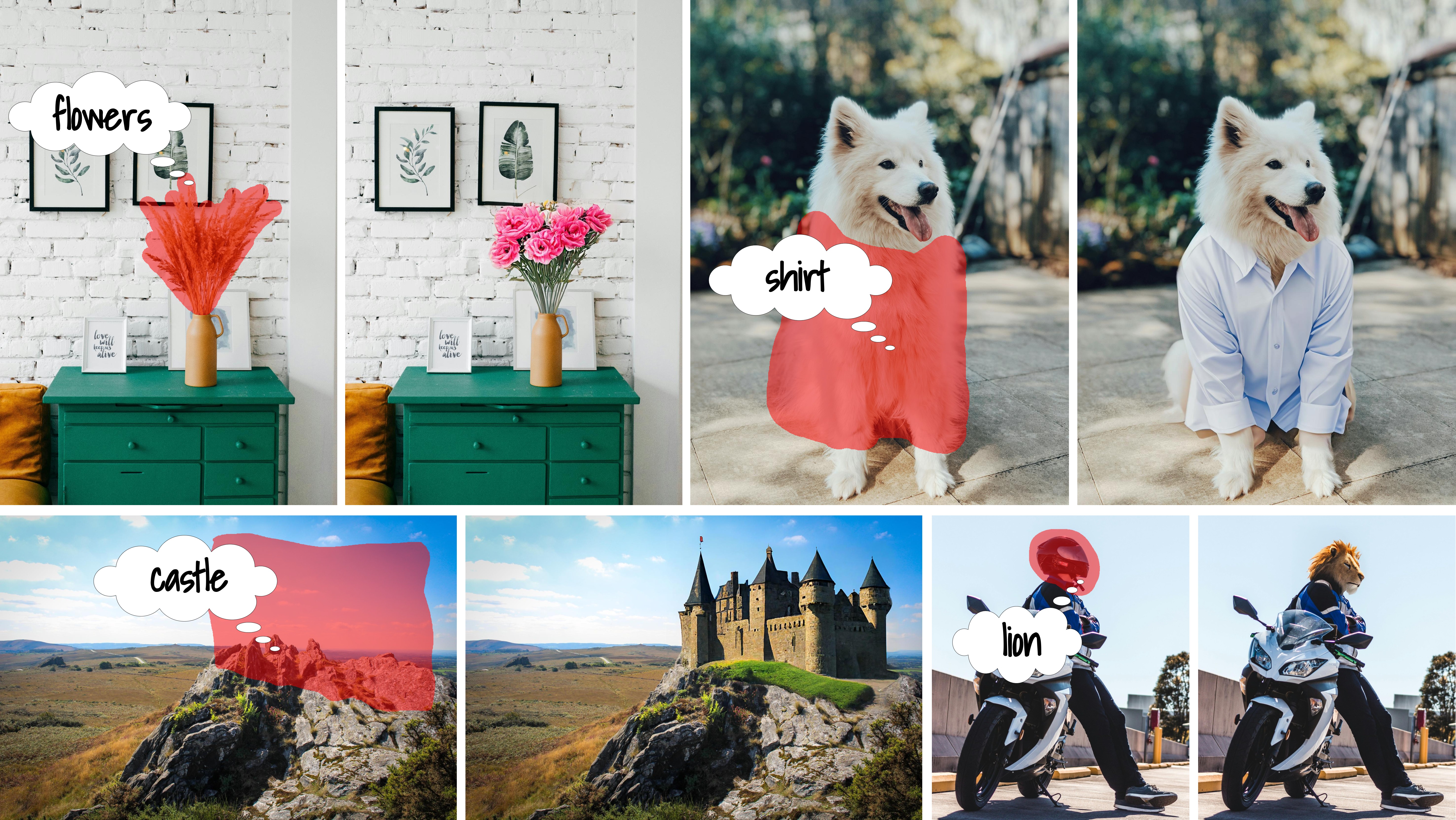
The abstract from the paper is:
Recent progress in text-guided image inpainting, based on the unprecedented success of text-to-image diffusion models, has led to exceptionally realistic and visually plausible results. However, there is still significant potential for improvement in current text-to-image inpainting models, particularly in better aligning the inpainted area with user prompts and performing high-resolution inpainting. Therefore, in this paper we introduce HD-Painter, a completely training-free approach that accurately follows to prompts and coherently scales to high-resolution image inpainting. To this end, we design the Prompt-Aware Introverted Attention (PAIntA) layer enhancing self-attention scores by prompt information and resulting in better text alignment generations. To further improve the prompt coherence we introduce the Reweighting Attention Score Guidance (RASG) mechanism seamlessly integrating a post-hoc sampling strategy into general form of DDIM to prevent out-of-distribution latent shifts. Moreover, HD-Painter allows extension to larger scales by introducing a specialized super-resolution technique customized for inpainting, enabling the completion of missing regions in images of up to 2K resolution. Our experiments demonstrate that HD-Painter surpasses existing state-of-the-art approaches qualitatively and quantitatively, achieving an impressive generation accuracy improvement of 61.4 vs 51.9. We will make the codes publicly available.
You can find additional information about Text2Video-Zero in the paper or the original codebase.
Usage example
import torch
from diffusers import DiffusionPipeline, DDIMScheduler
from diffusers.utils import load_image, make_image_grid

pipe = DiffusionPipeline.from_pretrained(
    "stabilityai/stable-diffusion-2-inpainting",
    custom_pipeline="hd_painter"
)
pipe.scheduler = DDIMScheduler.from_config(pipe.scheduler.config)

prompt = "wooden boat"
init_image = load_image("https://raw.githubusercontent.com/Picsart-AI-Research/HD-Painter/main/__assets__/samples/images/2.jpg")
mask_image = load_image("https://raw.githubusercontent.com/Picsart-AI-Research/HD-Painter/main/__assets__/samples/masks/2.png")

image = pipe (prompt, init_image, mask_image, use_rasg = True, use_painta = True, generator=torch.manual_seed(12345)).images[0]

make_image_grid([init_image, mask_image, image], rows=1, cols=3)
Marigold Depth Estimation
Marigold is a universal monocular depth estimator that delivers accurate and sharp predictions in the wild. Based on Stable Diffusion, it is trained exclusively with synthetic depth data and excels in zero-shot adaptation to real-world imagery. This pipeline is an official implementation of the inference process. More details can be found on our project page and full codebase (also implemented with diffusers).
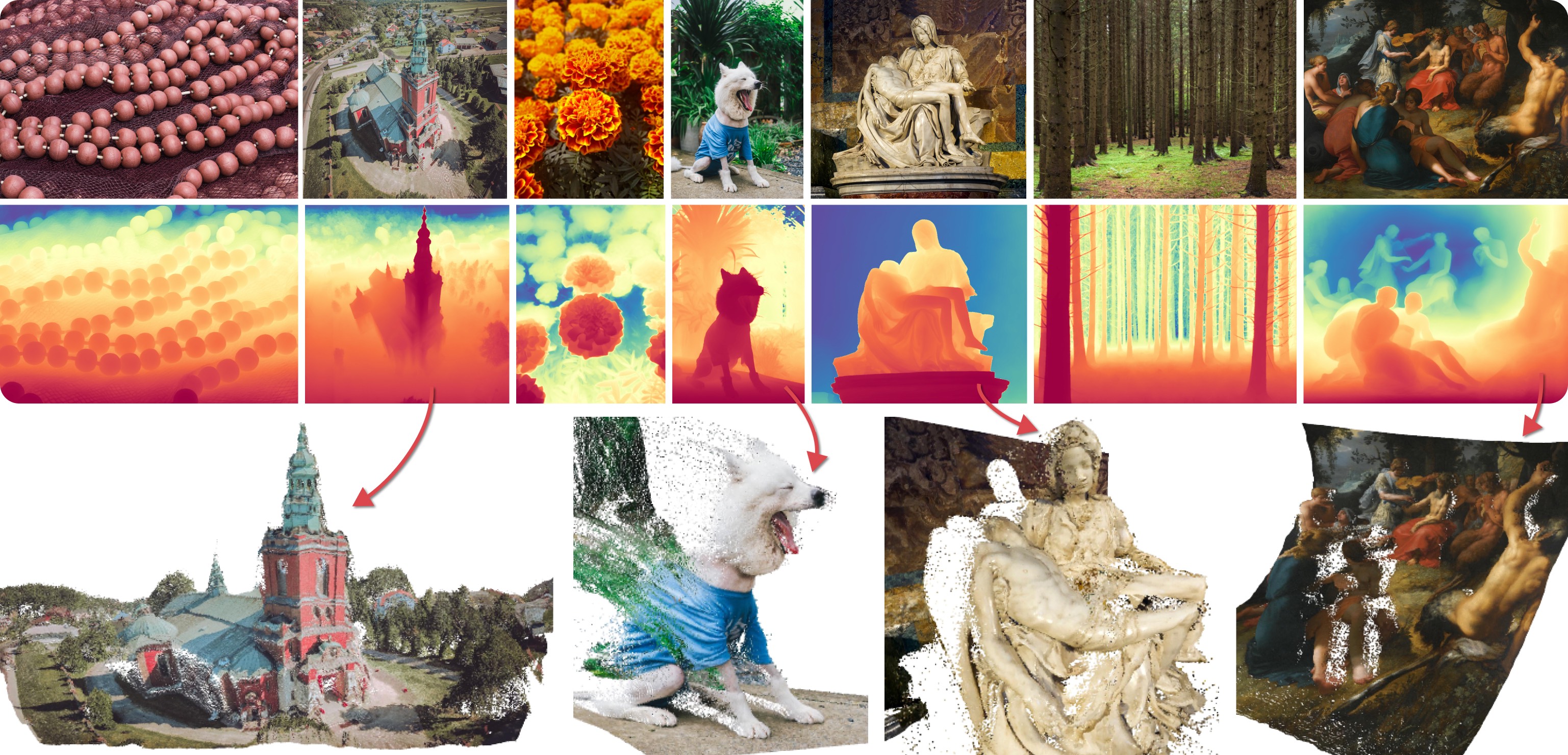
This depth estimation pipeline processes a single input image through multiple diffusion denoising stages to estimate depth maps. These maps are subsequently merged to produce the final output. Below is an example code snippet, including optional arguments:
import numpy as np
import torch
from PIL import Image
from diffusers import DiffusionPipeline
from diffusers.utils import load_image

# Original DDIM version (higher quality)
pipe = DiffusionPipeline.from_pretrained(
    "prs-eth/marigold-v1-0",
    custom_pipeline="marigold_depth_estimation"
    # torch_dtype=torch.float16,                # (optional) Run with half-precision (16-bit float).
    # variant="fp16",                           # (optional) Use with `torch_dtype=torch.float16`, to directly load fp16 checkpoint
)

# (New) LCM version (faster speed)
pipe = DiffusionPipeline.from_pretrained(
    "prs-eth/marigold-lcm-v1-0",
    custom_pipeline="marigold_depth_estimation"
    # torch_dtype=torch.float16,                # (optional) Run with half-precision (16-bit float).
    # variant="fp16",                           # (optional) Use with `torch_dtype=torch.float16`, to directly load fp16 checkpoint
)

pipe.to("cuda")

img_path_or_url = "https://share.phys.ethz.ch/~pf/bingkedata/marigold/pipeline_example.jpg"
image: Image.Image = load_image(img_path_or_url)

pipeline_output = pipe(
    image,                    # Input image.
    # ----- recommended setting for DDIM version -----
    # denoising_steps=10,     # (optional) Number of denoising steps of each inference pass. Default: 10.
    # ensemble_size=10,       # (optional) Number of inference passes in the ensemble. Default: 10.
    # ------------------------------------------------

    # ----- recommended setting for LCM version ------
    # denoising_steps=4,
    # ensemble_size=5,
    # -------------------------------------------------

    # processing_res=768,     # (optional) Maximum resolution of processing. If set to 0: will not resize at all. Defaults to 768.
    # match_input_res=True,   # (optional) Resize depth prediction to match input resolution.
    # batch_size=0,           # (optional) Inference batch size, no bigger than `num_ensemble`. If set to 0, the script will automatically decide the proper batch size. Defaults to 0.
    # seed=2024,              # (optional) Random seed can be set to ensure additional reproducibility. Default: None (unseeded). Note: forcing --batch_size 1 helps to increase reproducibility. To ensure full reproducibility, deterministic mode needs to be used.
    # color_map="Spectral",   # (optional) Colormap used to colorize the depth map. Defaults to "Spectral". Set to `None` to skip colormap generation.
    # show_progress_bar=True, # (optional) If true, will show progress bars of the inference progress.
)

depth: np.ndarray = pipeline_output.depth_np                    # Predicted depth map
depth_colored: Image.Image = pipeline_output.depth_colored      # Colorized prediction

# Save as uint16 PNG
depth_uint16 = (depth * 65535.0).astype(np.uint16)
Image.fromarray(depth_uint16).save("./depth_map.png", mode="I;16")

# Save colorized depth map
depth_colored.save("./depth_colored.png")
LLM-grounded Diffusion
LMD and LMD+ greatly improves the prompt understanding ability of text-to-image generation models by introducing an LLM as a front-end prompt parser and layout planner. It improves spatial reasoning, the understanding of negation, attribute binding, generative numeracy, etc. in a unified manner without explicitly aiming for each. LMD is completely training-free (i.e., uses SD model off-the-shelf). LMD+ takes in additional adapters for better control. This is a reproduction of LMD+ model used in our work. Project page. See our full codebase (also with diffusers).
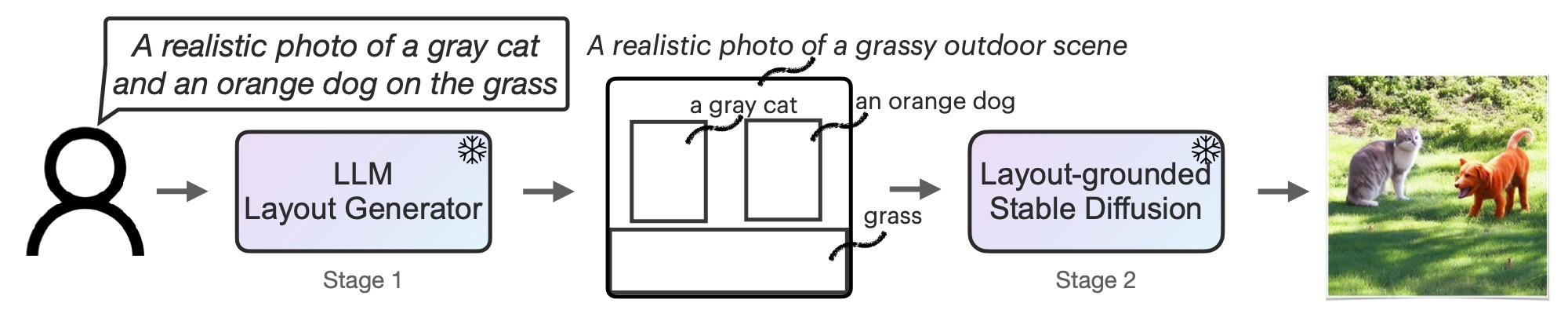
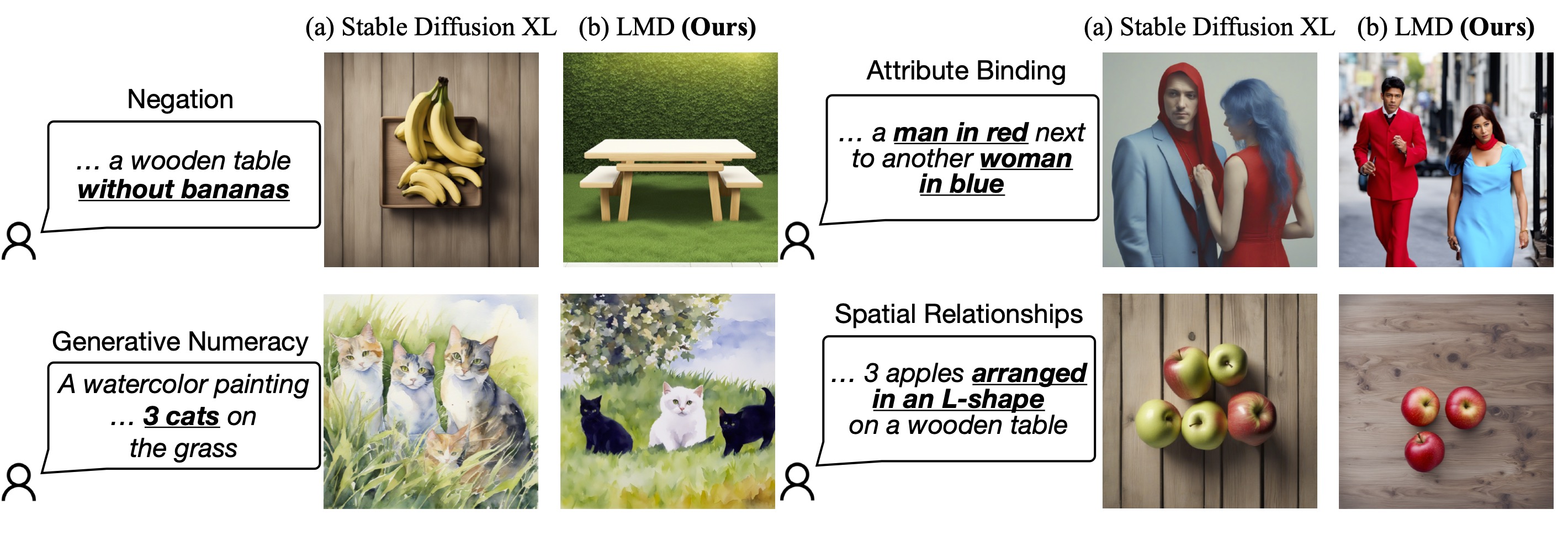
This pipeline can be used with an LLM or on its own. We provide a parser that parses LLM outputs to the layouts. You can obtain the prompt to input to the LLM for layout generation here. After feeding the prompt to an LLM (e.g., GPT-4 on ChatGPT website), you can feed the LLM response into our pipeline.
The following code has been tested on 1x RTX 4090, but it should also support GPUs with lower GPU memory.
Use this pipeline with an LLM
import torch
from diffusers import DiffusionPipeline

pipe = DiffusionPipeline.from_pretrained(
    "longlian/lmd_plus",
    custom_pipeline="llm_grounded_diffusion",
    custom_revision="main",
    variant="fp16", torch_dtype=torch.float16
)
pipe.enable_model_cpu_offload()

# Generate directly from a text prompt and an LLM response
prompt = "a waterfall and a modern high speed train in a beautiful forest with fall foliage"
phrases, boxes, bg_prompt, neg_prompt = pipe.parse_llm_response("""
[('a waterfall', [71, 105, 148, 258]), ('a modern high speed train', [255, 223, 181, 149])]
Background prompt: A beautiful forest with fall foliage
Negative prompt:
""")

images = pipe(
    prompt=prompt,
    negative_prompt=neg_prompt,
    phrases=phrases,
    boxes=boxes,
    gligen_scheduled_sampling_beta=0.4,
    output_type="pil",
    num_inference_steps=50,
    lmd_guidance_kwargs={}
).images

images[0].save("./lmd_plus_generation.jpg")
Use this pipeline on its own for layout generation
import torch
from diffusers import DiffusionPipeline

pipe = DiffusionPipeline.from_pretrained(
    "longlian/lmd_plus",
    custom_pipeline="llm_grounded_diffusion",
    variant="fp16", torch_dtype=torch.float16
)
pipe.enable_model_cpu_offload()

# Generate an image described by the prompt and
# insert objects described by text at the region defined by bounding boxes
prompt = "a waterfall and a modern high speed train in a beautiful forest with fall foliage"
boxes = [[0.1387, 0.2051, 0.4277, 0.7090], [0.4980, 0.4355, 0.8516, 0.7266]]
phrases = ["a waterfall", "a modern high speed train"]

images = pipe(
    prompt=prompt,
    phrases=phrases,
    boxes=boxes,
    gligen_scheduled_sampling_beta=0.4,
    output_type="pil",
    num_inference_steps=50,
    lmd_guidance_kwargs={}
).images

images[0].save("./lmd_plus_generation.jpg")
CLIP Guided Stable Diffusion
CLIP guided stable diffusion can help to generate more realistic images by guiding stable diffusion at every denoising step with an additional CLIP model.
The following code requires roughly 12GB of GPU RAM.
from diffusers import DiffusionPipeline
from transformers import CLIPImageProcessor, CLIPModel
import torch


feature_extractor = CLIPImageProcessor.from_pretrained("laion/CLIP-ViT-B-32-laion2B-s34B-b79K")
clip_model = CLIPModel.from_pretrained("laion/CLIP-ViT-B-32-laion2B-s34B-b79K", torch_dtype=torch.float16)


guided_pipeline = DiffusionPipeline.from_pretrained(
    "runwayml/stable-diffusion-v1-5",
    custom_pipeline="clip_guided_stable_diffusion",
    clip_model=clip_model,
    feature_extractor=feature_extractor,

    torch_dtype=torch.float16,
)
guided_pipeline.enable_attention_slicing()
guided_pipeline = guided_pipeline.to("cuda")

prompt = "fantasy book cover, full moon, fantasy forest landscape, golden vector elements, fantasy magic, dark light night, intricate, elegant, sharp focus, illustration, highly detailed, digital painting, concept art, matte, art by WLOP and Artgerm and Albert Bierstadt, masterpiece"

generator = torch.Generator(device="cuda").manual_seed(0)
images = []
for i in range(4):
    image = guided_pipeline(
        prompt,
        num_inference_steps=50,
        guidance_scale=7.5,
        clip_guidance_scale=100,
        num_cutouts=4,
        use_cutouts=False,
        generator=generator,
    ).images[0]
    images.append(image)

# save images locally
for i, img in enumerate(images):
    img.save(f"./clip_guided_sd/image_{i}.png")
The images list contains a list of PIL images that can be saved locally or displayed directly in a google colab.
Generated images tend to be of higher qualtiy than natively using stable diffusion. E.g. the above script generates the following images:
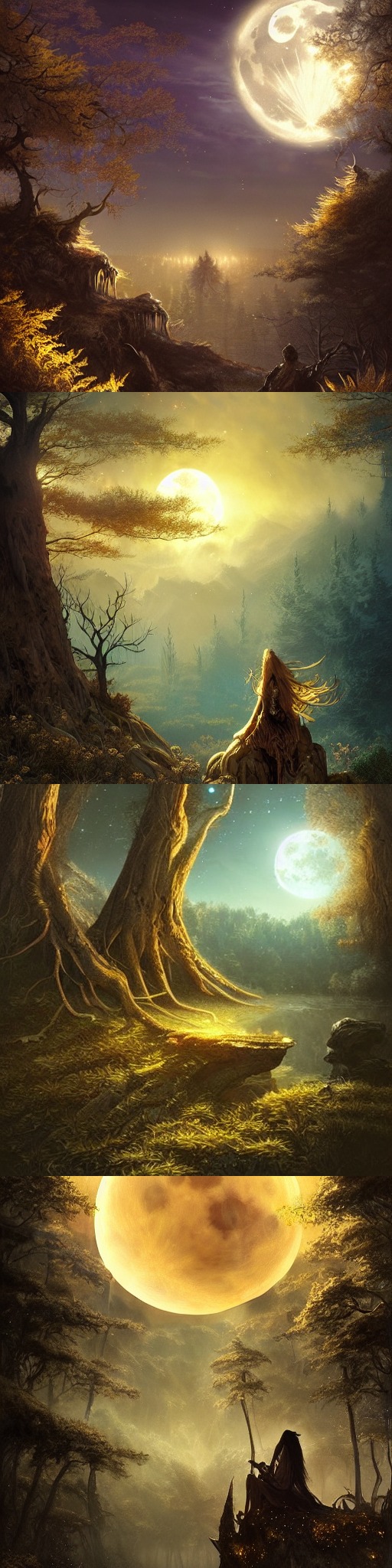 .
.
One Step Unet
The dummy "one-step-unet" can be run as follows:
from diffusers import DiffusionPipeline

pipe = DiffusionPipeline.from_pretrained("google/ddpm-cifar10-32", custom_pipeline="one_step_unet")
pipe()Note: This community pipeline is not useful as a feature, but rather just serves as an example of how community pipelines can be added (see https://github.com/huggingface/diffusers/issues/841).
Stable Diffusion Interpolation
The following code can be run on a GPU of at least 8GB VRAM and should take approximately 5 minutes.
from diffusers import DiffusionPipeline
import torch

pipe = DiffusionPipeline.from_pretrained(
    "CompVis/stable-diffusion-v1-4",
    revision='fp16',
    torch_dtype=torch.float16,
    safety_checker=None,  # Very important for videos...lots of false positives while interpolating
    custom_pipeline="interpolate_stable_diffusion",
).to('cuda')
pipe.enable_attention_slicing()

frame_filepaths = pipe.walk(
    prompts=['a dog', 'a cat', 'a horse'],
    seeds=[42, 1337, 1234],
    num_interpolation_steps=16,
    output_dir='./dreams',
    batch_size=4,
    height=512,
    width=512,
    guidance_scale=8.5,
    num_inference_steps=50,
)
The output of the walk(...) function returns a list of images saved under the folder as defined in output_dir. You can use these images to create videos of stable diffusion.
Please have a look at https://github.com/nateraw/stable-diffusion-videos for more in-detail information on how to create videos using stable diffusion as well as more feature-complete functionality.
Stable Diffusion Mega
The Stable Diffusion Mega Pipeline lets you use the main use cases of the stable diffusion pipeline in a single class.
#!/usr/bin/env python3
from diffusers import DiffusionPipeline
import PIL
import requests
from io import BytesIO
import torch


def download_image(url):
    response = requests.get(url)
    return PIL.Image.open(BytesIO(response.content)).convert("RGB")

pipe = DiffusionPipeline.from_pretrained("runwayml/stable-diffusion-v1-5", custom_pipeline="stable_diffusion_mega", torch_dtype=torch.float16, revision="fp16")
pipe.to("cuda")
pipe.enable_attention_slicing()


### Text-to-Image

images = pipe.text2img("An astronaut riding a horse").images

### Image-to-Image

init_image = download_image("https://raw.githubusercontent.com/CompVis/stable-diffusion/main/assets/stable-samples/img2img/sketch-mountains-input.jpg")

prompt = "A fantasy landscape, trending on artstation"

images = pipe.img2img(prompt=prompt, image=init_image, strength=0.75, guidance_scale=7.5).images

### Inpainting

img_url = "https://raw.githubusercontent.com/CompVis/latent-diffusion/main/data/inpainting_examples/overture-creations-5sI6fQgYIuo.png"
mask_url = "https://raw.githubusercontent.com/CompVis/latent-diffusion/main/data/inpainting_examples/overture-creations-5sI6fQgYIuo_mask.png"
init_image = download_image(img_url).resize((512, 512))
mask_image = download_image(mask_url).resize((512, 512))

prompt = "a cat sitting on a bench"
images = pipe.inpaint(prompt=prompt, image=init_image, mask_image=mask_image, strength=0.75).images
As shown above this one pipeline can run all both "text-to-image", "image-to-image", and "inpainting" in one pipeline.
Long Prompt Weighting Stable Diffusion
Features of this custom pipeline:
- Input a prompt without the 77 token length limit.
- Includes tx2img, img2img. and inpainting pipelines.
- Emphasize/weigh part of your prompt with parentheses as so:
a baby deer with (big eyes) - De-emphasize part of your prompt as so:
a [baby] deer with big eyes - Precisely weigh part of your prompt as so:
a baby deer with (big eyes:1.3)
Prompt weighting equivalents:
a baby deer with==(a baby deer with:1.0)(big eyes)==(big eyes:1.1)((big eyes))==(big eyes:1.21)[big eyes]==(big eyes:0.91)
You can run this custom pipeline as so:
pytorch
from diffusers import DiffusionPipeline
import torch

pipe = DiffusionPipeline.from_pretrained(
    'hakurei/waifu-diffusion',
    custom_pipeline="lpw_stable_diffusion",

    torch_dtype=torch.float16
)
pipe=pipe.to("cuda")

prompt = "best_quality (1girl:1.3) bow bride brown_hair closed_mouth frilled_bow frilled_hair_tubes frills (full_body:1.3) fox_ear hair_bow hair_tubes happy hood japanese_clothes kimono long_sleeves red_bow smile solo tabi uchikake white_kimono wide_sleeves cherry_blossoms"
neg_prompt = "lowres, bad_anatomy, error_body, error_hair, error_arm, error_hands, bad_hands, error_fingers, bad_fingers, missing_fingers, error_legs, bad_legs, multiple_legs, missing_legs, error_lighting, error_shadow, error_reflection, text, error, extra_digit, fewer_digits, cropped, worst_quality, low_quality, normal_quality, jpeg_artifacts, signature, watermark, username, blurry"

pipe.text2img(prompt, negative_prompt=neg_prompt, width=512,height=512,max_embeddings_multiples=3).images[0]
onnxruntime
from diffusers import DiffusionPipeline
import torch

pipe = DiffusionPipeline.from_pretrained(
    'CompVis/stable-diffusion-v1-4',
    custom_pipeline="lpw_stable_diffusion_onnx",
    revision="onnx",
    provider="CUDAExecutionProvider"
)

prompt = "a photo of an astronaut riding a horse on mars, best quality"
neg_prompt = "lowres, bad anatomy, error body, error hair, error arm, error hands, bad hands, error fingers, bad fingers, missing fingers, error legs, bad legs, multiple legs, missing legs, error lighting, error shadow, error reflection, text, error, extra digit, fewer digits, cropped, worst quality, low quality, normal quality, jpeg artifacts, signature, watermark, username, blurry"

pipe.text2img(prompt,negative_prompt=neg_prompt, width=512, height=512, max_embeddings_multiples=3).images[0]
if you see Token indices sequence length is longer than the specified maximum sequence length for this model ( *** > 77 ) . Running this sequence through the model will result in indexing errors. Do not worry, it is normal.
Speech to Image
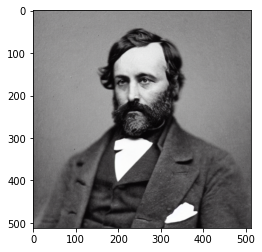
The following code can generate an image from an audio sample using pre-trained OpenAI whisper-small and Stable Diffusion.
import torch

import matplotlib.pyplot as plt
from datasets import load_dataset
from diffusers import DiffusionPipeline
from transformers import (
    WhisperForConditionalGeneration,
    WhisperProcessor,
)


device = "cuda" if torch.cuda.is_available() else "cpu"

ds = load_dataset("hf-internal-testing/librispeech_asr_dummy", "clean", split="validation")

audio_sample = ds[3]

text = audio_sample["text"].lower()
speech_data = audio_sample["audio"]["array"]

model = WhisperForConditionalGeneration.from_pretrained("openai/whisper-small").to(device)
processor = WhisperProcessor.from_pretrained("openai/whisper-small")

diffuser_pipeline = DiffusionPipeline.from_pretrained(
    "CompVis/stable-diffusion-v1-4",
    custom_pipeline="speech_to_image_diffusion",
    speech_model=model,
    speech_processor=processor,

    torch_dtype=torch.float16,
)

diffuser_pipeline.enable_attention_slicing()
diffuser_pipeline = diffuser_pipeline.to(device)

output = diffuser_pipeline(speech_data)
plt.imshow(output.images[0])
This example produces the following image:
Wildcard Stable Diffusion
Following the great examples from https://github.com/jtkelm2/stable-diffusion-webui-1/blob/master/scripts/wildcards.py and https://github.com/AUTOMATIC1111/stable-diffusion-webui/wiki/Custom-Scripts#wildcards, here's a minimal implementation that allows for users to add "wildcards", denoted by __wildcard__ to prompts that are used as placeholders for randomly sampled values given by either a dictionary or a .txt file. For example:
Say we have a prompt:
prompt = "__animal__ sitting on a __object__ wearing a __clothing__"We can then define possible values to be sampled for animal, object, and clothing. These can either be from a .txt with the same name as the category.
The possible values can also be defined / combined by using a dictionary like: {"animal":["dog", "cat", mouse"]}.
The actual pipeline works just like StableDiffusionPipeline, except the __call__ method takes in:
wildcard_files: list of file paths for wild card replacement
wildcard_option_dict: dict with key as wildcard and values as a list of possible replacements
num_prompt_samples: number of prompts to sample, uniformly sampling wildcards
A full example:
create animal.txt, with contents like:
dog
cat
mouse
create object.txt, with contents like:
chair
sofa
benchfrom diffusers import DiffusionPipeline
import torch
pipe = DiffusionPipeline.from_pretrained(
"CompVis/stable-diffusion-v1-4",
custom_pipeline="wildcard_stable_diffusion",
torch_dtype=torch.float16,
)
prompt = "__animal__ sitting on a __object__ wearing a __clothing__"
out = pipe(
prompt,
wildcard_option_dict={
"clothing":["hat", "shirt", "scarf", "beret"]
},
wildcard_files=["object.txt", "animal.txt"],
num_prompt_samples=1
)Composable Stable diffusion
Composable Stable Diffusion proposes conjunction and negation (negative prompts) operators for compositional generation with conditional diffusion models.
import torch as th
import numpy as np
import torchvision.utils as tvu

from diffusers import DiffusionPipeline

import argparse

parser = argparse.ArgumentParser()
parser.add_argument("--prompt", type=str, default="mystical trees | A magical pond | dark",
                    help="use '|' as the delimiter to compose separate sentences.")
parser.add_argument("--steps", type=int, default=50)
parser.add_argument("--scale", type=float, default=7.5)
parser.add_argument("--weights", type=str, default="7.5 | 7.5 | -7.5")
parser.add_argument("--seed", type=int, default=2)
parser.add_argument("--model_path", type=str, default="CompVis/stable-diffusion-v1-4")
parser.add_argument("--num_images", type=int, default=1)
args = parser.parse_args()

has_cuda = th.cuda.is_available()
device = th.device('cpu' if not has_cuda else 'cuda')

prompt = args.prompt
scale = args.scale
steps = args.steps

pipe = DiffusionPipeline.from_pretrained(
    args.model_path,
    custom_pipeline="composable_stable_diffusion",
).to(device)

pipe.safety_checker = None

images = []
generator = th.Generator("cuda").manual_seed(args.seed)
for i in range(args.num_images):
    image = pipe(prompt, guidance_scale=scale, num_inference_steps=steps,
                 weights=args.weights, generator=generator).images[0]
    images.append(th.from_numpy(np.array(image)).permute(2, 0, 1) / 255.)
grid = tvu.make_grid(th.stack(images, dim=0), nrow=4, padding=0)
tvu.save_image(grid, f'{prompt}_{args.weights}' + '.png')
Imagic Stable Diffusion
Allows you to edit an image using stable diffusion.
import requests
from PIL import Image
from io import BytesIO
import torch
import os
from diffusers import DiffusionPipeline, DDIMScheduler
has_cuda = torch.cuda.is_available()
device = torch.device('cpu' if not has_cuda else 'cuda')
pipe = DiffusionPipeline.from_pretrained(
    "CompVis/stable-diffusion-v1-4",
        safety_checker=None,
    custom_pipeline="imagic_stable_diffusion",
    scheduler = DDIMScheduler(beta_start=0.00085, beta_end=0.012, beta_schedule="scaled_linear", clip_sample=False, set_alpha_to_one=False)
).to(device)
generator = torch.Generator("cuda").manual_seed(0)
seed = 0
prompt = "A photo of Barack Obama smiling with a big grin"
url = 'https://www.dropbox.com/s/6tlwzr73jd1r9yk/obama.png?dl=1'
response = requests.get(url)
init_image = Image.open(BytesIO(response.content)).convert("RGB")
init_image = init_image.resize((512, 512))
res = pipe.train(
    prompt,
    image=init_image,
    generator=generator)
res = pipe(alpha=1, guidance_scale=7.5, num_inference_steps=50)
os.makedirs("imagic", exist_ok=True)
image = res.images[0]
image.save('./imagic/imagic_image_alpha_1.png')
res = pipe(alpha=1.5, guidance_scale=7.5, num_inference_steps=50)
image = res.images[0]
image.save('./imagic/imagic_image_alpha_1_5.png')
res = pipe(alpha=2, guidance_scale=7.5, num_inference_steps=50)
image = res.images[0]
image.save('./imagic/imagic_image_alpha_2.png')
Seed Resizing
Test seed resizing. Originally generate an image in 512 by 512, then generate image with same seed at 512 by 592 using seed resizing. Finally, generate 512 by 592 using original stable diffusion pipeline.
import torch as th
import numpy as np
from diffusers import DiffusionPipeline

has_cuda = th.cuda.is_available()
device = th.device('cpu' if not has_cuda else 'cuda')

pipe = DiffusionPipeline.from_pretrained(
    "CompVis/stable-diffusion-v1-4",
    custom_pipeline="seed_resize_stable_diffusion"
).to(device)

def dummy(images, **kwargs):
    return images, False

pipe.safety_checker = dummy


images = []
th.manual_seed(0)
generator = th.Generator("cuda").manual_seed(0)

seed = 0
prompt = "A painting of a futuristic cop"

width = 512
height = 512

res = pipe(
    prompt,
    guidance_scale=7.5,
    num_inference_steps=50,
    height=height,
    width=width,
    generator=generator)
image = res.images[0]
image.save('./seed_resize/seed_resize_{w}_{h}_image.png'.format(w=width, h=height))


th.manual_seed(0)
generator = th.Generator("cuda").manual_seed(0)

pipe = DiffusionPipeline.from_pretrained(
    "CompVis/stable-diffusion-v1-4",
    custom_pipeline="/home/mark/open_source/diffusers/examples/community/"
).to(device)

width = 512
height = 592

res = pipe(
    prompt,
    guidance_scale=7.5,
    num_inference_steps=50,
    height=height,
    width=width,
    generator=generator)
image = res.images[0]
image.save('./seed_resize/seed_resize_{w}_{h}_image.png'.format(w=width, h=height))

pipe_compare = DiffusionPipeline.from_pretrained(
    "CompVis/stable-diffusion-v1-4",
    custom_pipeline="/home/mark/open_source/diffusers/examples/community/"
).to(device)

res = pipe_compare(
    prompt,
    guidance_scale=7.5,
    num_inference_steps=50,
    height=height,
    width=width,
    generator=generator
)

image = res.images[0]
image.save('./seed_resize/seed_resize_{w}_{h}_image_compare.png'.format(w=width, h=height))
Multilingual Stable Diffusion Pipeline
The following code can generate an images from texts in different languages using the pre-trained mBART-50 many-to-one multilingual machine translation model and Stable Diffusion.
from PIL import Image

import torch

from diffusers import DiffusionPipeline
from transformers import (
    pipeline,
    MBart50TokenizerFast,
    MBartForConditionalGeneration,
)
device = "cuda" if torch.cuda.is_available() else "cpu"
device_dict = {"cuda": 0, "cpu": -1}

# helper function taken from: https://huggingface.co/blog/stable_diffusion
def image_grid(imgs, rows, cols):
    assert len(imgs) == rows*cols

    w, h = imgs[0].size
    grid = Image.new('RGB', size=(cols*w, rows*h))
    grid_w, grid_h = grid.size

    for i, img in enumerate(imgs):
        grid.paste(img, box=(i%cols*w, i//cols*h))
    return grid

# Add language detection pipeline
language_detection_model_ckpt = "papluca/xlm-roberta-base-language-detection"
language_detection_pipeline = pipeline("text-classification",
                                       model=language_detection_model_ckpt,
                                       device=device_dict[device])

# Add model for language translation
trans_tokenizer = MBart50TokenizerFast.from_pretrained("facebook/mbart-large-50-many-to-one-mmt")
trans_model = MBartForConditionalGeneration.from_pretrained("facebook/mbart-large-50-many-to-one-mmt").to(device)

diffuser_pipeline = DiffusionPipeline.from_pretrained(
    "CompVis/stable-diffusion-v1-4",
    custom_pipeline="multilingual_stable_diffusion",
    detection_pipeline=language_detection_pipeline,
    translation_model=trans_model,
    translation_tokenizer=trans_tokenizer,

    torch_dtype=torch.float16,
)

diffuser_pipeline.enable_attention_slicing()
diffuser_pipeline = diffuser_pipeline.to(device)

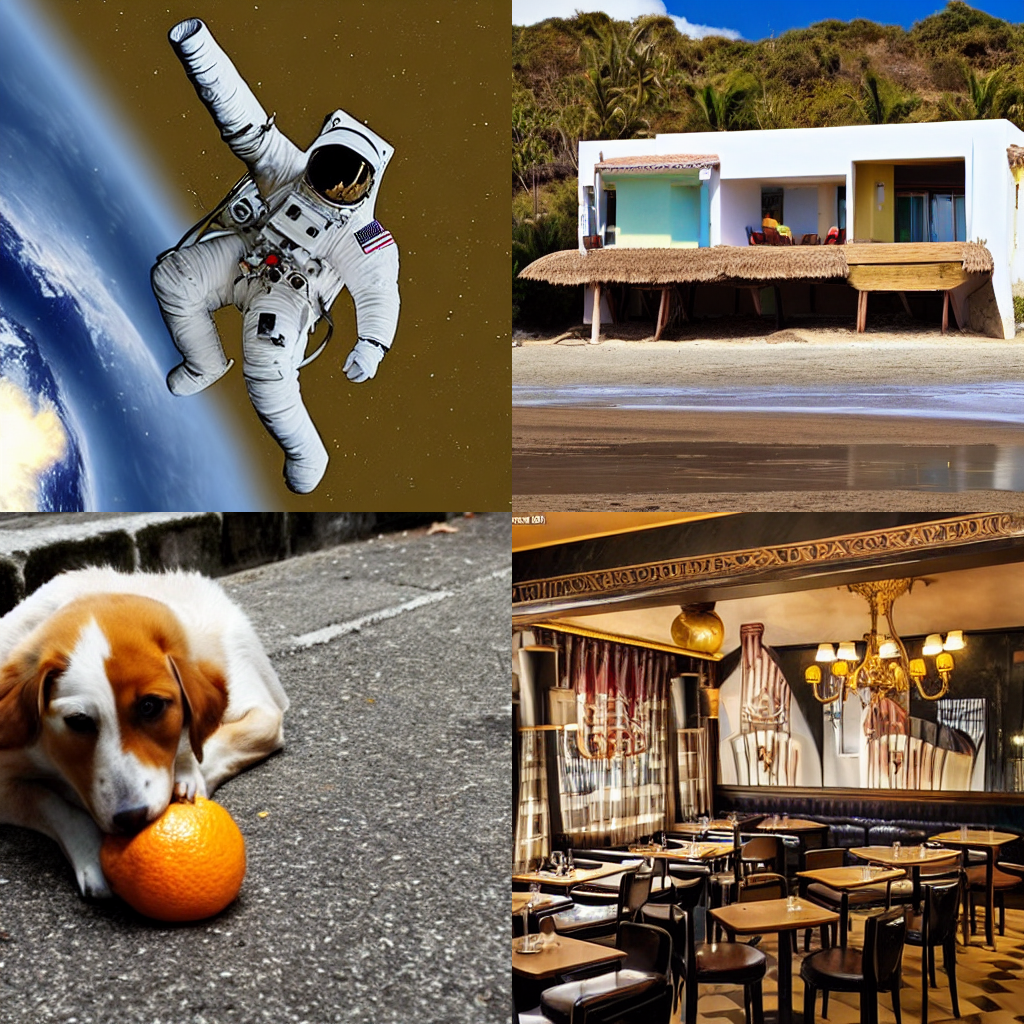
prompt = ["a photograph of an astronaut riding a horse",
          "Una casa en la playa",
          "Ein Hund, der Orange isst",
          "Un restaurant parisien"]

output = diffuser_pipeline(prompt)

images = output.images

grid = image_grid(images, rows=2, cols=2)
This example produces the following images:
GlueGen Stable Diffusion Pipeline
GlueGen is a minimal adapter that allow alignment between any encoder (Text Encoder of different language, Multilingual Roberta, AudioClip) and CLIP text encoder used in standard Stable Diffusion model. This method allows easy language adaptation to available english Stable Diffusion checkpoints without the need of an image captioning dataset as well as long training hours.
Make sure you downloaded gluenet_French_clip_overnorm_over3_noln.ckpt for French (there are also pre-trained weights for Chinese, Italian, Japanese, Spanish or train your own) at GlueGen's official repo
from PIL import Image

import torch

from transformers import AutoModel, AutoTokenizer

from diffusers import DiffusionPipeline

if __name__ == "__main__":
    device = "cuda"

    lm_model_id = "xlm-roberta-large"
    token_max_length = 77

    text_encoder = AutoModel.from_pretrained(lm_model_id)
    tokenizer = AutoTokenizer.from_pretrained(lm_model_id, model_max_length=token_max_length, use_fast=False)

    tensor_norm = torch.Tensor([[43.8203],[28.3668],[27.9345],[28.0084],[28.2958],[28.2576],[28.3373],[28.2695],[28.4097],[28.2790],[28.2825],[28.2807],[28.2775],[28.2708],[28.2682],[28.2624],[28.2589],[28.2611],[28.2616],[28.2639],[28.2613],[28.2566],[28.2615],[28.2665],[28.2799],[28.2885],[28.2852],[28.2863],[28.2780],[28.2818],[28.2764],[28.2532],[28.2412],[28.2336],[28.2514],[28.2734],[28.2763],[28.2977],[28.2971],[28.2948],[28.2818],[28.2676],[28.2831],[28.2890],[28.2979],[28.2999],[28.3117],[28.3363],[28.3554],[28.3626],[28.3589],[28.3597],[28.3543],[28.3660],[28.3731],[28.3717],[28.3812],[28.3753],[28.3810],[28.3777],[28.3693],[28.3713],[28.3670],[28.3691],[28.3679],[28.3624],[28.3703],[28.3703],[28.3720],[28.3594],[28.3576],[28.3562],[28.3438],[28.3376],[28.3389],[28.3433],[28.3191]])

    pipeline = DiffusionPipeline.from_pretrained(
        "runwayml/stable-diffusion-v1-5",
        text_encoder=text_encoder,
        tokenizer=tokenizer,
        custom_pipeline="gluegen"
    ).to(device)
    pipeline.load_language_adapter("gluenet_French_clip_overnorm_over3_noln.ckpt", num_token=token_max_length, dim=1024, dim_out=768, tensor_norm=tensor_norm)

    prompt = "une voiture sur la plage"

    generator = torch.Generator(device=device).manual_seed(42)
    image = pipeline(prompt, generator=generator).images[0]
    image.save("gluegen_output_fr.png")
Which will produce:
Image to Image Inpainting Stable Diffusion
Similar to the standard stable diffusion inpainting example, except with the addition of an inner_image argument.
image, inner_image, and mask should have the same dimensions. inner_image should have an alpha (transparency) channel.
The aim is to overlay two images, then mask out the boundary between image and inner_image to allow stable diffusion to make the connection more seamless.
For example, this could be used to place a logo on a shirt and make it blend seamlessly.
import PIL
import torch

from diffusers import DiffusionPipeline

image_path = "./path-to-image.png"
inner_image_path = "./path-to-inner-image.png"
mask_path = "./path-to-mask.png"

init_image = PIL.Image.open(image_path).convert("RGB").resize((512, 512))
inner_image = PIL.Image.open(inner_image_path).convert("RGBA").resize((512, 512))
mask_image = PIL.Image.open(mask_path).convert("RGB").resize((512, 512))

pipe = DiffusionPipeline.from_pretrained(
    "runwayml/stable-diffusion-inpainting",
    custom_pipeline="img2img_inpainting",

    torch_dtype=torch.float16
)
pipe = pipe.to("cuda")

prompt = "Your prompt here!"
image = pipe(prompt=prompt, image=init_image, inner_image=inner_image, mask_image=mask_image).images[0]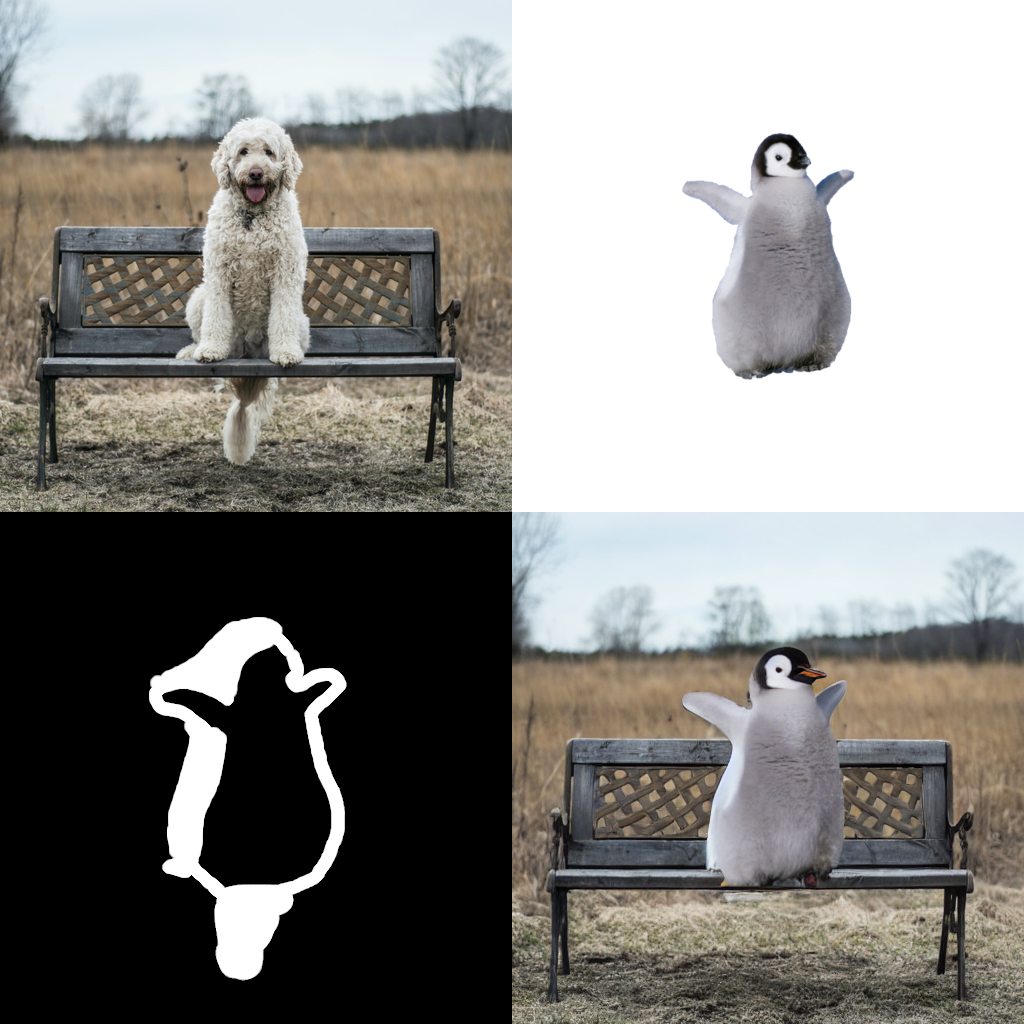
Text Based Inpainting Stable Diffusion
Use a text prompt to generate the mask for the area to be inpainted. Currently uses the CLIPSeg model for mask generation, then calls the standard Stable Diffusion Inpainting pipeline to perform the inpainting.
from transformers import CLIPSegProcessor, CLIPSegForImageSegmentation
from diffusers import DiffusionPipeline

from PIL import Image
import requests

processor = CLIPSegProcessor.from_pretrained("CIDAS/clipseg-rd64-refined")
model = CLIPSegForImageSegmentation.from_pretrained("CIDAS/clipseg-rd64-refined")

pipe = DiffusionPipeline.from_pretrained(
    "runwayml/stable-diffusion-inpainting",
    custom_pipeline="text_inpainting",
    segmentation_model=model,
    segmentation_processor=processor
)
pipe = pipe.to("cuda")


url = "https://github.com/timojl/clipseg/blob/master/example_image.jpg?raw=true"
image = Image.open(requests.get(url, stream=True).raw).resize((512, 512))
text = "a glass"  # will mask out this text
prompt = "a cup"  # the masked out region will be replaced with this

image = pipe(image=image, text=text, prompt=prompt).images[0]
Bit Diffusion
Based https://arxiv.org/abs/2208.04202, this is used for diffusion on discrete data - eg, discreate image data, DNA sequence data. An unconditional discreate image can be generated like this:
from diffusers import DiffusionPipeline
pipe = DiffusionPipeline.from_pretrained("google/ddpm-cifar10-32", custom_pipeline="bit_diffusion")
image = pipe().images[0]
Stable Diffusion with K Diffusion
Make sure you have @crowsonkb's https://github.com/crowsonkb/k-diffusion installed:
pip install k-diffusionYou can use the community pipeline as follows:
from diffusers import DiffusionPipeline

pipe = DiffusionPipeline.from_pretrained("CompVis/stable-diffusion-v1-4", custom_pipeline="sd_text2img_k_diffusion")
pipe = pipe.to("cuda")

prompt = "an astronaut riding a horse on mars"
pipe.set_scheduler("sample_heun")
generator = torch.Generator(device="cuda").manual_seed(seed)
image = pipe(prompt, generator=generator, num_inference_steps=20).images[0]

image.save("./astronaut_heun_k_diffusion.png")
To make sure that K Diffusion and diffusers yield the same results:
Diffusers:
from diffusers import DiffusionPipeline, EulerDiscreteScheduler

seed = 33

pipe = DiffusionPipeline.from_pretrained("CompVis/stable-diffusion-v1-4")
pipe.scheduler = EulerDiscreteScheduler.from_config(pipe.scheduler.config)
pipe = pipe.to("cuda")

generator = torch.Generator(device="cuda").manual_seed(seed)
image = pipe(prompt, generator=generator, num_inference_steps=50).images[0]
K Diffusion:
from diffusers import DiffusionPipeline, EulerDiscreteScheduler

seed = 33

pipe = DiffusionPipeline.from_pretrained("CompVis/stable-diffusion-v1-4", custom_pipeline="sd_text2img_k_diffusion")
pipe.scheduler = EulerDiscreteScheduler.from_config(pipe.scheduler.config)
pipe = pipe.to("cuda")

pipe.set_scheduler("sample_euler")
generator = torch.Generator(device="cuda").manual_seed(seed)
image = pipe(prompt, generator=generator, num_inference_steps=50).images[0]
Checkpoint Merger Pipeline
Based on the AUTOMATIC1111/webui for checkpoint merging. This is a custom pipeline that merges upto 3 pretrained model checkpoints as long as they are in the HuggingFace model_index.json format.
The checkpoint merging is currently memory intensive as it modifies the weights of a DiffusionPipeline object in place. Expect at least 13GB RAM Usage on Kaggle GPU kernels and on colab you might run out of the 12GB memory even while merging two checkpoints.
Usage:-
from diffusers import DiffusionPipeline

#Return a CheckpointMergerPipeline class that allows you to merge checkpoints.
#The checkpoint passed here is ignored. But still pass one of the checkpoints you plan to
#merge for convenience
pipe = DiffusionPipeline.from_pretrained("CompVis/stable-diffusion-v1-4", custom_pipeline="checkpoint_merger")

#There are multiple possible scenarios:
#The pipeline with the merged checkpoints is returned in all the scenarios

#Compatible checkpoints a.k.a matched model_index.json files. Ignores the meta attributes in model_index.json during comparison.( attrs with _ as prefix )
merged_pipe = pipe.merge(["CompVis/stable-diffusion-v1-4","CompVis/stable-diffusion-v1-2"], interp = "sigmoid", alpha = 0.4)

#Incompatible checkpoints in model_index.json but merge might be possible. Use force = True to ignore model_index.json compatibility
merged_pipe_1 = pipe.merge(["CompVis/stable-diffusion-v1-4","hakurei/waifu-diffusion"], force = True, interp = "sigmoid", alpha = 0.4)

#Three checkpoint merging. Only "add_difference" method actually works on all three checkpoints. Using any other options will ignore the 3rd checkpoint.
merged_pipe_2 = pipe.merge(["CompVis/stable-diffusion-v1-4","hakurei/waifu-diffusion","prompthero/openjourney"], force = True, interp = "add_difference", alpha = 0.4)

prompt = "An astronaut riding a horse on Mars"

image = merged_pipe(prompt).images[0]
Some examples along with the merge details:
- "CompVis/stable-diffusion-v1-4" + "hakurei/waifu-diffusion" ; Sigmoid interpolation; alpha = 0.8

- "hakurei/waifu-diffusion" + "prompthero/openjourney" ; Inverse Sigmoid interpolation; alpha = 0.8

- "CompVis/stable-diffusion-v1-4" + "hakurei/waifu-diffusion" + "prompthero/openjourney"; Add Difference interpolation; alpha = 0.5

Stable Diffusion Comparisons
This Community Pipeline enables the comparison between the 4 checkpoints that exist for Stable Diffusion. They can be found through the following links:
from diffusers import DiffusionPipeline
import matplotlib.pyplot as plt

pipe = DiffusionPipeline.from_pretrained('CompVis/stable-diffusion-v1-4', custom_pipeline='suvadityamuk/StableDiffusionComparison')
pipe.enable_attention_slicing()
pipe = pipe.to('cuda')
prompt = "an astronaut riding a horse on mars"
output = pipe(prompt)

plt.subplots(2,2,1)
plt.imshow(output.images[0])
plt.title('Stable Diffusion v1.1')
plt.axis('off')
plt.subplots(2,2,2)
plt.imshow(output.images[1])
plt.title('Stable Diffusion v1.2')
plt.axis('off')
plt.subplots(2,2,3)
plt.imshow(output.images[2])
plt.title('Stable Diffusion v1.3')
plt.axis('off')
plt.subplots(2,2,4)
plt.imshow(output.images[3])
plt.title('Stable Diffusion v1.4')
plt.axis('off')

plt.show()
As a result, you can look at a grid of all 4 generated images being shown together, that captures a difference the advancement of the training between the 4 checkpoints.
Magic Mix
Implementation of the MagicMix: Semantic Mixing with Diffusion Models paper. This is a Diffusion Pipeline for semantic mixing of an image and a text prompt to create a new concept while preserving the spatial layout and geometry of the subject in the image. The pipeline takes an image that provides the layout semantics and a prompt that provides the content semantics for the mixing process.
There are 3 parameters for the method-
mix_factor: It is the interpolation constant used in the layout generation phase. The greater the value ofmix_factor, the greater the influence of the prompt on the layout generation process.kmaxandkmin: These determine the range for the layout and content generation process. A higher value of kmax results in loss of more information about the layout of the original image and a higher value of kmin results in more steps for content generation process.
Here is an example usage-
from diffusers import DiffusionPipeline, DDIMScheduler
from PIL import Image

pipe = DiffusionPipeline.from_pretrained(
    "CompVis/stable-diffusion-v1-4",
    custom_pipeline="magic_mix",
    scheduler = DDIMScheduler.from_pretrained("CompVis/stable-diffusion-v1-4", subfolder="scheduler"),
).to('cuda')

img = Image.open('phone.jpg')
mix_img = pipe(
    img,
    prompt = 'bed',
    kmin = 0.3,
    kmax = 0.5,
    mix_factor = 0.5,
    )
mix_img.save('phone_bed_mix.jpg')
The mix_img is a PIL image that can be saved locally or displayed directly in a google colab. Generated image is a mix of the layout semantics of the given image and the content semantics of the prompt.
E.g. the above script generates the following image:
phone.jpg

phone_bed_mix.jpg

For more example generations check out this demo notebook.
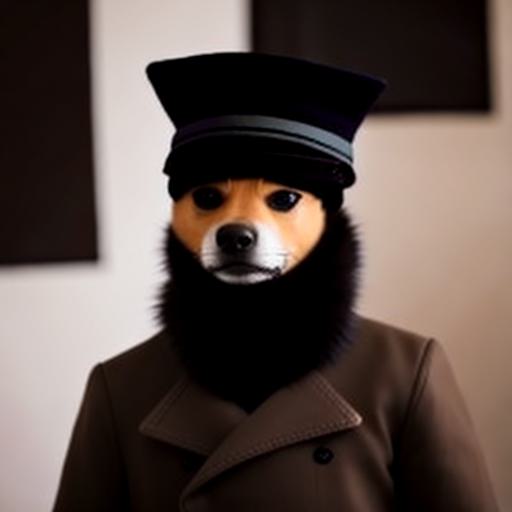
Stable UnCLIP
UnCLIPPipeline("kakaobrain/karlo-v1-alpha") provide a prior model that can generate clip image embedding from text. StableDiffusionImageVariationPipeline("lambdalabs/sd-image-variations-diffusers") provide a decoder model than can generate images from clip image embedding.
import torch
from diffusers import DiffusionPipeline

device = torch.device("cpu" if not torch.cuda.is_available() else "cuda")

pipeline = DiffusionPipeline.from_pretrained(
    "kakaobrain/karlo-v1-alpha",
    torch_dtype=torch.float16,
    custom_pipeline="stable_unclip",
    decoder_pipe_kwargs=dict(
        image_encoder=None,
    ),
)
pipeline.to(device)

prompt = "a shiba inu wearing a beret and black turtleneck"
random_generator = torch.Generator(device=device).manual_seed(1000)
output = pipeline(
    prompt=prompt,
    width=512,
    height=512,
    generator=random_generator,
    prior_guidance_scale=4,
    prior_num_inference_steps=25,
    decoder_guidance_scale=8,
    decoder_num_inference_steps=50,
)

image = output.images[0]
image.save("./shiba-inu.jpg")

# debug

# `pipeline.decoder_pipe` is a regular StableDiffusionImageVariationPipeline instance.
# It is used to convert clip image embedding to latents, then fed into VAE decoder.
print(pipeline.decoder_pipe.__class__)
#

# this pipeline only use prior module in "kakaobrain/karlo-v1-alpha"
# It is used to convert clip text embedding to clip image embedding.
print(pipeline)
# StableUnCLIPPipeline {
#   "_class_name": "StableUnCLIPPipeline",
#   "_diffusers_version": "0.12.0.dev0",
#   "prior": [
#     "diffusers",
#     "PriorTransformer"
#   ],
#   "prior_scheduler": [
#     "diffusers",
#     "UnCLIPScheduler"
#   ],
#   "text_encoder": [
#     "transformers",
#     "CLIPTextModelWithProjection"
#   ],
#   "tokenizer": [
#     "transformers",
#     "CLIPTokenizer"
#   ]
# }

# pipeline.prior_scheduler is the scheduler used for prior in UnCLIP.
print(pipeline.prior_scheduler)
# UnCLIPScheduler {
#   "_class_name": "UnCLIPScheduler",
#   "_diffusers_version": "0.12.0.dev0",
#   "clip_sample": true,
#   "clip_sample_range": 5.0,
#   "num_train_timesteps": 1000,
#   "prediction_type": "sample",
#   "variance_type": "fixed_small_log"
# }
shiba-inu.jpg
UnCLIP Text Interpolation Pipeline
This Diffusion Pipeline takes two prompts and interpolates between the two input prompts using spherical interpolation ( slerp ). The input prompts are converted to text embeddings by the pipeline's text_encoder and the interpolation is done on the resulting text_embeddings over the number of steps specified. Defaults to 5 steps.
i

[Content truncated...]AI Summary: Based on Hugging Face metadata. Not a recommendation.
🛡️ Dataset Transparency Report
Technical metadata sourced from upstream repositories.
🆔 Identity & Source
- id
- hf-dataset--diffusers--community-pipelines-mirror
- slug
- diffusers--community-pipelines-mirror
- source
- huggingface
- author
- diffusers
- license
- tags
- arxiv:2204.00227, arxiv:2201.0986, arxiv:2305.03486, arxiv:2303.11328, arxiv:2310.04378, arxiv:2311.16973, arxiv:2309.06380, arxiv:2211.09794, arxiv:2306.07954, arxiv:2312.02133, arxiv:2403.12962, arxiv:2312.14091, arxiv:2208.04202, arxiv:2210.16056, arxiv:2211.12446, arxiv:2201.09865, arxiv:2302.02412, arxiv:2311.03226, arxiv:2209.14687, arxiv:2311.01410, arxiv:2208.01626, arxiv:2311.09257, arxiv:2403.17377, region:us
⚙️ Technical Specs
- architecture
- null
- params billions
- null
- context length
- null
- pipeline tag
📊 Engagement & Metrics
- downloads
- 31,530
- stars
- 9
- forks
- 0
Data indexed from public sources. Updated daily.