🔬Technical Deep Dive
Full Specifications [+]
Quick Commands
git clone https://github.com/royosherove/repo-swarm pip install repo-swarm ⚖️ Nexus Index V2.0
💬 Index Insight
FNI V2.0 for Repo Swarm: Semantic (S:50), Authority (A:0), Popularity (P:0), Recency (R:0), Quality (Q:0).
Verification Authority
📋 Specs
- Language
- Python
- License
- Open Source
- Version
- 1.0.0
Usage documentation not yet indexed for this tool.
🔗 View Source Code ↗Technical Documentation
RepoSwarm🤖

🎬 Architecture Overview (click to play)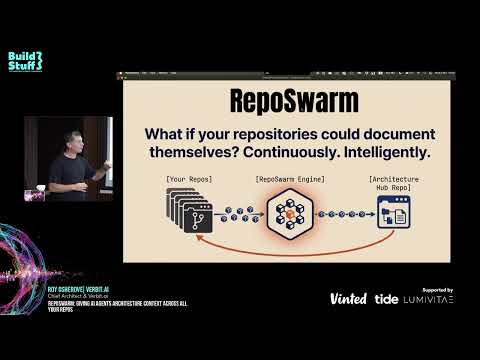
RepoSwarm is an AI powered multi-repo architecture discovery platform that generates its output in a specialized output repository that you can use for agent context.
see example results repo at repo-swarm-sample-results-hub.
Credits
RepoSwarm was born out of a hackathon we ran at Verbit, in which our team, comprised of Moshe, Idan and Roy created this project together.
What's This For?
RepoSwarm is an intelligent agentic-like engine that:
- 🔍 Analyzes GitHub repositories using Claude Code SDK
- 📝 Generates standardized
.arch.mdarchitecture files - 🔄 Runs daily via Temporal workflows on repos with new commits
- 💾 Caches results to avoid redundant analysis
- Writes the results into a results repository that you configure
📋 See it in action: Check out RepoSwarm's self-analysis report - an example of RepoSwarm investigating its own codebase!
How It Works
RepoSwarm runs as a Temporal workflow that automatically processes repositories and feeds a configured targer repository.
graph TB
    A[Your Repositories] -->|New commits detected| B[repo-swarm]
    B -->|Temporal Workflow
Daily execution| C[Clone & Analyze]
    C -->|AI Analysis
using Claude| D[Generate .arch.md]
    D -->|Cache in DynamoDB or file system| E[Store Results]
    E -->|Auto-commit| F[Results Repository]
    F -->|Query with AI| G[Reports & Insights]

    style A fill:#e1f5fe,color:#000
    style B fill:#fff3e0,color:#000
    style F fill:#f3e5f5,color:#000
    style G fill:#e8f5e8,color:#000
🔗 Analysis prompts: prompts/shared - The AI prompts used to understand your codebases
🏗️ Generated docs: repo-swarm-sample-results-hub - Where the .arch.md files end up
Quick Start
Prerequisites
- Python 3.12+
- Claude API key
Installation
Install mise (tool version manager):
# macOS
brew install mise

# Linux/WSL
curl https://mise.run | sh
🚀 Run the setup wizard (recommended):
# Interactive setup wizard - sets up everything automatically
mise get-started
This wizard will:
- ✅ Create your
.env.localfile - ✅ Configure your Claude API key
- ✅ Set up GitHub integration (optional)
- ✅ Configure Architecture Hub repository
- ✅ Set up git user details
Manual setup (alternative):
# Copy local environment template
cp env.local.example .env.local

# Edit .env.local with your Claude API key
# ANTHROPIC_API_KEY=your_key_here
Install dependencies:
mise install
mise run dev-dependencies
Running RepoSwarm
Recommended: Full Local Testing
# Analyze repositories and generate .arch.md files
# Uses file-based storage (no AWS required)
mise investigate-all
This command:
- ✅ Loads configuration from
.env.local - ✅ Uses file-based storage (no DynamoDB required)
- ✅ Automatically starts Temporal server and worker
- ✅ Analyzes repositories from
src/prompts/repos.json - ✅ Stores
.arch.mdfiles intemp/directory
Test Single Repository
# Test a specific repository
mise investigate-one https://github.com/user/repo

# Or use predefined repos
mise investigate-one hello-world
Configuration
Adding Repositories
Edit prompts/repos.json to add repositories for analysis:
{
  "repositories": {
    "my-backend": {
      "url": "https://github.com/org/my-backend",
      "type": "backend",
      "description": "Main API service"
    },
    "my-frontend": {
      "url": "https://github.com/org/my-frontend",
      "type": "frontend",
      "description": "React web app"
    }
  }
}
Customizing Analysis Prompts
RepoSwarm uses specialized prompts for different repository types:
- 🔧 Backend: APIs, databases, services → prompts/backend/
- 🎨 Frontend: Components, routing, state → prompts/frontend/
- 📱 Mobile: UI, device features, offline → prompts/mobile/
- 📚 Libraries: API surface, internals → prompts/libraries/
- ☁️ Infrastructure: Resources, deployments → prompts/infra-as-code/
- 🔗 Shared: Security, auth, monitoring → prompts/shared/
Each type has a prompts.json that defines which analysis steps to run.
Mise Task Organization
RepoSwarm uses a logical naming convention for all mise tasks:
Development Tasks (`dev-*`)
mise dev-server          # Start Temporal server
mise dev-dependencies      # Install Python dependencies
mise dev-worker           # Start Temporal worker
mise dev-client           # Run workflow client
mise dev-hello            # Test basic workflow
mise kill                 # Stop all Temporal processes
mise dev-repos-list       # List available repositories
mise dev-repos-update     # Update repository list from GitHub
Investigation Tasks (`investigate-*`)
mise investigate-all      # Analyze all repositories locally
mise investigate-one      # Analyze single repository locally
mise investigate-public   # Analyze public repository
mise investigate-debug    # Analyze with detailed logging
Testing Tasks (`test-*`)
mise verify-config        # Validate configuration and test repository access
mise test-all             # Run complete test suite
mise test-units           # Run unit tests only
mise test-integration     # Run integration tests
mise test-dynamodb        # Test DynamoDB functionality
Docker Tasks (`docker-*`)
mise docker-dev           # Build and run for development
mise docker-debug         # Debug with verbose logging
mise docker-test-build    # Test Docker build process
Maintenance Tasks
mise cleanup-temp         # Clean temporary files
mise monitor-workflow     # Check workflow status
Testing
# Run all tests
mise test-all

# Run unit tests only
mise test-units

# Run integration tests
mise test-integration
Related Projects
- 🏗️ repo-swarm-sample-results-hub - The centralized repository where generated
.arch.mdfiles are stored and queried - 📝 Analysis prompts - The AI prompts used to understand different types of codebases
Understanding the Codebase
Key Directories
repo-swarm/
├── prompts/                 # AI analysis prompts by repo type
│   ├── backend/            # API, database, service prompts
│   ├── frontend/           # UI, component, routing prompts
│   ├── mobile/             # Mobile app specific prompts
│   ├── libraries/          # Library/API prompts
│   ├── infra-as-code/      # Infrastructure prompts
│   ├── shared/             # Cross-cutting concerns (auth, security, etc)
│   └── repos.json          # Repository configuration
│
├── src/
│   ├── investigator/       # Core analysis engine
│   │   ├── core/          # Main analysis logic
│   │   └── investigator.py # Main investigator class
│   │
│   ├── workflows/          # Temporal workflow definitions
│   ├── activities/         # Temporal activity implementations
│   ├── models/             # Data models and schemas
│   └── utils/              # Storage adapters and utilities
│
├── tests/                  # Unit and integration tests
├── temp/                   # Generated .arch.md files (local development)
└── scripts/                # Development and deployment scripts
Getting Started with Development
- Explore the codebase: Start with
src/investigator/core/to understand the analysis engine - Check existing prompts: Look at
prompts/shared/for examples of analysis prompts - Run tests: Use
mise test-allto ensure everything works - Try investigations: Use
mise investigate-one hello-worldto see the system in action
Need Help?
- Check existing issues and pull requests
- Look at the test files for usage examples
- Review the prompts in
prompts/for analysis patterns
Production Deployment
For production deployments, you need to deploy Temporal workers that can run on company servers or your local machine. The worker connects to a Temporal server (either locally or remotely) and processes workflow tasks.
Temporal Worker Deployment
Key Concepts:
- Worker: A process that hosts workflow and activity implementations
- Task Queue: Named queue where workers poll for tasks
- Temporal Server: Orchestrates workflow execution and task distribution
Deployment Options:
- Local Development: Run workers on your development machine
- Company Servers: Deploy workers to internal infrastructure
- Cloud Infrastructure: Deploy to any cloud provider (AWS, GCP, Azure, etc.)
- Containerized: Run workers in Docker containers or Kubernetes
Getting Started with Worker Deployment
# Start Temporal server (local development)
mise dev-server

# Run worker in background
mise dev-worker &

# Trigger workflow via client
mise dev-client

# Monitor workflow status
mise monitor-workflow investigate-repos-workflow
Production Worker Setup
For production environments:
- Deploy Worker Image: Containerize your worker application
- Connect to Temporal Server: Configure connection to your Temporal server
- Set Task Queue: Workers listen on specific task queues
- Trigger via API: Use Temporal client to start workflows
Example Worker Deployment:
# Run worker connecting to remote Temporal server
TEMPORAL_SERVER_URL=your-temporal-server:7233 mise dev-worker
Client Integration
Clients trigger workflows by connecting to the Temporal server and specifying the task queue:
# Example client integration
from temporalio.client import Client

async def trigger_investigation():
    client = await Client.connect("your-temporal-server:7233")
    await client.execute_workflow(
        "investigate_repos_workflow",
        args=["repo-url"],
        id="workflow-id",
        task_queue="investigation-queue"
    )
For detailed worker deployment strategies, see the Temporal Worker Deployments documentation.
Monitoring
# Check workflow status
mise monitor-workflow investigate-repos-workflow

# Check Temporal server status
mise monitor-temporal

# View logs (local)
tail -f temp/investigation.log
Advanced: System Architecture
Workflow Orchestration
The system uses Temporal for reliable workflow orchestration:
- Cache Check: Query DynamoDB to see if repo was already analyzed
- Clone: Clone the repository to temporary storage
- Type Detection: Determine if it's backend, frontend, mobile, etc.
- Structure Analysis: Build a tree of files and directories
- Prompt Selection: Choose appropriate analysis prompts based on repo type
- AI Analysis: Send prompts + code context to Claude for analysis
- Result Storage: Save results to DynamoDB and generate markdown files
- Cleanup: Remove temporary files
DynamoDB Caching
Cache invalidation happens when:
- Repository has new commits
- Branch has changed
- TTL expires (30 days)
- Manual cache clear requested
Troubleshooting
Common Development Issues
Temporal Server Connection
# Check if Temporal server is running
mise monitor-temporal

# Start Temporal server if needed
mise dev-server
Claude API Errors
- Verify API key:
echo $ANTHROPIC_API_KEY | head -c 10(should show first 10 chars) - Check rate limits in your Anthropic dashboard
- Ensure you're using a valid Claude model name
Test Failures
# Run specific test suites
mise test-units              # Unit tests only
mise test-integration        # Integration tests only
mise test-dynamodb           # DynamoDB tests
Clean Development Environment
# Stop all processes
mise kill

# Clean temporary files
mise cleanup-temp

# Reset everything
mise cleanup-temp && mise dev-dependencies
Contributing
- Fork the repository
- Create a feature branch
- Make changes and add tests
- Ensure tests pass:
mise test-all - Submit a pull request
Development Workflow
# Set up development environment
mise dev-dependencies
mise dev-server

# Run tests before committing
mise test-all

# Clean up when done
mise kill
mise cleanup-temp
Twin project: repo-swarm-sample-results-hub - Query and analyze the generated architecture documentation
License
This project is licensed under the Polyform Noncommercial License 1.0.0. You may use, copy, and modify the code for non-commercial purposes only. For commercial licensing, please contact roy at osherove dot_com.
🚀 Quick Start
# macOS
brew install mise

# Linux/WSL
curl https://mise.run | shAI Summary: Based on GitHub metadata. Not a recommendation.
🛡️ Tool Transparency Report
Verified data manifest for traceability and transparency.
🆔 Identity & Source
- id
- gh-tool--royosherove--repo-swarm
- source
- github
- author
- royosherove
- tags
- agenticaiarchitecturepython
⚙️ Technical Specs
- architecture
- null
- params billions
- null
- context length
- null
- pipeline tag
- other
📊 Engagement & Metrics
- likes
- 0
- downloads
- 0
- github stars
- 207
Free2AITools Constitutional Data Pipeline: Curated disclosure mode active. (V15.x Standard)